
If your SimpliSafe Doorbell isn’t working, you’re not alone. Many homeowners love how easy SimpliSafe is to install and use, but even reliable devices can have problems. A doorbell that won’t ring, record, or connect can be frustrating—especially when you depend on it for security. The good news: Most SimpliSafe Doorbell issues can be fixed with a little troubleshooting. This guide gives you clear solutions to get your doorbell working again, highlights common mistakes, and explains why problems happen in the first place. Whether you’re new to SimpliSafe or a long-time user, you’ll find practical tips to restore your doorbell and keep your home protected.
Understanding The Simplisafe Doorbell
Before you start troubleshooting, it helps to know how the SimpliSafe Video Doorbell Pro works. This device replaces a traditional wired doorbell. When someone presses the button, you get a notification on your phone and a live video feed. The doorbell uses your home’s Wi-Fi and gets power from existing doorbell wiring (16-24V AC). Inside, a chime rings just like a normal doorbell.
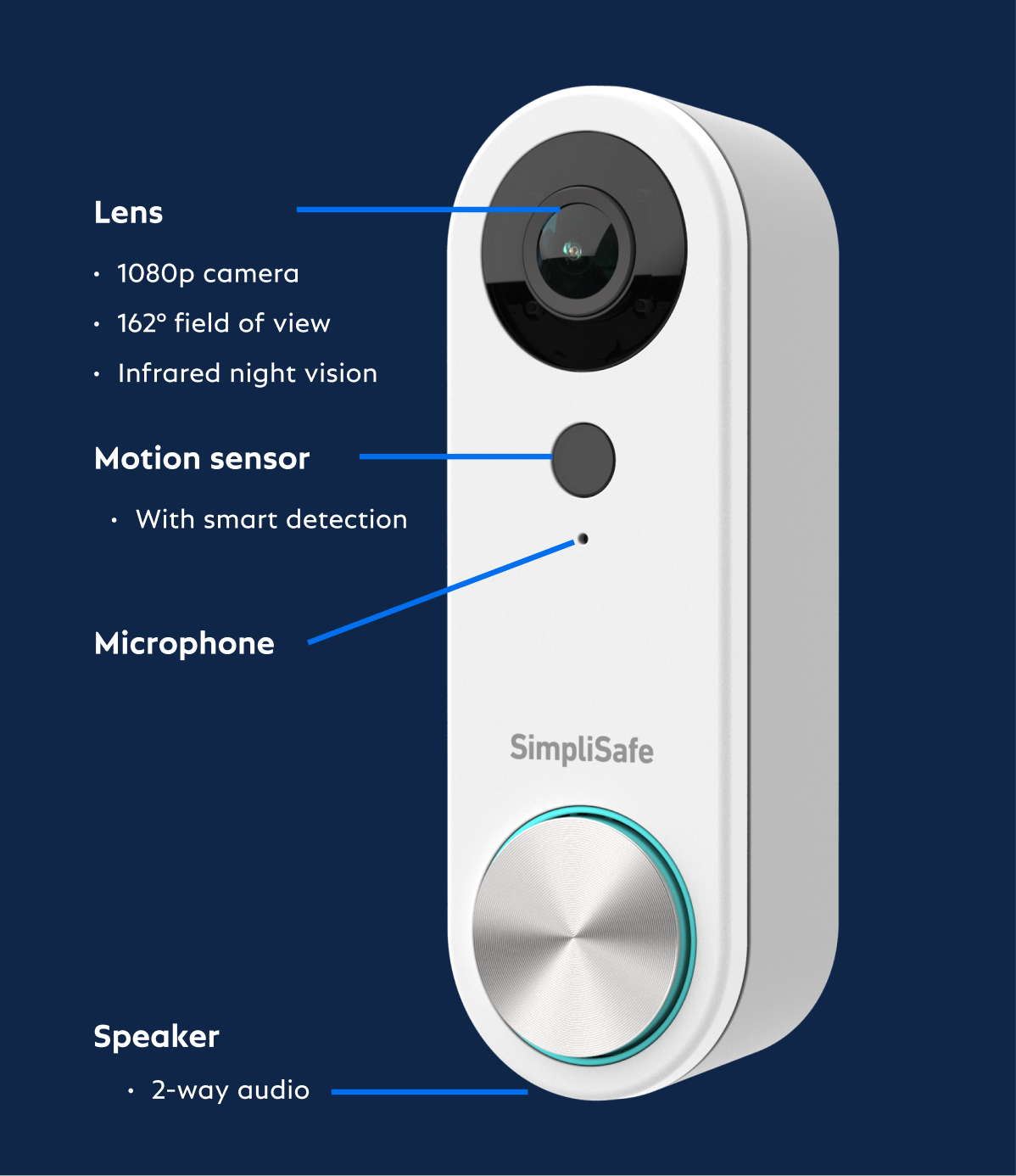
SimpliSafe’s doorbell also has a motion sensor and night vision. It stores video in the cloud, so you can review events even if you’re not at home. Most problems with the doorbell fall into a few categories: power, Wi-Fi, app issues, or hardware defects.
Common Reasons A Simplisafe Doorbell Stops Working
Many issues with your SimpliSafe Doorbell are easy to diagnose. Here are the most frequent causes:
- Power Issues: The doorbell needs a steady power supply. Old wiring, low voltage, or a broken transformer will cause problems.
- Wi-Fi Problems: If your Wi-Fi is weak or unreliable, the doorbell may disconnect or not send notifications.
- App Glitches: Sometimes, the SimpliSafe app doesn’t update, freezes, or stops talking to the doorbell.
- Physical Damage: Exposure to water, insects, or impact can damage the device.
- Firmware or Software Bugs: Outdated firmware can cause features to stop working.
- Compatibility Problems: Not all doorbell chimes or wiring setups work with SimpliSafe.
- Incorrect Installation: A small mistake during setup can cause big issues later.
Knowing the cause helps you pick the right fix. Next, let’s look at the signs your doorbell isn’t working and what they mean.
Signs Your Simplisafe Doorbell Is Not Working
Different problems lead to different symptoms. Here’s what you might notice and what it usually means:
- No Ring or Chime: The button is pressed, but nothing happens.
- No Video Feed: The app shows a black screen or won’t load video.
- Not Connecting to Wi-Fi: The doorbell can’t join your network.
- No Motion Detection: The camera doesn’t alert you to movement.
- Doorbell Offline: The app says the device is offline.
- Continuous Ringing: The chime rings without anyone pressing the button.
- Frozen LED or Button: The light on the doorbell is stuck or doesn’t light up.
Each symptom points to a different root problem. The next sections give you step-by-step instructions to solve each one.
How To Troubleshoot A Simplisafe Doorbell That’s Not Working
Let’s go through the best steps to fix your SimpliSafe Doorbell. Start with the simplest solutions before you try anything more advanced.
1. Check The Power Supply
A reliable power source is essential. If the doorbell isn’t getting enough voltage, it won’t work correctly.
Steps:
- Find your home’s doorbell transformer. It should provide 16-24V AC.
- Use a multimeter to check the voltage across the doorbell’s two wires.
- If the voltage is below 16V, you may need a new transformer.
- Inspect wires for corrosion, loose connections, or breaks.
- Make sure the breaker for your doorbell circuit is turned on.
Pro Tip: Many older homes use transformers below 16V. The SimpliSafe doorbell may work for a while, then fail. Upgrading your transformer can prevent future issues.
2. Test Your Wi-fi Connection
Weak Wi-Fi is a top reason for doorbell problems. If the camera disconnects or lags, your network could be to blame.
Steps:
- Check your router’s location. It should be as close to the doorbell as possible.
- In the SimpliSafe app, check the doorbell’s signal strength.
- Run a speed test near your doorbell. You need at least 2 Mbps upload speed for smooth video.
- Try connecting your phone to Wi-Fi in the same spot. If it’s slow, consider adding a Wi-Fi extender.
- Restart your router and doorbell.
Non-obvious tip: Many people forget that brick, metal, and even glass can block Wi-Fi. Placing your router in an open area, not behind furniture, often improves signal.
3. Reboot Or Reset The Doorbell
Sometimes, a simple reboot fixes software glitches.
Steps:
- Remove the doorbell from its mounting bracket. This usually disconnects power.
- Wait 30 seconds, then reattach the doorbell.
- The light should blink as it restarts.
- If that doesn’t work, try a factory reset:
- Hold the reset button (usually on the back) for 15 seconds.
- Wait for the LED to flash yellow, then blue.
- Go through setup again in the app.
Warning: A factory reset erases all custom settings. Only do this if other steps fail.
4. Update Firmware And The Simplisafe App
Outdated firmware or app versions can cause compatibility problems.
Steps:
- Open the SimpliSafe app. Check for updates in your device’s app store.
- In the app, find the firmware update option for your doorbell.
- Follow the instructions to install any updates.
Non-obvious insight: SimpliSafe often releases bug fixes in firmware updates. Even if your doorbell was working before, updating can fix sudden problems.
5. Inspect For Physical Damage
Weather, insects, or accidental bumps can cause hidden damage.
Steps:
- Check the doorbell’s casing for cracks or water inside.
- Look for spider webs, dirt, or nests blocking the camera or button.
- If the device feels hot or won’t power on at all, it may be shorted out.
If you see physical damage, you may need a replacement. SimpliSafe’s warranty covers many hardware issues.
6. Check For Installation Mistakes
Miswired connections are a common cause of failure—especially after a DIY install.
Steps:
- Make sure the wires are connected to the right terminals.
- The front and trans wires should be used. The rear terminal is not supported.
- Wires must be tight, with no bare copper touching other parts.
If you’re unsure, SimpliSafe’s website has wiring diagrams or call their support line.
7. Test The Doorbell Chime
Not all chimes work with smart doorbells. Mechanical chimes work best, but digital ones often need an adapter.
Steps:
- Identify your chime type. Mechanical chimes have moving parts; digital chimes play tunes.
- If using a digital chime, check if SimpliSafe supports it.
- Some users add a chime connector (a small device from SimpliSafe) to make digital chimes compatible.
Pro Tip: If your chime buzzes or rings nonstop, it’s a sign of a compatibility issue.
8. Solve App Connection Problems
If the doorbell works but doesn’t show in your app, the problem might be with your phone or the SimpliSafe app.
Steps:
- Log out and log back into the SimpliSafe app.
- Uninstall and reinstall the app.
- Make sure your phone’s operating system is up to date.
- Try accessing your doorbell from another device.
Example: Some Android users report the app freezes after a phone update. Reinstalling the app usually fixes this.
9. Fix Motion Detection Issues
If motion alerts don’t work, the problem could be with settings, Wi-Fi, or the environment.
Steps:
- Open the SimpliSafe app and check motion sensitivity settings.
- Make sure Motion Detection is enabled.
- Clear away plants or decorations that might block the camera’s view.
- Avoid pointing the camera at busy streets, which can trigger false alerts.
Non-obvious insight: Bright sunlight or car headlights at night can confuse the camera’s sensor. Adjusting the camera angle often solves this.
10. Continuous Ringing Or False Alarms
If your doorbell rings by itself or won’t stop, you may have a wiring short or a stuck button.
Steps:
- Inspect the button for dirt or debris.
- Check for frayed wires touching each other.
- If you recently installed a new chime, remove it and see if the problem stops.
Pro Tip: Temporary electrical shorts may happen in humid weather. Dry out connections and try again.
11. Doorbell Won’t Record Video
Sometimes the live feed works, but no clips are saved.
Steps:
- Make sure your SimpliSafe subscription is active (required for cloud storage).
- Check storage settings in the app.
- Update firmware, as some bugs cause missed recordings.
If your account is current and the problem continues, contact SimpliSafe support.
12. Doorbell Won’t Ring Inside
If your phone alerts work, but the indoor chime doesn’t ring, the wiring to the chime may be the issue.
Steps:
- Check all connections between the doorbell and the chime.
- Confirm your chime is compatible.
- If you hear a faint click but no ring, the transformer may not have enough power.
13. Doorbell Not Detected During Setup
If the app can’t find the doorbell during installation, try these steps:
- Check Wi-Fi password and settings.
- Ensure the doorbell is powered and the LED is blinking.
- Try setup from a different phone or tablet.
Non-obvious tip: Some routers block new devices until you approve them in the router settings. Check your router’s admin page.
Credit: www.astorianhotels.com
Simplisafe Doorbell Troubleshooting: Quick Reference
Here’s a summary to help you diagnose the problem quickly:
| Problem | Likely Cause | Quick Fix |
|---|---|---|
| No ring/chime | Power or wiring issue | Check transformer & wires |
| No video | Wi-Fi or app issue | Check signal, update app |
| Offline device | Wi-Fi dropout | Restart router/doorbell |
| Continuous ring | Wiring or chime problem | Check compatibility |
| No motion alerts | Settings or blocked view | Change settings, clear view |
Simplisafe Doorbell Vs. Other Smart Doorbells: Reliability
If you’re wondering how SimpliSafe compares to other brands, here’s a quick look at reliability based on user reviews and support data.
| Brand | Ease of Setup | Wi-Fi Reliability | Power Issues | Support Quality |
|---|---|---|---|---|
| SimpliSafe | Very Easy | Good | Occasional | High |
| Ring | Moderate | Very Good | Rare | Medium |
| Google Nest | Easy | Good | Rare | High |
| Arlo | Moderate | Average | Occasional | Medium |
Key Insight: SimpliSafe is praised for easy setup and strong support, but power and compatibility issues are slightly more common compared to Ring or Nest.
Credit: ciadapostagem.com.br
When To Call Simplisafe Support
Some issues require expert help. Contact SimpliSafe support if:
- You see error codes you don’t understand.
- The doorbell won’t power on, even with correct wiring.
- There is visible damage or water inside the unit.
- You tried all steps and nothing works.
SimpliSafe support can walk you through advanced troubleshooting or offer a replacement if your device is under warranty. Their official help page is available at SimpliSafe Support.
Non-obvious tip: Support can sometimes “push” a firmware update directly to your doorbell if the update fails from your end.
Preventing Future Simplisafe Doorbell Problems
Once your doorbell is working again, a little maintenance can prevent future headaches.
- Check Wiring Annually: Loose connections are a common cause of new problems, especially after storms or renovations.
- Clean the Camera Lens: Wipe away dust and spider webs to keep motion detection accurate.
- Keep App and Firmware Updated: Turn on automatic updates if available.
- Test Notifications: Press the button once a month to make sure alerts and chimes still work.
- Protect from Weather: If your entry is exposed, use a small awning or shield to reduce water and sun damage.
Non-obvious insight: Some users install a small surge protector on their doorbell circuit. This can prevent damage from lightning or power spikes—a leading cause of sudden device failure.
Simplisafe Doorbell Not Working: Real-world Examples
Hearing about actual experiences can help you diagnose your own issue. Here are a few scenarios:
Example 1: Maria noticed her SimpliSafe Doorbell stopped ringing after a heavy rain. She checked and found water droplets inside the case. Solution: She dried the inside with a hair dryer (on low heat), resealed the gasket, and the doorbell worked again.
Example 2: Ben’s doorbell would not connect to Wi-Fi, even though his phone worked fine outside. He discovered his router’s 5GHz band wasn’t supported by the doorbell. He enabled the 2.4GHz band, reconnected, and the doorbell came online.
Example 3: Priya’s doorbell recorded video but never rang inside. It turned out her digital chime was incompatible. She switched to a mechanical chime, and the problem was solved.
Example 4: Sam’s doorbell went offline every few days. After checking the wiring and Wi-Fi, he found a firmware update waiting in the SimpliSafe app. Updating the firmware fixed the issue.
Key Lesson: Many issues are not with the doorbell itself but with wiring, Wi-Fi, or home setup.
Simplisafe Doorbell: Compatibility And Installation Tips
Before buying or reinstalling a SimpliSafe Doorbell, make sure your home’s setup matches the requirements.
| Requirement | Details |
|---|---|
| Doorbell Wiring | 16-24V AC (not DC), 10VA minimum |
| Chime Type | Mechanical or compatible digital |
| Wi-Fi Band | 2.4GHz only |
| App Support | iOS 12+, Android 6.0+ |
| Subscription | Required for cloud video storage |
Non-obvious tip: Some older homes use DC-powered doorbells, which are not compatible with SimpliSafe. Check before purchasing.

Credit: reinigungkrefeld.de
Should You Replace Or Repair Your Simplisafe Doorbell?
If your doorbell is still not working after all troubleshooting steps, you have two options:
- Repair: If the device is under warranty (usually one year), contact SimpliSafe for a replacement or repair.
- Replace: If out of warranty, consider upgrading to the latest model. Newer models offer better motion detection and reliability.
Pro Tip: If you have frequent power or Wi-Fi problems, fixing your home’s wiring or upgrading your router can save you more headaches than just replacing the doorbell.
Frequently Asked Questions
Why Is My Simplisafe Doorbell Not Connecting To Wi-fi?
The most common reason is weak signal or using the wrong Wi-Fi band. The SimpliSafe Doorbell only works on 2. 4GHz, not 5GHz. Make sure your router is set up for 2. 4GHz, and the signal is strong near your door.
Can I Use The Simplisafe Doorbell Without A Subscription?
You can use the basic doorbell and get live video, but cloud video recording and some features require a subscription. If you stop paying, you lose access to past recordings.
What Chimes Are Compatible With Simplisafe Doorbell?
Most mechanical chimes are compatible. Some digital chimes work, but may need a chime connector. Always check the SimpliSafe compatibility list before installing.
How Do I Reset My Simplisafe Doorbell?
Remove the doorbell from its bracket, press and hold the reset button for 15 seconds, wait for the LED to flash, and follow the setup steps in the app.
Where Can I Get Help If My Simplisafe Doorbell Is Still Not Working?
Visit the official SimpliSafe Support Center for live chat, guides, or to contact their support team.
Getting your SimpliSafe Doorbell working again is usually possible with some patient troubleshooting. Pay attention to power, Wi-Fi, and wiring—these are the most common sources of trouble. If all else fails, SimpliSafe’s support can help you solve even the toughest problems. With the right steps, you’ll have your doorbell protecting your home again in no time.