
Is your Samsung washer showing the frustrating “ND” error code? This little message means your machine isn’t draining water properly, and it can stop your laundry routine in its tracks.
But don’t worry—you don’t have to call a repair technician just yet. You can often fix this issue yourself by checking a few simple spots like the drain filter, hose, and pump. You’ll discover step-by-step solutions that will help you understand why the “ND” code appears and how to clear it quickly.
Keep reading, and you’ll get your washer back to working smoothly in no time.

Credit: www.youtube.com
Meaning Of Nd Code
The Samsung Washer ND code means the machine cannot drain water properly. This usually happens due to a clogged drain filter, hose, or pump. Checking and cleaning these parts often fixes the problem quickly.
What Does The Nd Code Mean?
The ND code on a Samsung washer stands for “No Drain.”
This means the washer cannot pump out water properly.
Water stays inside the drum after the cycle ends.
The washer stops and shows the ND error on the display.
Common Causes Of The Nd Code
Blockages in the drain system often cause the ND code.
Clogs can happen in the drain filter, hose, or pump.
Kinks or bends in the drain hose can stop water flow.
Excessive soap suds also prevent proper draining.
How To Fix The Nd Code
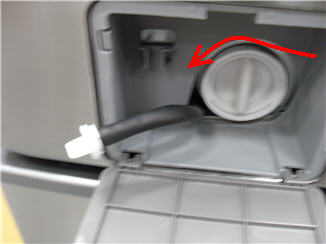
Start by cleaning the drain filter at the washer’s front bottom.
Remove the filter, clear out debris, and rinse it well.
Check the drain hose for kinks or blockages next.
Inspect the drain pump and clean any dirt or lint found.
Use the right amount and type of detergent to avoid suds.
Checking The Drain Filter
Checking the drain filter is a key step when the Samsung washer shows the ND code. This error means the washer cannot drain water properly. A clogged drain filter often causes this problem. Cleaning the filter can restore normal draining and prevent damage.
Regular maintenance of the drain filter keeps your washer working well. It helps avoid water buildup and foul odors. Follow the steps below to locate, clean, and test the drain filter.
Locating The Filter
- Find the small access door at the washer’s bottom front.
- Place a towel and shallow pan underneath to catch water.
- Open the door carefully to avoid splashing water.
- Turn the round filter cap counter-clockwise to remove it.
Cleaning Steps
- Remove any lint, coins, or debris from the filter.
- Rinse the filter under running water until it is clean.
- Check inside the filter housing for leftover dirt.
- Reinstall the filter by turning the cap clockwise until tight.
- Close the access door securely before testing the washer.
Testing Drain After Cleaning
- Run a short drain or spin cycle on the washer.
- Watch for smooth water draining without leaks or noises.
- If the ND code returns, check the drain hose for blockages.
- Ensure the drain hose is not kinked or bent.
- Disconnect and clear any clogs in the hose if needed.
Inspecting The Drain Hose
Inspecting the drain hose is a key step to fix the Samsung washer ND code. This error means the washer does not drain properly. The drain hose can get blocked or bent, stopping water flow. Checking the hose helps spot problems fast. Proper inspection prevents water backup and machine damage.
Identifying Kinks And Blockages
Look closely at the drain hose behind the washer. Kinks or sharp bends can block water flow. The hose must be smooth and free of twists. Check the entire length of the hose. Feel for hard spots or lumps that may be blockages. Clear any visible debris or dirt around the hose ends.
Disconnecting And Cleaning Hose
Turn off the washer and unplug it before starting. Place a towel and shallow pan under the hose connection. Unscrew the hose from the washer carefully. Drain any water remaining in the hose into the pan. Use a long flexible brush or water to clean inside the hose. Remove all dirt and buildup for clear water flow. Reattach the hose securely and check for leaks.

Credit: www.samsung.com
Evaluating The Drain Pump
Evaluating the drain pump is essential when your Samsung washer shows the ND error code. This code indicates the washer is not draining water properly. A faulty drain pump can block water flow, stopping the cycle. Checking the pump helps find the cause of the problem quickly. It also prevents further damage to your machine. Below, learn how to inspect the drain pump carefully.
Checking For Damage And Debris
Start by unplugging the washer from power. Locate the drain pump near the bottom of the machine. Look for cracks, broken parts, or loose wires around the pump. Remove any visible debris like lint, coins, or small objects. These can block the pump impeller from spinning. Clean the pump area using a soft cloth. Make sure no dirt remains inside the pump housing. Clear any clogs in the connected hoses too. This step ensures water can flow out smoothly.
Testing Pump Functionality
After cleaning, test the pump motor. Reconnect the power and set the washer to drain or spin mode. Listen for the pump running sound. A working pump makes a humming or whirring noise. If silent or strange noises occur, the pump may be faulty. Use a multimeter to check electrical continuity in the pump motor. No continuity means the pump needs replacement. Testing the pump confirms if it drains water properly or must be fixed.
Detergent Use And Suds Issues
Detergent use plays a key role in the performance of your Samsung washer. Using too much detergent or the wrong type causes suds problems. Excess suds may trigger the ND error code, meaning the washer cannot drain properly. Understanding how detergent affects your washer helps avoid this issue. Proper detergent use keeps your washer running smoothly and clothes clean.
Effects Of Excessive Detergent
Excess detergent creates too many suds inside the washer drum. These suds can block the drain pump and filter. When the water cannot drain, the ND error code appears. Too many suds also leave residue on clothes and inside the machine. This buildup can cause odors and damage parts over time. Using too much detergent wastes soap and harms the washer’s function.
Choosing The Right Detergent
Choose a high-efficiency (HE) detergent for Samsung washers. HE detergents produce fewer suds and clean well with less water. Avoid using regular detergents as they create excessive suds. Liquid or powder detergents both work if they are HE certified. Follow the detergent package instructions for the correct amount. This helps prevent suds problems and the ND error code.
Credit: www.samsung.com
Advanced Troubleshooting
Advanced troubleshooting helps fix the Samsung washer ND error beyond basic steps. It involves checking key components that control water drainage and electrical functions. This approach saves time and prevents unnecessary repairs. Follow these steps carefully to diagnose the problem accurately.
Examining Water Level Sensor
The water level sensor controls how much water fills the drum. A faulty sensor can cause drainage errors like the ND code. Start by unplugging the washer to avoid electric shock. Locate the sensor near the top or side of the tub. Look for signs of damage or loose connections. Clean the sensor gently using a soft cloth to remove dirt or residue. Test the sensor with a multimeter to check for proper operation. Replace it if readings are irregular or if it shows physical damage.
Inspecting Control Board And Wiring
The control board manages all washer functions, including draining. Faulty wiring or a damaged board can trigger the ND error code. First, disconnect the power and open the control panel carefully. Look for burnt spots, corrosion, or loose wires on the board. Use a multimeter to test electrical continuity in wires and connectors. Secure any loose connections and replace damaged wires. If the control board shows visible damage or fails tests, it needs replacement to restore normal function.
When To Call A Technician
Advanced troubleshooting requires technical skills and tools. Call a technician if you cannot find the problem or fix it safely. Avoid forcing parts or ignoring electrical safety. Professionals have the experience to diagnose complex issues quickly. They ensure proper repairs and prevent further damage. Calling a technician saves time and protects your washer’s lifespan.
Preventive Maintenance Tips
Preventive maintenance helps keep your Samsung washer running smoothly. It reduces the chance of the ND error code appearing. Simple steps can avoid most drainage problems. Regular care saves time and repair costs. Follow these easy tips to maintain your washer properly.
Regular Filter Cleaning
The drain filter catches lint and debris during washing. Clean it every month to prevent clogs. Locate the small access door at the washer’s bottom front. Place a towel and pan below to catch water. Open the door and turn the filter cap counter-clockwise. Remove the filter and clear any trapped debris. Rinse it under running water before reinstalling. Turn the cap clockwise to secure it tightly.
Avoiding Drain Hose Issues
Drain hoses can get kinked or blocked, causing no drainage. Check the hose regularly for bends or twists. Disconnect the hose from the washer and inspect for clogs. Remove any blockages using a flexible brush or water flow. Ensure the hose is positioned correctly without sharp bends. Secure it firmly to avoid leaks or disconnections during cycles.
Using Proper Detergent Amounts
Using too much detergent creates excess suds that block drainage. Follow detergent instructions to use the correct amount. Use high-efficiency (HE) detergent if your washer requires it. Avoid powder detergents that do not dissolve well. Excess soap residue can cause the ND error to appear. Running a rinse cycle without detergent can clear leftover suds.
Frequently Asked Questions
How Do I Fix The Code Nd On My Samsung Washer?
The Samsung washer “ND” code means no drain. Clean the drain filter, check and clear the drain hose, and inspect the drain pump. Reduce detergent use to avoid suds. Test the pump by running a spin cycle. Contact a technician if the error persists after these steps.
How Do I Force My Samsung Washer To Drain?
Open the access door at the washer’s bottom front. Remove and clean the drain filter. Check and clear the drain hose. Run a drain or spin cycle to force draining. Replace the drain pump if needed.
How Do I Fix The Nf Code On My Samsung Washer?
Clear the drain filter by opening the bottom front access panel. Check and straighten the drain hose. Remove blockages from the drain pump. Use HE detergent sparingly to prevent suds. Test the pump function. If issues persist, inspect wiring or call a technician.
How To Fix Unbalanced Error Code On Samsung Washer?
Clean the drain filter behind the access door. Check and clear the drain hose for clogs or kinks. Inspect the drain pump for blockages or damage. Use less detergent or switch to HE detergent to reduce suds. Test the pump; call a technician if errors persist.
What Does The Samsung Washer Nd Code Mean?
The ND code means “no drain. ” It shows when your washer cannot drain water properly.
Conclusion
The Samsung washer ND code signals a drainage problem. Start by cleaning the drain filter carefully. Check the drain hose for any blockages or kinks. Make sure to use the right detergent and avoid excess soap. If these steps don’t help, inspect the drain pump for damage.
Simple maintenance can often fix the issue quickly. Regular cleaning keeps your washer running smoothly. Understanding this code saves time and repair costs. Keep your laundry routine stress-free and your machine working well.