
If you’ve just seen the Samsung washer code SE or 5E pop up on your machine’s display, you’re probably wondering what it means—and more importantly, how to fix it. This error code is a common signal that your washer is having trouble draining water properly.
But don’t worry, you don’t have to call a repair person just yet. By understanding what causes this issue and following a few simple steps, you can often get your washer back to working smoothly in no time. Keep reading to discover easy and effective ways to tackle the SE or 5E error, so you can save time, avoid frustration, and keep your laundry routine on track.
Credit: www.samsung.com
Error Code Se And 5e Meaning
Samsung washers show error codes to alert users about problems. The SE and 5E codes both point to drainage issues. Understanding these codes helps fix the problem quickly. This section explains what SE and 5E codes mean and why they appear.
Error Code Se Meaning
The SE code means the washer cannot drain water properly. This error stops the washing cycle. It often happens due to a clogged drain pump filter or a blocked drain hose. The machine detects water is still inside and shows the SE code.
Error Code 5e Meaning
The 5E code has the same meaning as SE. It also signals a drainage problem. Some Samsung models use 5E instead of SE. Both codes indicate the washer’s drainage system is not working correctly.
Common Causes Of Se And 5e Errors
Clogged drain pump filter is the most common cause. Debris like lint, coins, or hairpins block the filter. A kinked or clogged drain hose also causes these errors. An unbalanced load can prevent proper draining. Sometimes, faulty motor parts or sensors cause the problem.
How To Check For Drainage Issues
First, unplug the washer for safety. Open the access panel at the washer’s base. Remove the drain pump filter cap carefully. Watch out for water that may spill out. Clean out any debris and check if the impeller spins freely. Also, inspect the drain hose for clogs or bends.
Safety Tips Before Repairs
Before repairing your Samsung washer showing the SE or 5E error code, safety must come first. These washers deal with electricity and water. Small mistakes can cause shocks or damage. Follow simple safety tips to avoid risks. Prepare your workspace and tools carefully. Take your time and work step-by-step for the best results.
Unplug The Washing Machine
Always disconnect the washer from the power outlet. This stops electricity flow and lowers shock risk. Never start repairs while the machine is plugged in. Double-check the plug is out before touching any parts.
Prepare For Water Spills
Water may leak when opening the drain pump filter or hoses. Keep towels and a shallow pan nearby. These catch water and keep your floor dry. A dry workspace helps prevent slips and water damage.
Wear Protective Gear
Use gloves to protect your hands from sharp edges and dirt. Safety glasses shield your eyes from splashes or debris. Dress in clothes that cover your skin to avoid scratches or irritations.
Work In A Well-lit Area
Good lighting helps you see small parts and connections clearly. Avoid dark or cluttered spaces. Bright light reduces mistakes and speeds up repairs. Use a flashlight if needed.
Use The Right Tools
Choose tools designed for appliance repair. Avoid using damaged or improper tools. The correct tools prevent injury and protect your washer parts. Keep tools organized and within reach.
Hard Reset Steps
Hard resetting your Samsung washer can clear the SE or 5E error code quickly. This error often means the machine has trouble draining water. A reset can reboot the system and fix simple glitches.
Before starting, unplug the washer from the power outlet. Safety first. Have towels ready because water might spill during the process. Follow these easy steps to perform a hard reset.
Unplug The Washing Machine
Disconnect the washer from the electrical socket. Leave it unplugged for at least five minutes. This pause allows the internal computer to reset fully.
Check For Water Leaks
Keep towels or a shallow pan nearby. When you open the filter or drain hose, water might leak out. This step prevents a mess on your floor.
Plug The Washer Back In
After waiting five minutes, plug the washer back into the outlet. Turn the machine on and check if the error code is gone. The reset might clear the issue.

Credit: www.youtube.com
Cleaning The Drain Pump Filter
Cleaning the drain pump filter is a key step to fix the Samsung washer code SE or 5E. This error often means water cannot drain properly. Dirt, lint, or small objects can block the filter. Regular cleaning helps the washer drain water smoothly. It also prevents damage to the pump and other parts. This guide shows how to clean the drain pump filter safely and easily.
Accessing The Filter Panel
First, unplug the washer from the power outlet. Find the filter panel at the bottom front of the machine. Use a flat tool or your fingers to open the panel door. Behind it, you will see a small drain hose and the round filter cap. Keep towels nearby to catch any water spills.
Draining Water Safely
Pull out the small rubber drain hose gently. Remove the plug from the hose end. Let water flow into a shallow pan or bowl. This step stops water from spilling when you open the filter. After draining, push the plug back into the hose securely. Place the hose back inside the panel.
Removing And Cleaning The Filter
Turn the filter cap counter-clockwise to unscrew it. Pull the filter out carefully. Check for lint, coins, hairpins, or other debris blocking the filter. Clean the filter under running water. Use a soft brush if needed to remove stubborn dirt. Wipe the filter housing inside the washer as well.
Checking The Drain Pump Impeller
Look inside the filter opening to find the drain pump impeller. Make sure it moves freely and is not stuck. Remove any objects blocking the impeller blades. A stuck impeller can cause the SE or 5E error. After cleaning, put the filter back and screw the cap tightly. Close the access panel and plug in the washer.
Inspecting Drain Hose And Standpipe
Inspecting the drain hose and standpipe is key to fixing the Samsung washer code SE or 5E. These parts help remove water from the washer. Blockages or damage here can stop water flow. This causes the washer to show the SE error. Checking these parts helps find and fix the problem fast.
Check For Kinks Or Bends In The Drain Hose
Start by looking at the drain hose shape. Make sure it is straight and not bent. Kinks or sharp bends stop water from flowing out. Smooth the hose out if you find any twists. A clear path helps the washer drain water properly.
Look For Clogs Or Blockages In The Hose
Remove the drain hose from the washer and standpipe. Shine a flashlight inside the hose to see blockages. Dirt, lint, or small objects can clog the hose. Flush the hose with water or use a flexible brush to clear it. Clean hoses let water drain without trouble.
Ensure Proper Height Of The Standpipe
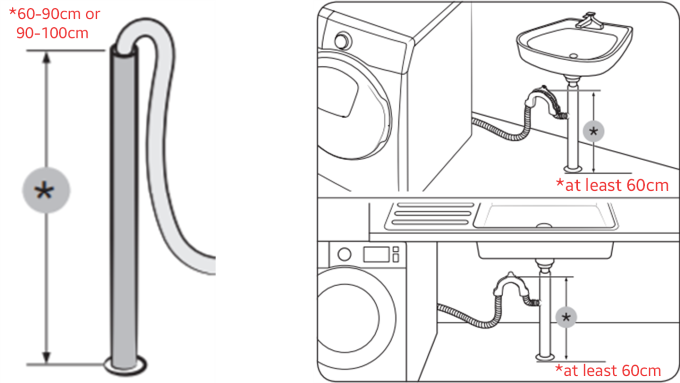
The standpipe must be the right height for the washer. It should be between 24 and 40 inches tall. A standpipe too low or too high can cause drainage errors. Adjust the standpipe height to fit the washer’s instructions. Correct height helps water flow out smoothly.
Check Hose Connection To The Standpipe
Look at where the drain hose fits into the standpipe. It should be secure and tight. A loose hose can cause leaks or water backup. Push the hose firmly into the standpipe opening. Use a clamp if needed to hold it in place. A good connection stops drainage problems.
Balancing The Load
Balancing the load in your Samsung washer is key to avoiding the SE or 5E error code. An unbalanced load causes the washer to stop and display this error. It happens when clothes clump together or the machine is overloaded. Balancing the load helps the washer spin smoothly and drain water properly. This section explains how to balance your laundry for better washing performance.
Redistributing Clothes
Start by spreading clothes evenly around the drum. Avoid piling all heavy items on one side. Mix large and small items to balance weight. Stop the washer and shake the drum if clothes are stuck together. Even distribution prevents the drum from wobbling and triggering errors. Check the load before starting the cycle for best results.
Avoiding Overloading
Overloading the washer strains the motor and causes imbalance. Follow your washer’s capacity limits in the manual. Fill the drum loosely to allow clothes to move freely. Overstuffing blocks water flow and stops proper spinning. Wash large or bulky items separately to avoid too much weight. Keeping the load light prevents error codes and extends machine life.
Checking Motor And Sensors
Checking the motor and sensors is crucial when the Samsung washer shows the SE or 5E error code. This error often means the machine struggles to drain water properly. The motor and sensors help control the washer’s drain function. Faulty parts here can cause the washer to stop mid-cycle or display error codes. Start by inspecting these components to find the problem.
Motor Tachometer Sensor
The motor tachometer sensor tracks the motor’s speed. It sends signals to the washer’s control board. If this sensor fails, the machine cannot detect motor movement. This failure often triggers the SE or 5E error. Check the sensor for damage or dirt. Clean the sensor gently with a soft cloth. Test the sensor with a multimeter to see if it works correctly. Replace the sensor if it shows no continuity or strange readings.
Lid Switch Issues
The lid switch signals if the washer lid is closed. The washer will not drain or spin if the lid switch is faulty. It can cause error codes like SE or 5E. Inspect the lid switch for broken parts or loose wires. Press the switch to see if it clicks properly. Use a multimeter to check its electrical function. Replace the lid switch if it does not pass the test or feels stuck.
Credit: www.samsung.com
When To Seek Professional Help
Knowing when to seek professional help for your Samsung washer showing the SE or 5E error code is important. Some problems need more than basic troubleshooting. Acting quickly can prevent bigger damage and save money. Understanding the signs of serious problems helps you decide the next step.
Signs Of Serious Problems
Persistent error codes even after resetting signal serious trouble. Loud noises during the drain cycle may indicate pump or motor issues. Water leaks around the washer base need immediate attention. If the washer does not drain or spin at all, do not ignore it. Strange smells or burning odors suggest electrical faults. These issues usually require professional repair to avoid safety risks.
Contacting Samsung Support
Samsung Support offers expert help for complex washer errors. They provide guidance on warranty and authorized repair centers. Have your model number and error code ready when calling. Samsung technicians can diagnose problems remotely or schedule a service visit. Using official support ensures genuine parts and safe repairs. Contacting them early helps restore your washer quickly and safely.
Frequently Asked Questions
How Do I Fix The 5e Error On My Samsung Washer?
Unplug your Samsung washer for a few minutes to reset it. Clean the drain pump filter behind the bottom front panel. Check for clogged or kinked drain hoses. Evenly redistribute clothes to avoid unbalanced loads. Call a technician if the error persists after these steps.
How Do I Fix The Se Code On My Samsung Washer?
Unplug your Samsung washer for a few minutes to reset it. Clean the drain pump filter behind the bottom front panel. Check the drain hose for clogs or kinks. Balance the laundry load evenly. Contact a technician if the SE code persists after these steps.
Should I Call A Repairman For An Se Error?
Call a repairman if the SE error persists after cleaning the drain pump filter and checking for clogs.
What Does 5e Mean On A Samsung?
5E on a Samsung washer means a drainage error. It indicates water isn’t draining properly, often due to clogs or filter issues.
What Does The Samsung Washer Error Code Se Mean?
The SE code means the washer is not draining water properly. It shows a drain issue.
Conclusion
Samsung washer code SE or 5E usually means a drainage problem. Start by unplugging the machine to reset it. Clean the drain pump filter carefully to remove any debris. Check the drain hose for clogs or kinks next. Make sure your laundry load is balanced inside the drum.
These simple steps often fix the issue quickly. If the error remains, consider contacting a technician. Proper care helps your washer work smoothly and last longer. Keep these tips handy for future troubleshooting.