
If your Nutone doorbell has suddenly stopped working, you’re not alone. Many homeowners face this problem and feel frustrated—especially when expecting a delivery, guests, or important notifications. A silent or unresponsive doorbell can be more than an inconvenience; it can also lead to missed visitors or even security concerns. Thankfully, most Nutone doorbell issues can be fixed with a bit of know-how and some basic tools. Whether you’re dealing with a wired chime, a Nutone doorbell with video features, or a simple push button, this guide will help you find and solve the problem step by step.
Understanding why your Nutone doorbell isn’t working requires patience and a systematic approach. This article will walk you through the most common causes, troubleshooting steps, repair solutions, and even advice for upgrading or replacing your system. You’ll learn how to spot small issues before they become expensive problems.
You’ll also see real examples, helpful data, and get answers to questions that beginners often miss. Even if you have never fixed a doorbell before, you can follow these instructions and get your Nutone doorbell working again.
Common Reasons A Nutone Doorbell Stops Working
When your Nutone doorbell fails, it’s usually for one or more of these reasons:
- Power supply problems – Faulty wiring, dead transformer, or tripped breaker.
- Worn-out button – The button at the door can stick, crack, or fail inside.
- Chime unit failure – The actual sound unit can break or have loose wires.
- Wiring issues – Corroded, loose, or broken wires anywhere in the system.
- Mechanical blockages – Dirt, debris, or insects inside the button or chime.
- Upgrades or renovations – Recent paint, construction, or changes can disrupt wires or buttons.
- Smart features not working – For Nutone video or smart doorbells: Wi-Fi, software, or app issues.
Most problems fall into one of these categories. Knowing where to start saves time and avoids unnecessary expenses. For example, if your doorbell stopped working right after painting or home repairs, check for paint or dust blocking the button or chime.
If your power went out recently, check the breaker or transformer first. Even a pet chewing wires or a child pressing the button too hard can cause problems you might not expect.
How Nutone Doorbells Work
To fix your Nutone doorbell, it helps to know how the system operates. A typical Nutone wired doorbell includes:
- The doorbell button (outside near your door)
- The chime unit (inside your house, makes the sound)
- A transformer (steps household voltage down to low voltage for safety)
- Wiring connecting all parts
When someone presses the button, it completes a circuit. This sends low-voltage electricity through the wires, activating the chime or bell. For smart or video models, electronics and Wi-Fi come into play, but the core principle is the same. Some smart Nutone doorbells use extra sensors for motion, or even record video to the cloud, but they all start with a simple button press.
Diagram: Basic Nutone Wired Doorbell System
| Component | Location | Main Function |
|---|---|---|
| Doorbell Button | Outside (Door Frame) | Starts the signal when pressed |
| Chime Unit | Inside (Hallway/Entryway) | Plays the chime sound |
| Transformer | Near electrical panel or attic | Reduces voltage for safety |
| Wiring | In walls/ceiling | Connects all parts |
For smart Nutone doorbells, add Wi-Fi and a mobile app to the list. These systems may also include a camera, microphone, and cloud connectivity. If you’re unsure about your model, look for a small camera lens or speaker holes near the button—these are signs of a video or smart unit.
Credit: medeiroscenografia.com
Quick Troubleshooting: Where To Start
Before you call a professional, try these basic steps. They solve most Nutone doorbell problems.
- Check the breaker – Make sure the circuit that powers your doorbell is ON.
- Inspect the doorbell button – Press it several times. Does it feel stuck or loose?
- Listen for the chime – Does it make any sound? Even a small click?
- Check for power – Is there power to the transformer or chime?
- Look for obvious damage – Broken wires, cracked buttons, or water near components.
If you’re not comfortable with electrical work, always turn off power at the breaker before touching wires. For wireless or battery-powered Nutone models, be sure to check the batteries first. Many homeowners forget this simple check and spend time searching for electrical problems when a quick battery swap fixes everything.
Quick Fixes Table
| Symptom | Possible Cause | First Step |
|---|---|---|
| Silent doorbell | No power, wiring issue | Check breaker and transformer |
| Button sticks | Dirt, worn mechanism | Clean or replace button |
| Chime hums but no ring | Transformer issue | Test transformer voltage |
| Works sometimes | Loose wire | Check connections at all points |
| Smart features fail | Wi-Fi, app, or firmware | Reboot router, check app |
For best results, try to isolate which part is failing. For example, if the chime works when you short the wires at the chime unit, but not when you press the button, your button is almost always the problem.
Step-by-step Nutone Doorbell Troubleshooting
1. Checking The Doorbell Button
The button is exposed to weather, so it fails often.
- Remove the button from the wall using a screwdriver.
- Check for cracks, rust, or stuck mechanisms.
- If dirty, gently clean with a dry cloth. Do not use water.
- Use a multimeter to test for continuity. When pressed, the circuit should close (beep or show zero resistance).
- If there’s no continuity when pressed, replace the button.
Non-obvious tip: Many Nutone buttons look fine outside but corrode behind. Always check the back of the button for green or white corrosion.
Also, pay attention to how the button feels. If it doesn’t “click” or feels mushy, the small spring inside may have broken. This is a cheap fix, but if you live in a humid area, consider sealing the new button with a bit of weatherproof silicone to help it last longer.
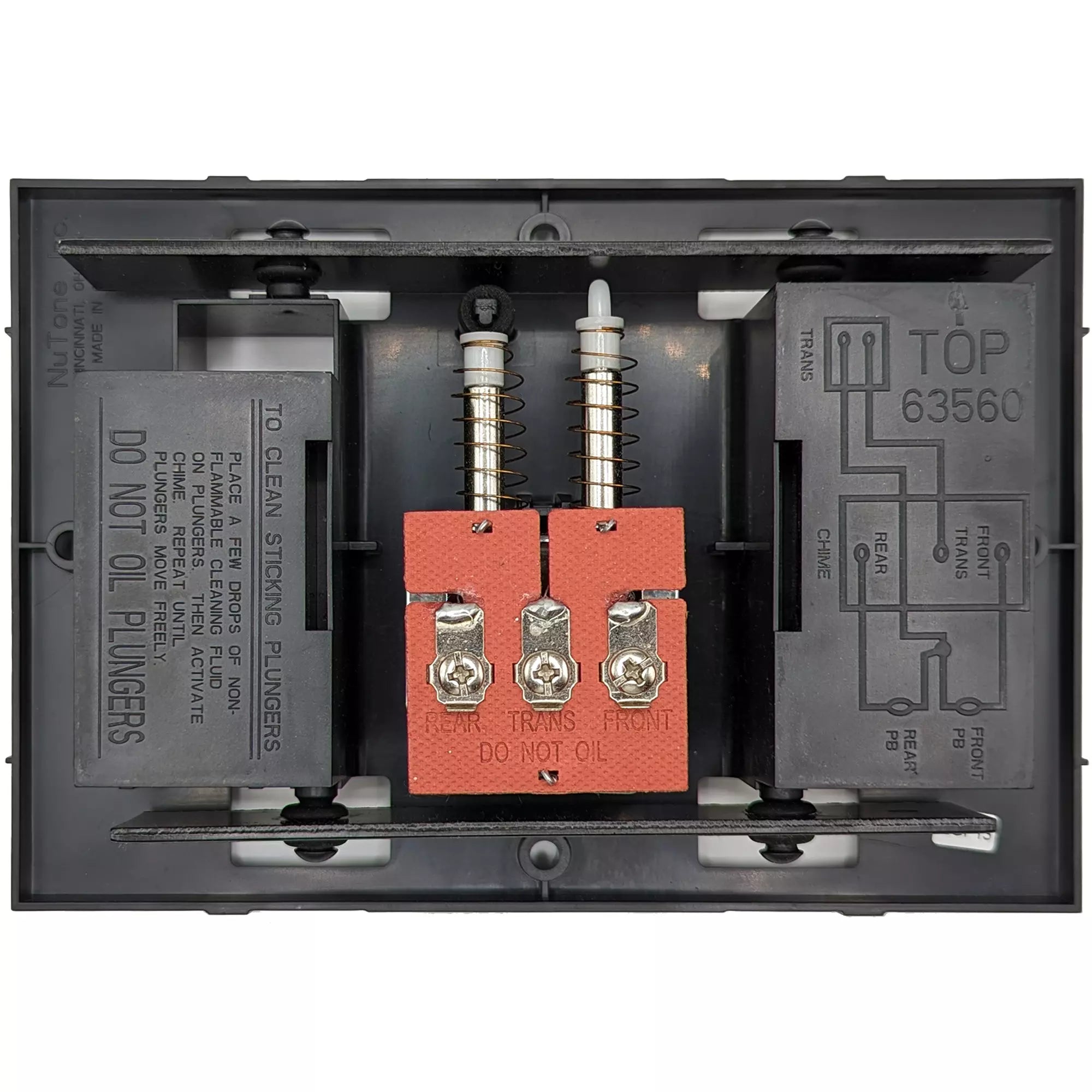
2. Inspecting The Chime Unit
The chime is usually inside the home, near the entry.
- Remove the cover (usually snaps or unscrews).
- Look for dust, cobwebs, or small insects inside.
- Gently clean the unit. Blocked plungers or hammers can stop the chime from working.
- Check for loose or broken wires.
- With power off, gently tug each wire to see if it’s secure.
If you hear a faint “buzz” when pressing the button, the chime may be getting power, but the internal mechanism could be stuck or broken.
Hidden issue: Sometimes, new paint or wallpaper can block the chime plungers from moving. Make sure nothing is blocking moving parts.
Another thing to watch for: if your chime plays only part of the melody or stops halfway, dust on the contacts or a weak transformer could be the reason. Cleaning and checking voltage can solve these partial failures.
3. Transformer Diagnosis
The transformer reduces high household voltage (120V) to a safe 16-24V for your doorbell.
- Locate the transformer (often near your main electrical panel, attic, or basement).
- Use a multimeter to check voltage at the transformer’s output terminals. It should read between 16V–24V AC.
- If no voltage, check the wiring connections.
- If the transformer is warm or humming loudly, it may need replacement.
Important: Old transformers can fail slowly. If the voltage is under 16V, replace it.
Some homes have hidden transformers, sometimes behind a furnace or tucked in a closet. If you can’t find yours, trace the wires from the chime or ask the previous homeowner if possible. Also, transformers can last decades, but a power surge can burn them out instantly, so check after electrical storms.
4. Wiring Troubles And Fixes
Wiring connects every part. Problems can be hard to spot.
- Look for frayed, cut, or corroded wires at every connection.
- Sometimes, wires get pinched in doors or during home renovations.
- Use a multimeter to test for continuity from button to chime, and from transformer to chime.
- If a wire is bad, try running a new wire or using wireless alternatives.
Beginner’s mistake: Not labeling wires before disconnecting. Always mark wires, especially if you have multiple buttons or chimes.
If your Nutone system has more than one button (for example, front and back doors), keep track of which wire goes where. Taking a photo before disconnecting wires is a smart move. If you find old, cloth-covered wires, be extra careful—they’re fragile and can break easily.
5. Smart Nutone Doorbell Issues
Nutone also offers video and smart doorbells. Problems with these can include:
- Wi-Fi connection issues – Check your router and signal strength.
- Software glitches – Restart the app and device.
- Firmware updates needed – Check for updates in the app.
- Account or cloud issues – Make sure your subscription is active, if required.
A wired issue can still affect smart features, so check power before blaming the software.
Advanced tip: If the video or app freezes but the doorbell rings, try resetting both the doorbell and your home router.
Another pitfall: If your Wi-Fi uses both 2.4GHz and 5GHz bands, make sure your Nutone smart doorbell is set to the right one—most only support 2.4GHz. Also, check if your network’s password has changed or if parental controls are blocking your device.

Credit: www.dentalhousecr.com
Repair Or Replace? Making The Right Choice
Sometimes, fixing an old Nutone doorbell is not worth the effort. Here’s how to decide:
- If the button or chime is old and corroded, replacement is usually best.
- If the wiring is damaged inside walls, consider a wireless model.
- If only the transformer is bad, replacement is often simple and inexpensive.
- For smart models, if the software is outdated and not supported, upgrade to a newer device.
Example: If your doorbell is more than 20 years old and repair parts are hard to find, a new system may work better and save you headaches later.
Wired Vs. Wireless Nutone Doorbells
Nutone makes both wired and wireless models. Here’s a quick comparison:
| Feature | Wired Nutone Doorbell | Wireless Nutone Doorbell |
|---|---|---|
| Installation | Requires wiring | Plug and play |
| Reliability | Very reliable | Depends on batteries/range |
| Sound quality | Traditional chime | Custom sounds possible |
| Features | Basic to smart | Often includes video, intercom |
| Cost | Low to moderate | Varies by features |
Non-obvious insight: Wireless models can be a fast fix if your home’s wiring is damaged or if you’re renting and can’t run new wires.
Wireless doorbells are also a good choice for detached garages or garden gates, where running wires would be expensive. But remember, wireless models need battery checks every few months, especially in cold weather.
Preventing Future Nutone Doorbell Problems
Prevention saves time and money. Here’s how to keep your doorbell working:
- Clean the button every few months. Wipe dust and moisture away.
- Check for insects or nests near the chime and button.
- Test the system monthly. Press the button and listen.
- Inspect wires if doing home repairs or painting.
- Change batteries on wireless or smart models as recommended.
Pro tip: Write the installation date on the transformer or chime cover. It helps track age and warranty.
If you live in a rainy or humid climate, consider adding a small awning above the button to shield it from direct water. In areas with lots of insects, check the chime box for spider webs or insect nests every spring and fall.

Credit: www.fotoenigma.com
When To Call A Professional
Some Nutone doorbell issues are best left to pros:
- If you’re uncomfortable with electricity or wiring.
- If you suspect hidden wiring problems inside walls.
- If you’ve replaced all parts and still have problems.
- If your smart doorbell is part of a home security system.
Professionals have tools to test wiring and components safely. They can also upgrade you to the latest smart features or integrate with alarms. It’s usually worth the cost if you want the job done quickly and safely. In some cases, electricians can spot unsafe electrical conditions in your home that you might miss.
Upgrading Your Nutone Doorbell System
If your old Nutone doorbell is beyond repair, consider upgrading. Modern Nutone options include:
- Video doorbells – See who’s at your door, even when away.
- Smart doorbells – Connect to Alexa, Google, or your phone.
- Multi-tone chimes – Choose from different sounds.
- Wireless kits – No wiring needed.
When upgrading, check your home’s wiring and power supply. Some advanced models need more power or a new transformer.
Upgrade tip: If you live in an older home, choose a wireless or battery-powered model to avoid complex rewiring.
Also, compare features like night vision for cameras, two-way audio, and compatibility with your smartphone. Some Nutone models offer local storage (SD card), while others use cloud services—pick what matches your privacy and usage needs.
Nutone Doorbell Not Working: Case Studies
Case 1: The Silent Button
A homeowner pressed their Nutone button, but nothing happened. The chime and transformer were less than five years old. Inspection revealed the button’s back had corroded from rainwater. Replacing the button ($10–$20) solved the problem instantly.
Case 2: Humming Chime, No Sound
Another user noticed their chime unit hummed but didn’t ring. Testing showed the transformer was only outputting 12V (should be 16V–24V). Swapping the transformer restored normal operation.
Case 3: Smart Doorbell Wi-fi Drop
A Nutone video doorbell worked for months, then stopped sending alerts. The Wi-Fi router had moved further away. Moving the router closer and updating the app fixed the issue—no hardware replacement was needed.
These real-world examples show how the most common issues can be solved with simple checks and fixes. Even if your issue seems unique, try these steps first—they often reveal the problem quickly.
Safety First: Working With Nutone Doorbells
Always put safety first:
- Turn off power at the breaker before touching wires.
- Use insulated tools.
- Wear gloves and safety glasses.
- Never work on wet surfaces or in rain.
If unsure, get help from an electrician. Even low-voltage systems can cause a shock or short if mishandled. If you see old or crumbling insulation on wires, stop and call a pro—old wires can be dangerous.
Nutone Doorbell Maintenance Checklist
Keep your doorbell working longer with this routine:
- Test the button and chime every month.
- Clean button and chime with a dry cloth.
- Replace batteries as needed (wireless/smart models).
- Check transformer voltage once a year.
- Inspect wires for damage after storms or renovations.
- Keep software updated (for smart models).
Routine checks take only a few minutes and prevent most issues. Most problems start small—a stuck button, a weak battery, or a little corrosion. Catching them early is the key to a reliable doorbell.
Where To Find Replacement Nutone Doorbell Parts
Nutone is a trusted brand with good support. Find parts at:
- Home improvement stores (Lowe’s, Home Depot)
- Online retailers (Amazon, Nutone official website)
- Electrical supply stores
- Local hardware stores
When buying, match the model number on your old part. For smart models, check compatibility with your home Wi-Fi and apps. If you’re unsure, bring the old part to the store or take a clear photo to show an employee. Sometimes, a small difference in voltage or size can cause problems with installation.
Frequently Asked Questions
Why Does My Nutone Doorbell Make A Buzzing Sound But Not Ring?
A buzzing sound usually means the transformer or chime mechanism is getting power but can’t complete the signal. Check for stuck plungers, weak transformer voltage (should be 16V–24V), or loose wires at the chime. Sometimes, the button is stuck, keeping the circuit partly closed.
Can I Replace A Nutone Wired Doorbell With A Wireless One?
Yes. If your home’s wiring is damaged or you want an easier solution, a wireless Nutone doorbell is a good choice. These systems use batteries and radio signals. Just remove or tape off old wires, and install the new button and chime according to instructions.
How Do I Know If My Nutone Doorbell Transformer Is Bad?
Use a multimeter to check the voltage at the transformer’s output. It should read between 16V and 24V AC. If voltage is low or missing, the transformer is likely bad. Also, if the transformer is hot or humming loudly, it may be failing.
My Nutone Video Doorbell Is Not Connecting To Wi-fi. What Should I Do?
First, check your Wi-Fi router and internet connection. Restart the doorbell and your router. Make sure the doorbell is within range of your Wi-Fi. Update the doorbell’s app and firmware. If issues continue, consult the product manual or Nutone’s official support.
How Often Should I Replace A Nutone Doorbell Button Or Chime?
A doorbell button often lasts 5–10 years, depending on weather and use. The chime can last much longer, sometimes 20 years or more. Replace parts when they fail, become damaged, or show signs of wear.
Conclusion
A broken Nutone doorbell doesn’t have to be a mystery. Most problems have clear causes and practical solutions. With a careful approach, some basic tools, and the tips above, you can restore your doorbell to perfect working order—or even upgrade to a smarter, more reliable system.
A little maintenance goes a long way, and knowing what to check first will save you time, money, and frustration. If you ever feel out of your depth, don’t hesitate to call a professional. Your doorbell is a small part of home life, but it makes a big difference every day.