
Is your Toto Washlet remote suddenly not working, leaving you frustrated and stuck without control? You’re not alone.
When your remote fails, simple comforts become a hassle, and you want a quick fix—without complicated tech talk. Whether the buttons don’t respond or the remote won’t connect, this guide will walk you through easy steps to get your Toto Washlet remote back in action.
Keep reading to discover smart, practical solutions you can try right now and regain full control of your washlet with confidence.

Credit: www.reddit.com
Common Battery Issues
Battery problems are a common reason why your Toto Washlet remote may stop working. Most issues come from simple battery-related faults that you can fix at home. Checking the battery setup is the first step to restore your remote’s function.
Many users skip these basic checks and miss easy fixes. Troubleshooting battery issues saves time and avoids unnecessary replacements. Here are the main battery-related points to check.
Check Battery Orientation
Ensure the batteries sit correctly in the remote. Look for the + and – signs inside the battery compartment.
Inserting batteries the wrong way stops power flow. Flip them if needed. Proper alignment is essential for the remote to work.
Clean Battery Contacts
Dirt or corrosion on battery contacts can block power. Use a cotton swab dipped in rubbing alcohol to clean the metal contacts.
Gently wipe both the batteries’ ends and the compartment terminals. Clean contacts improve the connection and restore power.
Try Fresh Batteries
Old or weak batteries may not have enough power. Replace them with new, high-quality batteries for best results.
Check the expiration date on the package before use. Fresh batteries ensure steady power supply to your remote.

Credit: www.youtube.com
Infrared Signal Problems
Infrared signal problems often cause the Toto Washlet remote to stop working. The remote uses infrared (IR) light to send commands to the washlet unit. Any interruption in this signal can prevent the washlet from responding. Common issues include blocked sensors, dirty IR emitters, or weak signals. Understanding how the IR system works helps you troubleshoot effectively.
Test Ir Emitter With Phone Camera
Use your phone’s camera to check the remote’s IR emitter. Point the remote at the camera lens and press any button. You should see a blinking light on your phone screen if the IR emitter works. If no light appears, the remote may have a faulty IR LED. This simple test helps identify if the remote sends signals properly.
Clear Sensor Obstructions
Make sure nothing blocks the IR sensor on the washlet or the remote. Objects, dirt, or grime can stop the IR signal from reaching the washlet. Remove any obstacles between the remote and the sensor area. Keep the sensor area clear for a smooth signal path.
Clean Ir Sensor And Led
Dust and dirt can cover the IR sensor and LED, weakening the signal. Use a soft, dry cloth to wipe both the remote’s IR emitter and the washlet’s sensor. Avoid liquids unless the cloth is slightly damp. Regular cleaning ensures strong and clear IR communication.
Button And Remote Reset
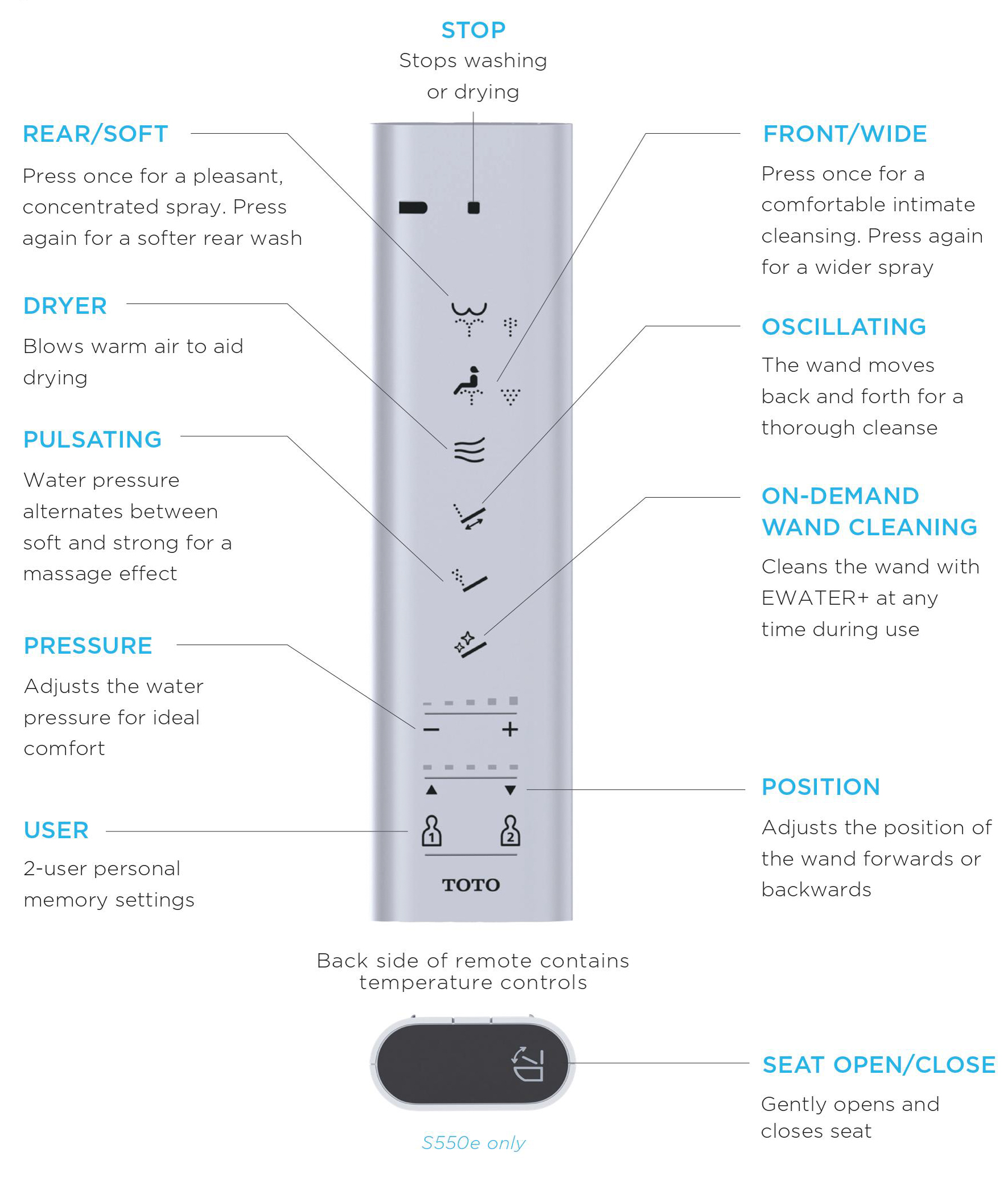
Resetting the buttons and remote is a key step when the Toto Washlet remote stops working. Small issues like stuck buttons or battery problems often cause the remote to become unresponsive. A reset can clear these minor faults and restore normal function. The process involves identifying any stuck buttons, removing the batteries to reset the device, and re-pairing smart remotes if needed. These simple actions solve many common problems without extra tools or service calls.
Identify And Fix Stuck Buttons
Stuck buttons can prevent the remote from sending signals properly. Press each button several times to loosen any dirt or debris. Look for grime around the edges and clean gently with a soft cloth. Avoid using liquids that might damage the remote. Make sure buttons move smoothly and return to their normal position after pressing. This often fixes unresponsive buttons quickly.
Remove Batteries To Reset
Removing batteries resets the remote’s internal memory and clears glitches. Take out the batteries and wait at least one minute before reinserting them. Check battery orientation carefully, matching the + and – signs inside the compartment. Clean battery contacts if they look dirty or corroded. Use a cotton swab dipped in rubbing alcohol to wipe the metal contacts gently. This step refreshes the power supply and often restores function.
Re-pair Smart Remotes
Some Toto Washlet remotes use smart technology and may need re-pairing with the main unit. Follow the manufacturer’s instructions to enter pairing mode, usually by holding specific buttons together. Common combinations include holding the Return and Play/Pause buttons simultaneously. Once in pairing mode, bring the remote close to the washlet to reconnect. Re-pairing fixes communication issues between the remote and device.
Credit: www.totousa.com
Hardware Troubleshooting
Hardware issues often cause Toto Washlet remote problems. These issues stop the remote from working correctly. Hardware troubleshooting helps find and fix these problems. This guide covers simple checks you can do at home.
Check For Loose Battery Contacts
Open the battery compartment carefully. Look for loose or bent metal contacts. These contacts connect batteries to the remote’s circuits. If contacts are loose, the remote may not get power. Push them gently back into place. Clean contacts with a dry cloth if dirty. Dirty contacts block power flow.
Inspect For Internal Damage
Remove the batteries and open the remote case. Check inside for broken parts or corrosion. Water damage can cause internal rust and shorts. Look for cracked circuit boards or loose wires. Damage inside stops signals from reaching the Toto unit. If you see damage, repair may need a professional.
Consider Remote Replacement
If battery contacts and internal parts look fine, replacement may be best. Remotes wear out after years of use. Electronics inside can fail over time. Buying a new Toto Washlet remote restores full function. Make sure to get the correct model for your unit. This saves time and stops frustration.
Frequently Asked Questions
How Do You Reset A Toto Remote Control?
To reset a Toto remote control, remove the batteries and wait for two minutes. Reinsert batteries correctly, then press any button to restart the remote. This clears internal memory and resolves minor issues quickly.
Why Is My Remote Not Working Even With New Batteries?
Your remote may fail despite new batteries due to dirty contacts, wrong battery placement, blocked IR sensor, stuck buttons, or a faulty IR LED. Clean contacts, check alignment, clear obstructions, reset the remote/device, and test the IR signal with a phone camera for troubleshooting.
Why Is My Bidet Controller Not Working?
Your bidet controller may not work due to dead batteries, dirty contacts, blocked sensors, stuck buttons, or needing a reset. Clean contacts, replace batteries, check sensors, press all buttons, and reset the device to fix common issues.
What Are Common Problems With Toto Toilets?
Common problems with Toto toilets include running water, weak flush, clogged trap, sensor malfunctions, and faulty remote controls. Regular maintenance helps prevent these issues.
Why Is My Toto Washlet Remote Not Responding?
The remote may have dead or incorrectly placed batteries. Dirt on battery contacts or a blocked sensor can also cause no response.
Conclusion
Troubleshooting your Toto Washlet remote can save time and money. Start by checking the batteries and cleaning contacts. Test the infrared signal with a phone camera to confirm it’s working. Clear any obstructions blocking the sensor. Try resetting the remote by removing batteries for a few minutes.
Press all buttons to release any stuck ones. If problems persist, the remote’s internal parts may be faulty. In such cases, replacement might be necessary. Following these simple steps often restores your remote’s function quickly. Keep your Toto Washlet remote working smoothly with regular care.