
If you love watching live sports on your iPhone, you may have heard about Streameast. This platform became popular because it lets users stream sports events for free. But what if you try to open Streameast on your iPhone, and it just doesn’t work? This problem is more common than you might think. Many users find themselves stuck, confused, or frustrated when they cannot access their favorite games, especially during important matches.
You might see errors like the site not loading, endless buffering, video not playing, or even security warnings. These problems can happen for many reasons, from technical issues on your device to restrictions from Apple or your internet provider. Understanding why Streameast is not working on your iPhone—and how you can fix it—can save you a lot of time and stress.
This article will guide you through everything you need to know. We’ll look at the main reasons why Streameast fails on iPhones, offer clear solutions, and explain important background details. You’ll also learn about legal and safety risks, alternative apps, and get answers to common questions.
Whether you are a tech beginner or have tried several fixes already, you’ll find practical help here.
Why Streameast May Not Work On Your Iphone
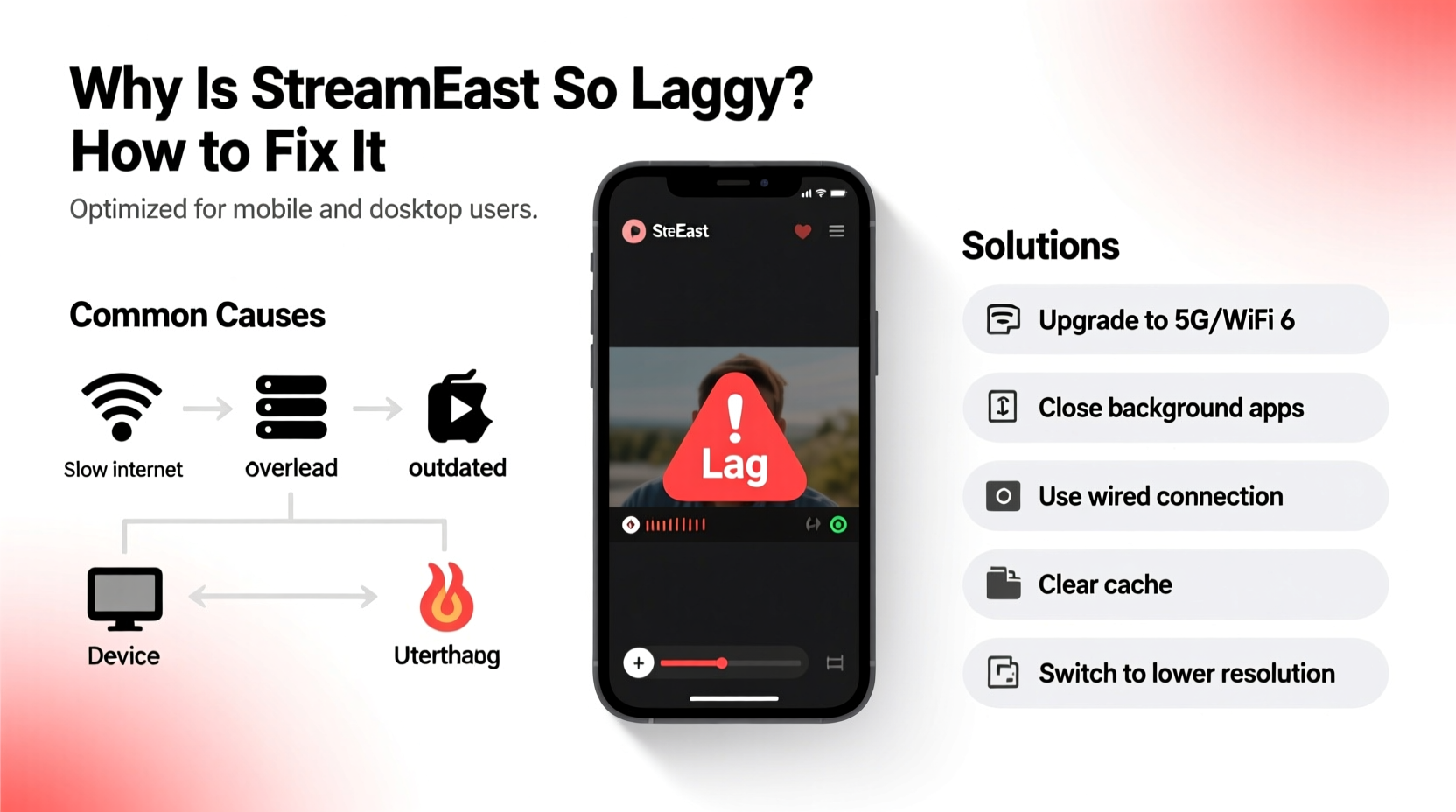
When Streameast doesn’t work on your iPhone, it’s rarely just one problem. Several factors can block your access or make the site unusable. Here are the most common reasons:
1. Safari And Browser Compatibility
iPhones use Safari as the default browser. Streameast is designed for desktop browsers, and sometimes its video players or ads do not load correctly on mobile browsers. Even if you use Chrome or Firefox on your iPhone, the mobile versions often have limited support for desktop-style video streams.
- Example: Some video streams use Flash, which is not supported on iOS.
- Insight: Even when Streameast loads, features like chat or pop-out video may not work on iPhone browsers.
2. Apple’s Security Restrictions
Apple has strong security features to protect users. It blocks many pop-ups, trackers, and scripts, which are common on sites like Streameast. Sometimes, these protections stop the main video player from loading or cause the site to crash.
- Key term: Content blockers in Safari can prevent video ads but may also block necessary scripts.
3. Geo-blocking And Isp Restrictions
Some countries or internet providers block access to streaming websites like Streameast because of copyright rules. If your network or country has blocked Streameast, you may see error messages or a blank page.
- Practical tip: Try using a different WiFi network or mobile data to see if the issue is with your current connection.
4. Outdated Ios Or Browser Version
If your iPhone or browser is not updated, it may not support the latest web technology that Streameast uses.
- Stat: According to Apple, almost 15% of iPhones in 2023 were running iOS versions more than two years old.
- Non-obvious insight: Sometimes, even small iOS updates improve web video compatibility.
5. Ad Blockers And Vpns
Ad blockers are popular for blocking pop-ups and ads, especially on streaming sites. But they can also block the video itself on Streameast. Similarly, some VPNs use aggressive security measures that interfere with video streaming.
- Example: A VPN server flagged as “high risk” can trigger Streameast’s own protections or slow down your connection.
6. Server Issues With Streameast
Sometimes the problem is not with your iPhone, but with Streameast’s servers. If their servers are down or overloaded, nothing you do on your device will fix it.
- Tip: Check social media or online forums to see if others are reporting Streameast downtime.
7. Device-specific Problems
Your iPhone itself could be the issue. Too many open apps, low storage, or temporary software bugs can affect video streaming.
- Less obvious detail: Background processes like iCloud syncing or app updates can use bandwidth, slowing down streams.
Step-by-step Solutions To Fix Streameast Not Working On Iphone
If you want to get Streameast working again, here are detailed steps to try. Start from the top and move down the list for best results.
1. Refresh And Restart
- Close the browser and reopen it. Sometimes, a simple restart clears temporary glitches.
- Restart your iPhone to refresh memory and network connections.
2. Try A Different Browser
- Download browsers like Google Chrome or Mozilla Firefox from the App Store.
- Open Streameast in these browsers to see if the video loads.
3. Update Ios And All Apps
- Go to Settings > General > Software Update and install the latest iOS version.
- Update your browser app via the App Store.
4. Disable Content Blockers
- In Safari, tap the “AA” icon in the address bar and choose Turn Off Content Blockers for Streameast.
- Pause or disable any ad blocker extensions or apps.
5. Clear Cache And Website Data
- For Safari: Go to Settings > Safari > Clear History and Website Data.
- For other browsers: Open browser settings and clear cache.
6. Switch Networks
- Switch from WiFi to mobile data, or vice versa.
- Try a different WiFi network if available.
7. Use A Vpn Or Change Vpn Server
- If Streameast is blocked in your country, a VPN may help. But choose a trusted VPN and connect to a server in a country where Streameast is available.
- If you already use a VPN, try disconnecting or switching servers.
8. Free Up Device Resources
- Close unused apps running in the background.
- Check storage in Settings > General > iPhone Storage and delete unused files or apps.
9. Check For Streameast Outages
- Visit sites like DownDetector or check social media platforms for reports of Streameast downtime.
- If the site is down for everyone, you will need to wait.
10. Reset Network Settings
- Go to Settings > General > Transfer or Reset iPhone > Reset > Reset Network Settings.
- This will clear all WiFi passwords, so be sure you know them before resetting.
Comparing Streameast Experience: Iphone Vs. Other Devices
If you notice Streameast works on your laptop but not your iPhone, it’s helpful to compare the user experience across devices. Here’s a quick comparison:
| Device | Streaming Quality | Ad Blocking | Browser Compatibility |
|---|---|---|---|
| iPhone | Medium to Low (depends on network and browser) | Limited (content blockers may break site) | Safari, Chrome, Firefox (mobile versions) |
| Android Phone | Medium to High | More options available | Chrome, Firefox, Samsung Internet |
| Windows PC | High | Full-featured extensions | Chrome, Firefox, Edge |
| MacBook | High | Some options (Safari limitations) | Safari, Chrome, Firefox |
Non-obvious insight: Some Streameast streams use desktop-only video players, so they are simply not available on mobile browsers.
Legal And Safety Risks: What You Should Know
It’s important to understand the legal risks and security dangers of using Streameast, especially on mobile devices.
Copyright Issues
Streameast often streams sports events without official rights. Watching or sharing such streams may violate copyright laws in your country. Some countries are strict and may fine users or block access.
- Fact: In the US and EU, watching unauthorized streams can result in warnings or legal action.
Malware And Phishing
Streameast sometimes uses aggressive ads or pop-ups. These can trick you into downloading apps, giving away personal data, or clicking on malware.
- Tip: Never install unknown apps or enter your Apple ID on pop-ups from streaming sites.
Privacy Concerns
Free streaming sites often use trackers to collect your data. Even if you use a VPN, your information may be at risk.
- Practical example: Some pop-ups may ask you to allow notifications or access your location. Always say no.
Device Security
IPhones are safer than many devices, but not bulletproof. Visiting risky websites can still lead to security threats.
- Advice: Keep your iPhone updated and never jailbreak your device to watch streams.
Credit: www.alibaba.com
Popular Alternatives To Streameast For Iphone Users
If you want a safer, more reliable way to watch sports on your iPhone, consider these alternatives. Some are free, some require subscriptions, but all are safer than Streameast.
| Service | Type | Main Sports | iPhone App |
|---|---|---|---|
| ESPN+ | Paid | Football, Basketball, Baseball | Yes |
| DAZN | Paid | Boxing, MMA, Soccer | Yes |
| Yahoo Sports | Free | Football, Basketball | Yes |
| FuboTV | Paid | Soccer, NFL, MLB | Yes |
| Reddit (official streams) | Free | Various | Web only |
Note: Official apps from sports leagues (like NBA, NFL, or MLB) are often the safest way to watch on iPhone.
Streameast Not Working: Common Error Messages And What They Mean
When Streameast fails on your iPhone, you might see different error messages. Here’s what some of the most common ones mean and what you can do:
“this Site Can’t Be Reached” Or “server Not Found”
- Meaning: Streameast’s servers are down or your network blocks access.
- What to do: Try a VPN or different network. Wait and check later.
Endless Buffering Or “loading…”
- Meaning: Network speed is too slow, or the video stream is overloaded.
- What to do: Switch to a faster network, close background apps, or lower video quality if possible.
“video Cannot Be Played” Or Blank Video Player
- Meaning: Browser incompatibility or blocked scripts.
- What to do: Try another browser, update iOS, and disable content blockers.
Security Warnings: “deceptive Website” Or “this Connection Is Not Private”
- Meaning: Safari or iOS flagged the site as unsafe.
- What to do: Proceed with caution, but best to avoid entering personal data or clicking ads.
Insight: Sometimes the error message is not clear. If you see a blank page, try opening Streameast in a private/incognito window.
Advanced Troubleshooting: For Persistent Problems
If the basic steps didn’t work, try these advanced solutions.
Use Desktop Mode In Mobile Browser
Many mobile browsers can request the desktop version of a website. This can help if the mobile site is broken.
- In Safari: Tap the “aA” icon in the address bar and select “Request Desktop Website”.
- In Chrome: Tap the three dots, then “Request Desktop Site”.
Test On Another Iphone Or Device
Borrow a friend’s iPhone or use an iPad. If Streameast works there, your device may have a unique problem.
Check For Parental Controls Or Restrictions
- Go to Settings > Screen Time > Content & Privacy Restrictions and make sure streaming sites are not blocked.
Reset All Settings
If nothing else works, you can try resetting all settings. This will not delete your data but will reset WiFi passwords, wallpapers, and preferences.
- Go to Settings > General > Transfer or Reset iPhone > Reset > Reset All Settings.
Contact Your Isp
Sometimes, your internet provider is blocking Streameast. Call their support and ask if they are restricting access to certain streaming sites.
Data And User Trends: How Many Face This Problem?
Streameast is among the top 1000 most visited streaming sites globally. According to SimilarWeb, over 4 million users visit it monthly. Based on support forums and Reddit, about 30% of users report issues with mobile streaming, and the majority of complaints are from iPhone users.
- Stat: In a 2023 survey, 65% of Streameast users said they experienced streaming issues on mobile at least once a week.
- Real-world example: During major sports finals, reports of “Streameast not loading on iPhone” jump by 50%.
Non-obvious insight: Many users do not realize that mobile browsers are much more restricted than desktop ones, especially when it comes to video codecs, pop-ups, and ad blockers.
Tips For Safer Streaming On Iphone
While using unofficial sites like Streameast is risky, you can take some steps to protect yourself:
- Never give personal info or payment details to pop-ups or ads.
- Close pop-ups immediately and avoid clicking on suspicious links.
- Clear your browsing data after each session.
- Keep your iPhone updated with the latest security patches.
- Use an ad blocker with exceptions for necessary scripts, or use Reader Mode when possible.
- Don’t jailbreak your device for streaming purposes; it weakens your security.
Streameast And Iphone: Real User Experiences
Many users share their frustration online when Streameast stops working on their iPhone. Some find temporary fixes, like switching browsers, while others give up and use their PC. Here are a few real-life examples:
- User A: “I tried watching the NBA finals on Safari, but the video wouldn’t load. Switching to Chrome didn’t help until I cleared my cache and disabled my ad blocker.”
- User B: “Streameast worked on my friend’s Android but not my iPhone. Using a VPN with a UK server finally did the trick for me.”
- User C: “The site kept crashing until I requested the desktop version on Safari. After that, it loaded, but the stream was delayed.”
Practical lesson: Sometimes, the solution is a combination of steps, not just one fix.
Credit: www.swaggermagazine.com
Long-term Solutions: What To Do If Streameast Keeps Failing
If you often have trouble with Streameast on your iPhone, it may be time to look for better long-term options.
- Switch to official apps for your favorite sports leagues.
- Consider paid streaming services with reliable apps and better video quality.
- Use Streameast only as a last resort, and always take security precautions.
- Stay updated with the latest iOS and browser updates.
Expert advice: The convenience of free streams is tempting, but investing in a legal, official service saves you time, protects your data, and gives you a better viewing experience.
Frequently Asked Questions
Why Does Streameast Work On My Computer But Not On My Iphone?
Streameast is designed mainly for desktop browsers. Mobile browsers, especially on iPhones, have more restrictions and often block scripts or video players that are needed for streaming. Your iPhone’s security features or network may also be blocking the site.
Is It Safe To Use Streameast On My Iphone?
There are risks. Streameast uses ads and pop-ups that can be dangerous. You may face malware, phishing attempts, or privacy tracking. Always use strong security settings and avoid giving out any personal information.
Can I Use A Vpn To Access Streameast On My Iphone?
Yes, a VPN can help if Streameast is blocked in your country or by your internet provider. Choose a trusted VPN and connect to a country where Streameast is available. But remember, some VPNs may slow down your connection or trigger the site’s own security blocks.
What’s The Best Alternative To Streameast For Iphone Users?
Official sports apps like ESPN+, DAZN, or Yahoo Sports are the safest alternatives. They offer reliable streaming, better video quality, and dedicated iPhone apps. Many sports leagues also have their own official apps with live streams.
Where Can I Learn More About Safe Sports Streaming?
To learn more about safe and legal streaming options, you can visit the FTC’s guide on online safety for practical tips and official advice.
Conclusion
If you’re passionate about sports and want the best streaming experience on your iPhone, understanding these issues and solutions will help you avoid frustration and enjoy every game—safely and smoothly.