
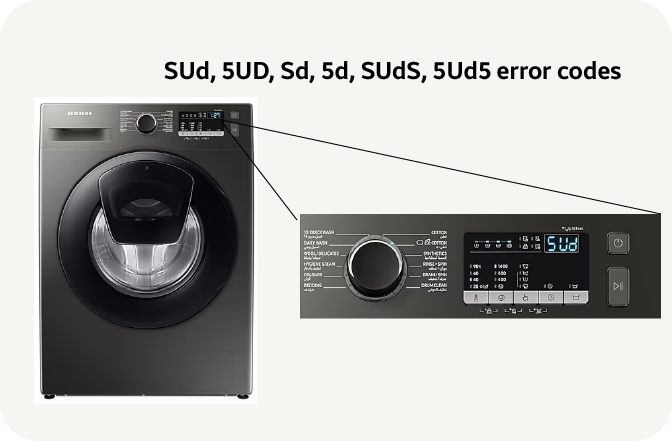
If you’ve ever seen the “SUD” or “5Ud” error code flash on your Samsung washer, you know how frustrating it can be. These error messages usually mean your machine has detected too many suds, which can stop your laundry cycle and leave your clothes soaking wet.
But don’t worry—you’re not alone, and fixing it is easier than you might think. You’ll learn simple, step-by-step solutions to clear the suds, prevent the error from coming back, and get your washer running smoothly again. Keep reading, because with a few quick tips, you can save time, avoid costly repairs, and get back to clean clothes without the hassle.
Credit: www.samsung.com
Causes Of Sud Or 5ud Error
The SUD or 5Ud error code on Samsung washers signals a problem with excess suds or drainage. Understanding the causes helps fix the issue quickly. This error stops the washer to prevent damage or improper washing. Common causes include too many suds, drainage blockages, or faulty parts. Below are the main reasons behind this error and what triggers them.
Excessive Suds Formation
Using too much detergent leads to excess suds. Non-HE detergents create more foam in HE washers. Suds overflow and confuse the sensor, triggering the error. Fabric softeners or additives can also increase suds. The machine detects suds buildup and stops the cycle to protect itself.
Drainage Problems
Drainage issues stop water and suds from leaving the washer. Blocked or kinked drain hoses cause water backup. A clogged pump filter traps lint and debris, reducing drainage. Poor drainage means suds stay inside longer, causing the error. Regular cleaning of the drain hose and filter prevents this problem.
Faulty Pressure Switch Or Control Board
The pressure switch senses water and suds levels inside the drum. A damaged switch sends wrong signals, causing false sud errors. The control board processes sensor data and controls washing cycles. Faulty boards may misread signals or fail to clear errors. Replacing these parts often fixes persistent SUD or 5Ud codes.

Credit: www.youtube.com
Clearing Excess Suds
Excess suds can cause your Samsung washer to display the Sud Or 5Ud error code. Clearing these suds quickly helps the machine run smoothly again. Excess foam blocks sensors and stops the washing cycle. Simple steps can reduce suds and prevent future errors.
Follow these easy methods to clear excess suds safely and effectively.
Run Eco Drum Clean Or Rinse Cycle
Start by running the Eco Drum Clean cycle without detergent. This cycle flushes out leftover soap and suds from the drum. If your washer does not have this cycle, run a rinse and spin cycle. Avoid adding detergent during these cycles to prevent more suds. These cleaning cycles help clear excess foam quickly.
Add Suds Reducers Like Vinegar Or Fabric Softener
Add a small amount of white vinegar or fabric softener to the detergent dispenser. These liquids help break down suds and reduce foam. Run a rinse and spin cycle after adding the suds reducer. This step clears suds and improves washer performance. Avoid using too much vinegar, as it may damage rubber parts.
Use Correct Detergent And Amount
Using the right detergent prevents excess suds from forming. Choose High Efficiency (HE) detergent designed for Samsung washers. Always measure detergent carefully according to the load size. Avoid using too much detergent or fabric softener. Proper detergent use keeps suds under control and helps the washer run without errors.
Fixing Drainage Issues
Drainage problems often cause the Samsung Washer Sud Or 5Ud error code. Fixing these issues restores proper water flow and stops error messages. Simple steps can clear blockages and improve drainage performance. Follow the instructions below to fix drainage problems safely and effectively.
Unplug And Inspect Machine
Unplug the washer from the power source. This prevents electric shock during inspection. Check the machine exterior for leaks or damage. Look behind the washer for loose or blocked parts. Safety first before any maintenance work.
Clean The Pump Filter
Open the small access door at the washer’s front bottom. Place a towel and shallow pan to catch water. Use the emergency drain hose to remove standing water. Unscrew the pump filter and clean out lint, coins, or debris. Rinse the filter and secure it back tightly.
Check And Straighten Drain Hose
Locate the drain hose at the back of the washer. Check for kinks, bends, or blockages. Remove any visible clogs or debris. Straighten the hose to allow smooth water flow. Ensure the hose is securely connected to the drain pipe.
Inspect Drain Pump Functionality
Listen for unusual noises during the drain cycle. A humming or buzzing sound may indicate a jammed pump. Remove the pump cover to check for trapped objects. Clean any obstruction carefully. Test the pump by running a short drain cycle without load.
Reset And Diagnostics
Resetting and running diagnostics on your Samsung washer can clear the SUD or 5Ud error code effectively. These steps help identify if the problem is temporary or needs a deeper fix. Simple resets often solve minor electronic glitches.
Diagnostics show detailed error information. This helps you understand the washer’s condition. Following these steps saves time and reduces repair costs.
Power Cycle The Washer
Start by turning off the washer. Unplug it from the power outlet. Wait for at least one minute. This pause allows the washer’s internal memory to clear.
Plug the washer back in and turn it on. Check if the error code disappears. Power cycling resets the control board and stops false errors.
Run Diagnostic Mode
Enter diagnostic mode to test the washer’s functions. Press and hold the “Spin” and “Soil Level” buttons simultaneously. Then, press the “Power” button to start diagnostics.
The washer will run tests on water sensors, motor, and drainage. Watch the display for error codes or unusual signals. This helps spot hardware problems.
Exit diagnostic mode by turning off the washer. Use the information to decide if a professional repair is needed.
When To Contact Support
Knowing when to contact support for your Samsung washer’s Sud or 5Ud error code is important. Some issues can be fixed at home. Others need expert help. This section explains when to get professional assistance to avoid further damage.
Persistent Error Codes
If the Sud or 5Ud error keeps appearing after you try basic fixes, it may signal a deeper problem. Repeated errors often mean the washer cannot clear the suds or drain water properly. Constant error messages can stop your washer from working.
At this point, calling support is the safest choice. Technicians can check parts and run tests. They help avoid costly mistakes and keep your washer running longer.
Potential Pressure Switch Or Control Board Failure
The pressure switch and control board control water levels and machine functions. Faulty parts here can cause Sud or 5Ud errors. These parts are complex and need special tools to diagnose.
If you suspect a pressure switch or control board failure, contact support immediately. Repairing or replacing these parts requires experience. A technician can provide a correct fix and prevent further issues.
Credit: applianceexpresstx.com
Preventing Future Sud Errors
Preventing future SUD errors on your Samsung washer helps avoid interruptions and repairs. These errors happen when too many suds build up inside the machine. Proper care and habits keep suds in check. This section explains how to prevent these issues.
Proper Detergent Use
Using the right detergent is key. Always choose High Efficiency (HE) detergent for your Samsung washer. HE detergents produce fewer suds, which helps prevent error codes. Measure detergent carefully. Too much detergent creates excess suds. Follow the detergent package instructions for load size and soil level.
Avoid using regular detergent or fabric softeners not designed for HE washers. These products can cause soap buildup. This buildup triggers the SUD error. Use only recommended products to keep your washer running smoothly.
Regular Maintenance And Cleaning
Regular cleaning removes soap residue and prevents sud buildup. Run the “Eco Drum Clean” cycle monthly. This cycle cleans the drum and removes detergent deposits. If your washer lacks this cycle, use a rinse and spin cycle without detergent.
Clean the detergent dispenser drawer often. Soap and fabric softener can build up here. Remove the drawer and rinse it under warm water. Wipe inside the dispenser slot to remove residue.
Check and clean the pump filter every few months. A clogged filter can cause drainage issues and sud buildup. Follow your washer’s manual to locate and clean the filter safely. Keeping these parts clean helps stop future SUD errors.
Frequently Asked Questions
How To Fix 5ud Error On Samsung Washer?
To fix the 5UD error on a Samsung washer, run a rinse and spin or “Eco Drum Clean” cycle without detergent. Clean the pump filter and check the drain hose for blockages. Use less detergent or a suds reducer. Reset the machine if needed.
Contact support for persistent issues.
How To Get Rid Of Sud Error On Samsung Washer?
Run a rinse and spin cycle without detergent to clear suds. Use less detergent or HE detergent next time. Clean the pump filter and check the drain hose for blockages. Reset the washer by unplugging it for two minutes. Contact support if the error persists.
Can I Still Use My Washer With A Sud Error?
Using your washer with a sud error is not recommended. Excess suds can cause malfunctions or damage. Clear suds by running a rinse cycle without detergent, using less detergent next time, or adding a suds reducer. Address the error promptly to avoid further issues.
How To Fix 5d Error Code?
To fix the 5D error code, run a rinse and spin or “Eco Drum Clean” cycle without detergent. Clean the pump filter and check the drain hose for clogs or kinks. Use less detergent next time and reset the machine by unplugging it for two minutes.
What Does The Samsung Washer Sud Or 5ud Error Mean?
The SUD or 5UD error means the washer detected too many suds or foam inside.
Conclusion
Samsung washer SUD or 5UD error codes signal too many suds or drainage trouble. Reducing detergent and running a rinse cycle helps clear excess suds. Cleaning the pump filter and checking drain hoses can fix drainage issues. Always unplug the machine before any cleaning or inspection.
If errors persist, resetting the washer may solve the problem. Following these simple steps keeps your washer running smoothly and avoids repeated error codes. Regular care prevents sud problems and ensures better washing results.