
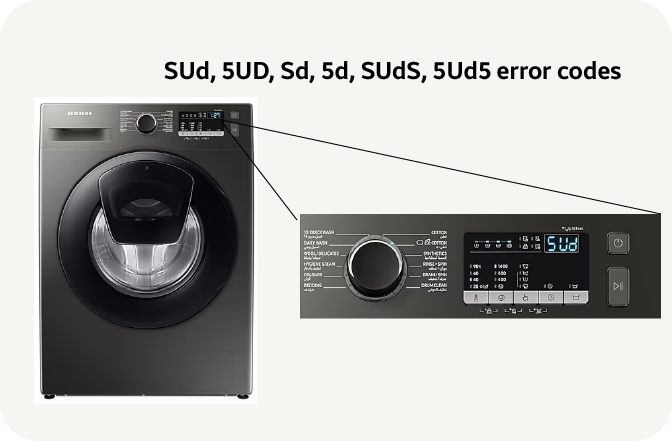
If you’ve ever seen the “SUD” code flash on your Samsung washer’s display, you know it can be frustrating. This error usually means there are too many suds in the machine, which can stop your wash cycle and leave your clothes soaking wet.
But don’t worry—fixing the Samsung Washer SUD code is easier than you might think. You’ll discover simple, step-by-step solutions to clear those stubborn suds and get your washer running smoothly again. Whether it’s running an extra rinse, adding vinegar, or cleaning the drain pump filter, you’ll learn exactly what to do to stop that error from ruining your laundry day.
Keep reading to save time, avoid costly repairs, and bring your washer back to life quickly.

Credit: www.youtube.com
Sud Code Causes
The SUD code on a Samsung washer signals excess suds detected during a wash cycle. This error stops the machine to avoid damage and poor cleaning results. Understanding the causes helps fix the problem quickly and prevents repeats.
Several factors trigger the SUD code. Most involve detergent or washing conditions that create too many suds. Addressing these issues keeps the washer running smoothly.
Excess Detergent Use
Using too much detergent is the main reason for excess suds. More detergent than needed creates bubbles that the washer cannot drain properly. Always measure detergent based on load size and soil level. Less is often better to avoid sud code errors.
Non-he Detergent Problems
Samsung washers require high-efficiency (HE) detergent. Regular detergents produce more suds that HE machines cannot handle. Using non-HE detergent causes the sud error code. Stick to HE detergents to reduce sud formation and protect the washer.
Drain Pump Filter Blockage
A clogged drain pump filter stops water and suds from draining. Sud builds up inside the washer and triggers the error. Regularly clean the drain pump filter to remove lint and debris. This simple task prevents blockages and keeps the washer draining well.
Fabric Softener And Bleach Effects
Overuse of fabric softener or bleach can also cause sud buildup. These liquids may mix with detergent suds and create thick foam. Use recommended amounts and avoid pouring them directly onto clothes. Proper use reduces sud problems and maintains washer health.
Credit: www.samsung.com
Extra Rinse Cycle
The Extra Rinse Cycle on Samsung washers helps remove leftover detergent and suds. It is useful when you see the SUD error code. This cycle adds an additional rinse to your normal washing process.
Using the Extra Rinse Cycle ensures clothes are rinsed thoroughly. It can prevent skin irritation caused by detergent residue. This cycle is especially helpful for sensitive skin or allergies.
Selecting The Cycle
To select the Extra Rinse Cycle, turn the cycle selector knob or press the cycle button. Look for options labeled “Extra Rinse” or “Rinse and Spin.” Some models allow you to add an extra rinse to any washing cycle.
Check your washer’s control panel for the specific button or setting. Press it before starting the wash. The machine will then run an additional rinse phase after the main wash.
How It Flushes Suds
During the Extra Rinse Cycle, the washer uses fresh water to flush out detergent suds. This reduces foam buildup inside the drum. The rinse water pushes suds down the drain efficiently.
The cycle may include extra spinning to remove excess water and suds. This helps keep the washer clean and prevents the SUD error code from appearing again. The result is cleaner clothes and a healthier washer.
Self-clean Cycle
The Self-Clean Cycle on a Samsung washer is a special setting designed to clean the drum and remove residue. It uses high water temperature and strong spinning to clear out dirt, detergent, and sud buildup. This cycle helps keep the washer fresh and running well without needing harsh chemicals.
Running the Self-Clean Cycle regularly can prevent problems like odors and malfunction. It is an easy way to maintain the washer’s hygiene and improve its performance.
When To Use It
Use the Self-Clean Cycle every one to three months. It is helpful after washing many loads with heavy detergent. Also, run it if you see the SUD error code or notice a bad smell inside the drum. This cycle is best when the washer is empty for thorough cleaning.
Benefits For Sud Buildup
The Self-Clean Cycle removes excess suds trapped inside the drum and pipes. Sud buildup can cause errors and affect washing quality. This cycle flushes out leftover detergent and suds, reducing clogs and blockages. It also helps stop mold and mildew, which grow in damp, sud-filled areas.
Regular use of this cycle keeps the washer working smoothly and extends its lifespan. It saves time and money by avoiding costly repairs related to sud buildup.
Using Vinegar For Suds
Using vinegar is a simple and natural way to reduce excessive suds in your Samsung washer. Vinegar helps break down soap residue that causes the SUD code. It prevents suds from building up again, improving your washer’s performance. This method is safe and easy to try before calling for service.
Amount To Add
Add one cup of white vinegar directly into the washer drum. Avoid pouring it into the detergent dispenser. This ensures the vinegar reaches the suds effectively. Using more vinegar will not improve results and may cause a strong smell. One cup is enough to break down excess suds safely.
Running The Drain And Spin Cycle
After adding vinegar, select the drain and spin cycle on your washer. This cycle removes water and suds without adding more detergent. It helps clear out the broken-down suds from the drum and pipes. Running this cycle once or twice is usually enough to fix the SUD error.
Cleaning Drain Pump Filter
Cleaning the drain pump filter is a key step to fix the Samsung Washer Sud Code. This filter traps debris that blocks water flow. A clogged filter can cause sud buildup and error codes. Regular cleaning keeps your washer working well. Follow these simple steps to clean the drain pump filter safely and effectively.
Locating The Filter
The drain pump filter is near the washer’s bottom front. Look for a small access door or panel. Open this door carefully. You may need a flat tool or just your hands. Inside, you will find the drain pump filter cover. This cover usually twists off. Make sure the washer is unplugged before you start.
Draining Residual Water
Before removing the filter, drain any water inside the pump. Locate the small emergency drain hose next to the filter. Remove the cap from this hose. Place a shallow bowl or towel underneath. Let the water flow out slowly. This stops spills when you remove the filter.
Removing And Cleaning Filter
Turn the filter cover counterclockwise to remove it. Pull the filter out gently. Clear away lint, coins, hair, and other debris. Rinse the filter under running water to remove dirt. Check inside the filter housing for leftover debris. Clean it with a cloth or small brush. Dry the filter before putting it back.
Reassembling And Testing
Insert the clean filter back into the pump housing. Turn the filter cover clockwise to secure it tightly. Close the access door or panel. Plug the washer back in. Run a short wash or rinse cycle to check for leaks. The washer should drain properly without the Sud code showing.
:max_bytes(150000):strip_icc()/samsung-front-load-washer-fault-codes-2147297_final-fbe1df0aaa4540bbac79238436bead3d.png)
Credit: www.thespruce.com
Preventing Sud Errors
Preventing SUD errors on your Samsung washer helps avoid washing interruptions. Excess suds cause the washer to stop and display an error code. This issue often arises from detergent misuse or maintenance neglect. Following simple steps can keep your washer running smoothly and suds-free. Proper care reduces error messages and extends the appliance’s life.
Proper Detergent Amounts
Use the right detergent amount for each load size. Too much detergent creates excess suds that trigger the error. Check the detergent packaging for recommended amounts. Measure carefully, especially with concentrated formulas. Avoid guessing or overfilling the detergent dispenser. Less detergent often cleans just as well and prevents sud buildup.
Choosing High-efficiency Detergent
Always use high-efficiency (HE) detergent in your Samsung washer. HE detergents produce fewer suds than regular ones. Suds can cause the washer to stop and show the SUD code. HE detergent protects your washer’s sensors and pump from damage. Look for the HE label on detergent packaging before buying. This simple switch helps prevent sud errors every wash.
Regular Filter Maintenance
Clean the washer’s drain pump filter regularly to prevent sud buildup. A clogged filter traps dirt and suds inside the machine. This blockage causes the washer to display the SUD error code. Locate the filter behind the small door at the washer’s base. Remove debris and rinse the filter under running water. Regular cleaning ensures smooth water flow and fewer sud problems.
Resetting The Washer
Resetting your Samsung washer can clear the SUD error code and restore normal operation. This process helps the machine reset its internal system after excess suds trigger the error. Follow these simple steps to reset your washer safely and effectively.
Unplugging Process
First, unplug your washer from the power source. This stops all electrical activity inside the machine. It is important to ensure safety and avoid damage during the reset.
Waiting Period
Leave the washer unplugged for at least one minute. This pause allows the internal memory to clear error codes. Waiting helps the machine to fully reset before restarting.
Restarting The Machine
Plug the washer back into the power outlet. Turn the machine on and select a rinse or spin cycle. This step checks if the SUD code has cleared and the washer works properly.
Frequently Asked Questions
How Do I Fix The Sud Code On My Samsung Washer?
Run an extra rinse or self-clean cycle to remove excess suds. Add a cup of vinegar and run drain/spin. Clean the drain pump filter if the error persists. Use less detergent and always choose high-efficiency (HE) detergent to prevent future SUD errors.
How Do I Clear The Sud Error Code?
Run an extra rinse or self-clean cycle to remove excess suds. Add a cup of vinegar and run drain/spin. Clean the drain pump filter if needed. Use less detergent and only HE detergent to prevent future SUD errors.
Can I Still Use My Washer With A Sud Error?
You can use your washer with a SUD error, but it may not clean properly. Run an extra rinse cycle or clean the drain filter to fix it. Avoid using too much detergent to prevent future suds errors.
What Type Of Detergent Causes Sud Errors?
Detergents causing sud errors usually produce excessive suds. Using non-HE or too much detergent triggers this issue. Choose high-efficiency (HE) detergent in recommended amounts to prevent sud errors.
What Does The Samsung Washer Sud Code Mean?
The SUD code means there are too many suds in the washer. It detects excess soap bubbles.
Conclusion
The Samsung washer SUD code shows excess suds inside your machine. Running extra rinse or self-clean cycles helps clear the suds quickly. Adding vinegar can also break down stubborn suds. Cleaning the drain pump filter removes blockages causing errors. Use less detergent and always choose HE detergent to prevent suds.
Following these steps keeps your washer working smoothly. Sud errors become easier to handle with simple care and attention. Keep your laundry routine hassle-free and your Samsung washer in top shape.