
Is your Samsung washer showing the frustrating “nF” error code? This little code means your washer isn’t filling with enough water, and it can stop your laundry routine in its tracks.
But don’t worry—you can fix this yourself without calling a repair technician right away. In this guide, you’ll learn exactly what causes the nF code, how to check your water supply, clean filters, and reset your machine step-by-step. By the end, you’ll have the confidence to get your washer back to working perfectly.
Keep reading to discover simple, practical solutions that save you time and money.

Credit: www.youtube.com
Nf Code Meaning
The Samsung washer displays the nF code when it detects a problem with water flow. This code means the washer cannot fill with water properly. Understanding the nF code helps you fix the issue quickly. It points to problems with water supply or related parts.
The nF error often appears if water does not enter the washer at the right speed. The washer checks water flow and stops the cycle if it is too slow or blocked. This protects the machine from damage and keeps your clothes safe.
What Causes The Samsung Washer Nf Code?
Several issues can trigger the nF code. Kinked or bent water hoses block water flow. Closed or partially open faucets reduce water supply. Dirty or clogged inlet filters stop water from reaching the washer. Low water pressure from your home’s supply can also cause this error.
How To Check Water Supply And Hoses
- Make sure both hot and cold faucets are fully open.
- Disconnect water supply hoses from the wall and washer.
- Look for kinks, bends, or blockages in the hoses.
- Clean the mesh filters on hose ends with a soft brush.
- Reconnect hoses to correct hot and cold inlets carefully.
Resetting The Washer To Clear The Nf Code
- Unplug the washer from the power outlet.
- Wait for one minute before plugging it back in.
- Run a washing cycle to check if the error is gone.
When To Inspect The Water Inlet Valve
If the error stays after resetting, the water inlet valve may be faulty. Check the valve screens for dirt and clean them. If cleaning does not help, test the valve with a multimeter. A faulty valve needs replacement to restore normal water flow.
Other Possible Causes Of The Nf Error
- Low water pressure from the city supply can block filling.
- A blocked or broken pressure switch may send wrong signals.
- Damaged wiring or loose connections affect water control parts.
- If unsure, contact a professional technician for help.
:max_bytes(150000):strip_icc()/samsung-front-load-washer-fault-codes-2147297_final-fbe1df0aaa4540bbac79238436bead3d.png)
Credit: www.thespruce.com
Common Causes
The Samsung Washer nF code signals a water supply problem. This error stops the washer from filling with water. Several common causes trigger this code. Understanding these helps fix the problem quickly. Below are the main reasons behind the nF code error.
Water Supply Issues
Check if both water faucets are fully open. Closed or partially open faucets block water flow. Also, inspect hoses for kinks or bends. These can stop water from reaching the washer. Remove and clean the mesh filters inside hose connectors. Dirt and debris in filters reduce water flow. Clean them gently with a brush, then reconnect.
Water Pressure Problems
Low water pressure can cause the nF error code. The washer needs enough pressure to fill properly. If the pressure is too low, water won’t reach the washer fast enough. This can happen in some homes or during peak usage. Contact your water provider to check pressure levels.
Faulty Water Inlet Valve
The water inlet valve controls water flow into the washer. A broken valve cannot open or close correctly. This stops water from entering the machine. Unplug the washer, turn off water, and remove the back panel. Test the valve with a multimeter for electrical continuity. Replace the valve if the reading is off.
Pressure Switch Malfunction
The pressure switch detects water level inside the washer. A blocked or faulty switch causes wrong readings. Check the air tube connected to the pressure switch for clogs. Clear any blockages to restore proper function. Replace the pressure switch if cleaning does not help.
Wiring And Connection Faults
Damaged wiring can stop signals between parts. Inspect wires connected to the water inlet valve and pressure switch. Look for loose connections or frayed wires. Repair or replace damaged wiring to fix communication errors. This step often resolves persistent nF code issues.
Quick Fixes
The Samsung Washer nF error code often points to water supply issues. Quick fixes can help you solve this problem fast. These simple steps focus on water flow and connectivity. They can save you time and avoid costly repairs.
Check Faucets And Hoses
Make sure both hot and cold water faucets are fully open. Closed or partially open faucets stop water flow. Disconnect the water hoses from the washer and wall. Look for any kinks, bends, or blockages in the hoses. Straighten or replace damaged hoses to restore water supply.
Clean Inlet Filters
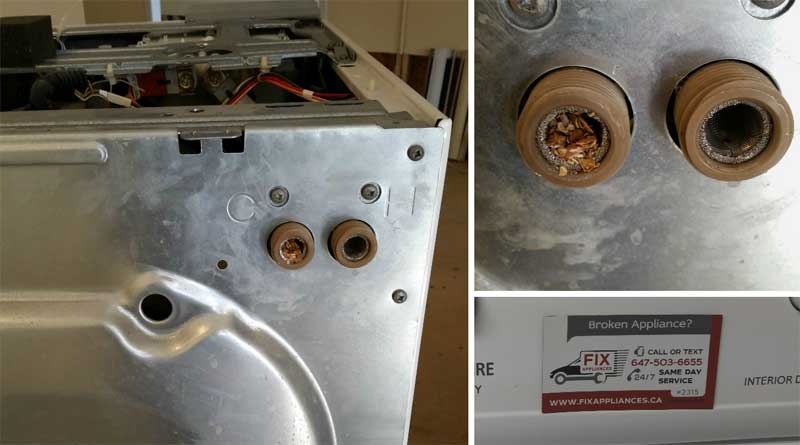
At the hose ends connecting to the washer, find small mesh filters. These filters catch debris but can get clogged. Remove the filters carefully and clean them with a soft brush. Clear any dirt or buildup to improve water flow. Reconnect the hoses to the correct hot and cold inlets.
Reset The Washer
Unplug the washer from the power outlet for a minute. This resets the machine’s electronics and clears error codes. Plug the washer back in and start a wash cycle. Check if the nF error disappears. If the code returns, further checks may be needed.
Credit: fixappliances.ca
Detailed Troubleshooting
The Samsung Washer nF error code signals a water supply issue. Detailed troubleshooting helps identify the exact cause. Follow these steps carefully to find and fix the problem. This guide breaks down key parts to check and test.
Inspect Water Inlet Valve
Start by checking the water inlet valve. Ensure both hot and cold water faucets are fully open. Look for kinks or bends in the water hoses. Remove hoses from the washer and check the mesh filter screens. Clean any debris gently with a brush. Reconnect hoses to the correct inlets to avoid mixing hot and cold water.
Test Valve With Multimeter
Unplug the washer before testing. Remove the back panel to access the water inlet valve. Disconnect hoses and electrical connectors from the valve. Set your multimeter to ohms for continuity testing. Place probes on each terminal of the valve. A wrong reading means the valve is faulty and needs replacement.
Examine Pressure Switch And Air Tube
The pressure switch controls water level detection. Check the air tube connected to the switch for blockages or damage. Clear any clogs found inside the tube. A faulty pressure switch or blocked air tube can cause the nF code. Replace the switch if cleaning does not fix the issue.
Check Wiring And Connections
Inspect all wiring linked to the water inlet valve and pressure switch. Look for loose, frayed, or damaged wires. Secure any loose connections firmly. Damaged wiring can prevent the washer from detecting water flow correctly. Repair or replace faulty wires to restore proper function.
Low Water Pressure Solutions
The Samsung washer NF error code often signals a problem with water filling. Low water pressure is a common cause behind this error. Without enough water pressure, the washer cannot fill to the needed level. This stops the cycle and shows the NF code.
Fixing low water pressure issues can clear this error. Simple checks and fixes can restore proper water flow. Below are key steps to solve low water pressure problems.
Ensure Faucets Are Fully Open
Check both hot and cold water faucets connected to the washer. Make sure they are fully open. Partially closed faucets reduce water flow. This can trigger the NF error.
Inspect And Clear Water Supply Hoses
Disconnect hoses from the washer and wall taps. Look for kinks, bends, or blockages. Straighten any bends and clear debris. This improves water flow to the washer.
Find the mesh filters inside each hose connection. Clean these gently with a small brush. Reattach hoses, matching hot and cold inlets correctly.
Check And Clean Water Inlet Valve Screens
Unplug the washer before working on the water inlet valve. Turn off water supply and pull the washer away from the wall. Remove the back panel to access the valve.
Disconnect hoses and electrical connectors. Clean the valve screens to remove any dirt. A clogged screen blocks water flow, causing low pressure.
Test The Water Inlet Valve
Use a multimeter set to ohms to check valve continuity. Place probes on valve terminals. A faulty valve shows no or wrong reading. Replace the valve if needed.
Check Home Water Pressure
Low water pressure in the home affects washer filling. Test pressure or call your water provider. High or stable pressure is necessary for the washer to work well.
Inspect Pressure Switch And Air Tube
The pressure switch detects water levels inside the washer. Blockages in the air tube can cause false readings. Clean or replace the tube if blocked or damaged.
Examine Wiring And Connections
Look over wiring to the water inlet valve and pressure switch. Any loose or damaged wires can disrupt signals. Repair or replace faulty wiring to ensure smooth operation.
Seek Professional Help If Needed
Persistent NF code after these checks may need expert service. Professionals can diagnose complex issues inside the washer. Contact a technician for thorough repair and support.
When To Call A Professional
Knowing when to call a professional for your Samsung washer’s nF error is important. Some issues can be fixed at home, but others need expert help. Avoid risking more damage or injury by trying complex repairs yourself.
Simple fixes like checking hoses or filters are fine to do alone. Persistent errors or electrical problems require a skilled technician. A professional has tools and experience to diagnose hidden faults quickly.
Signs You Should Call A Professional
- The nF error code stays after you reset the washer.
- Water inlet valve tests show no continuity or damage.
- Water pressure is normal but the washer won’t fill.
- Pressure switch or wiring looks faulty or worn out.
- Hoses and filters are clean but the problem persists.
Risks Of Diy Repairs For Nf Code
Incorrect repairs can damage the washer’s water inlet system. Electrical parts might cause shocks or short circuits. Poor fixing can lead to leaks or flooding. Calling a professional avoids these dangers.
What Professionals Do Differently
Technicians use special tools to test water pressure and valves. They check electrical wiring safely and thoroughly. They replace parts with correct OEM components. They ensure the washer runs smoothly after repair.
Preventive Maintenance Tips
Regular maintenance helps keep your Samsung washer working well. It reduces errors like the nF code. Simple care steps prevent many common problems. Follow these tips to avoid water supply issues and keep your washer running smoothly.
Check your washer often. Clean parts and inspect hoses to stop blockages. Small actions save time and money on repairs. Use these easy steps for better washer performance.
Check Water Faucets And Hoses
Ensure both hot and cold water faucets are fully open. Closed or partially open faucets stop water flow. Disconnect hoses from the wall and washer to check for bends or kinks. Straighten any twists or replace damaged hoses. Inspect mesh filter screens inside hose ends. Clean filters gently with a soft brush to remove dirt. Reattach hoses correctly to avoid leaks or errors.
Reset The Washer
Unplug your washer from the power outlet for a minute. Plug it back in and start a cycle. This can clear temporary errors like the nF code. Resetting refreshes the washer’s system. It is a quick fix before deeper checks.
Clean Or Replace Water Inlet Valve
If the nF error stays after reset, check the water inlet valve. Turn off water supply and unplug the washer. Remove the back panel to reach the valve. Disconnect hoses and electrical connectors carefully. Use a multimeter to test valve continuity. Faulty valves need replacement to restore water flow. Cleaning valve screens may also help if dirty.
Inspect Pressure Switch And Wiring
Low water pressure can cause filling problems. Check your home’s water pressure or ask your provider. The pressure switch controls water level sensing. Clear any blockages in the air tube to the switch. Look over wiring and connections for damage. Fix or replace any worn parts to avoid errors.
Call For Professional Help
Persistent nF errors might need expert diagnosis. A technician can find hidden problems fast. They have tools and parts to fix complex issues. Don’t delay calling a professional if simple fixes fail. Proper repair keeps your washer safe and working.
Frequently Asked Questions
How Do I Fix The Nf Error On My Samsung Washer?
To fix the nF error on a Samsung washer, fully open both water faucets. Check hoses for kinks or blockages. Clean inlet filters gently. Unplug and reset the washer. Test the water inlet valve for faults. Inspect water pressure and wiring.
Call a professional if the error persists.
What Does Nf Mean On A Washer Samsung?
The “nF” code on a Samsung washer means “No Fill. ” It indicates the washer isn’t filling with enough water. Check water supply, hoses, filters, and water inlet valve for issues. Ensure faucets are fully open and hoses are not kinked or blocked.
What Does Nf Mean On The Washing Machine?
The nF code on a washing machine means “No Fill. ” It signals the washer isn’t filling with enough water. Check water supply, hoses, filters, and pressure. Unplug and reset the machine. Persistent issues may require valve inspection or professional repair.
How Do I Clear The Error Code On My Samsung Washing Machine?
To clear the error code on your Samsung washing machine, unplug it for a few minutes, then plug it back in. Check water supply hoses for kinks or blockages and clean inlet filters. Ensure faucets are fully open. If the error persists, inspect or replace the water inlet valve or call a professional.
What Does The Samsung Washer Nf Code Mean?
The nF code means a water supply problem, usually no water reaching the washer.
Conclusion
The Samsung washer nF code signals a water fill problem. Check hoses for kinks and ensure faucets are open. Clean inlet filters and reset the machine by unplugging it. Test the water inlet valve with a multimeter if needed. Low water pressure or a faulty pressure switch can cause this error.
Inspect wiring for damage and blockages. If the code remains, seek professional help. Simple steps can often fix the nF code quickly and save time. Stay calm and follow the guide to restore your washer’s function.