
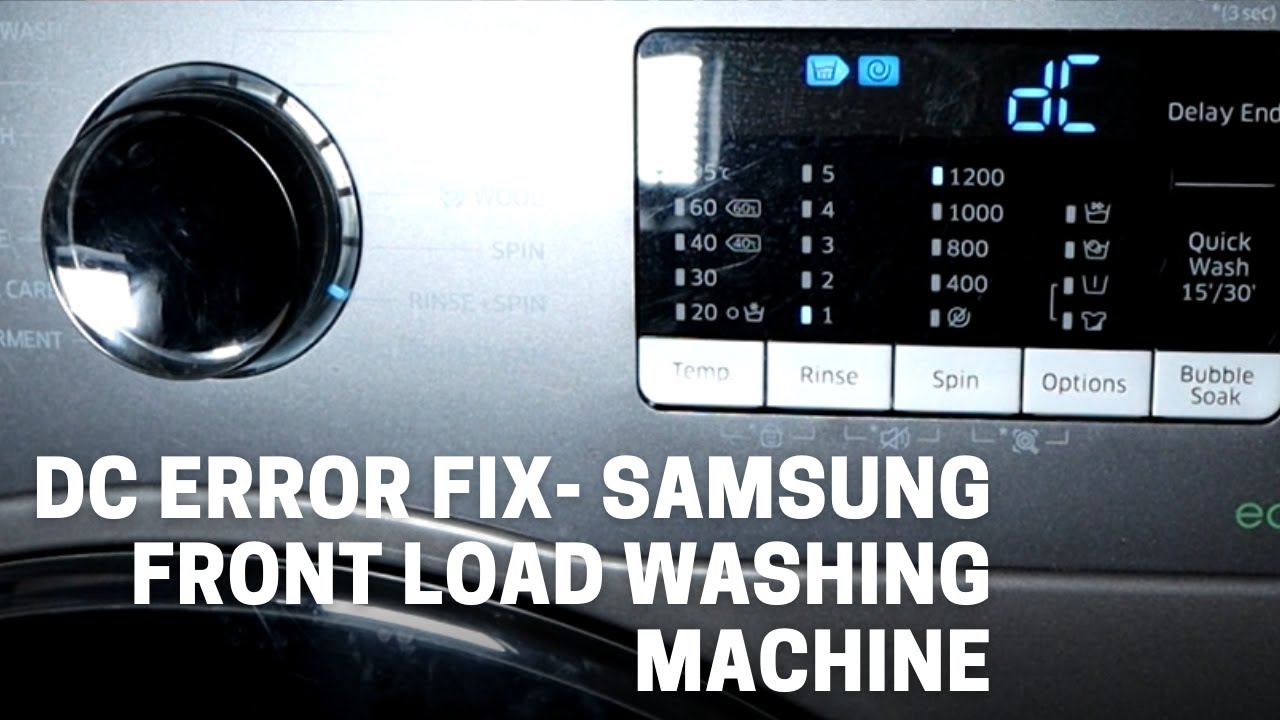
Is your Samsung washer showing the dreaded DC error code? If you’ve suddenly found your laundry routine disrupted by this frustrating message, you’re not alone—and you’re in the right place.
The DC code usually points to an issue with unbalanced loads or leveling problems that can stop your washer from working properly. But don’t worry, you don’t need to be a repair expert to tackle this. You’ll discover simple, step-by-step solutions to fix the DC error and get your Samsung washer back in action quickly.
Keep reading, and you’ll learn how to spot the problem, try easy fixes, and know when to call in professional help. Your laundry day is about to get a lot smoother!
Common Causes Of Dc Error
The DC error on Samsung washers signals a problem with the machine’s balance or leveling. This error stops the washer from spinning properly. Understanding common causes helps fix the issue quickly. Most causes relate to load distribution, machine stability, door mechanism, or electrical parts.
Unbalanced Load Issues
An uneven load is the top reason for a DC error. Clothes clumped on one side cause the drum to wobble. Heavy items alone can create imbalance. Spread clothes evenly in the drum. Add small items with large ones to balance weight. Avoid overloading the washer.
Unlevel Machine Problems
A washing machine not sitting flat triggers the DC code. Uneven floors or loose feet cause the machine to shake. Check that all four feet touch the floor firmly. Adjust the leveling feet until the washer stands steady. Tighten the feet to prevent movement during cycles.
Door And Door Switch Faults
The door must close and lock tightly to start spinning. A door left slightly open or blocked causes error codes. The door latch should click when closing. A broken door switch can also cause the DC error. Testing the switch with a multimeter confirms if it works well.
Motor And Wiring Concerns
The motor drives the drum’s spinning. Faulty wiring or motor problems stop the drum from rotating. Loose or damaged wires interrupt power flow. Inspect wiring harness for damage or loose connections. Motor faults need professional repair or replacement.
Quick Basic Fixes
Quick basic fixes can help solve the Samsung Washer DC code error fast. This error usually means the washer detects an unbalanced load or leveling issue. Try simple steps first to avoid calling a technician. These fixes often solve the problem without tools or parts.
Redistribute Clothes Evenly
Open the washer door and check the clothes inside. Make sure the load is balanced and spread out. Avoid putting one heavy item alone. Add more clothes to balance the weight. Remove extra items if the load is too large. Close the door securely before restarting the cycle.
Adjust Leveling Feet
Check if the washing machine rocks or moves easily. If it does, the feet need adjustment. Turn the leveling feet clockwise or counterclockwise to stabilize the machine. Use a level tool if available to ensure the washer is flat. Tighten the lock nuts on the feet after adjusting.
Restart The Washing Cycle
Turn off the washer and unplug it from the power source. Wait for about one minute to reset the electronics. Plug the washer back in and close the door firmly. Start a new washing cycle with a smaller, balanced load. Watch the machine to see if the error returns.
Intermediate Troubleshooting
Intermediate troubleshooting for the Samsung Washer DC code involves checking key components that affect the machine’s balance and operation. This step goes beyond simple fixes like redistributing clothes or leveling the machine.
Careful inspection of the door mechanism, sensors, and wiring helps identify hidden issues causing the error. Follow these checks to find the root cause and reduce repair costs.
Check Door Closure And Latch
Make sure the washer door closes completely. Clothes or debris can block the latch from securing properly. Listen for a clear click sound when closing the door. A faulty latch can trigger the DC error by stopping the cycle from starting.
Test Door Switch Continuity
The door switch signals if the door is locked. Use a multimeter to test for electrical continuity in the switch. No continuity means the switch is broken and needs replacement. This test ensures the machine detects the door status correctly.
Inspect Motor Tachometer Sensor
The motor tachometer sensor measures drum speed. Dirt or damage can cause incorrect readings. Inspect the sensor for dirt buildup or signs of wear. Clean gently or replace the sensor to fix speed detection problems linked to DC errors.
Examine Wiring Connections
Loose or damaged wires disrupt signals between parts. Check wiring harnesses near the door, motor, and control board. Look for disconnected plugs, corrosion, or broken wires. Secure and repair any faulty connections to restore proper communication.
Credit: www.youtube.com
Advanced Repair Options
Advanced repair options for the Samsung Washer DC code involve more detailed fixes. These options help address issues beyond simple troubleshooting. Repairing parts like suspension rods and spider brackets can restore balance and function. Sometimes, complex problems require a professional technician to ensure safe and effective repairs.
Replace Suspension Rods
Suspension rods keep the washer drum steady during cycles. Worn or broken rods cause the drum to shake and trigger the DC error. Replace old suspension rods to stop excessive vibrations. This repair restores drum stability and prevents damage to other parts.
Fix Damaged Spider Bracket
The spider bracket supports the washing drum’s rotation. Corrosion or cracks in this part cause imbalance and noise. Fixing or replacing the spider bracket stops the DC error from recurring. This repair requires disassembling the drum and careful handling.
Call Professional Technician
Some repairs need special tools and skills. A professional technician can diagnose and fix complex problems safely. Calling an expert prevents damage and ensures the washer works correctly. Professionals also provide warranty and follow safety standards.
Preventing Future Dc Errors
Preventing future DC errors on your Samsung washer helps keep your laundry routine smooth. These errors often happen because of imbalance or mechanical issues. Taking simple steps can reduce the chances of these interruptions.
Regular care and attention extend the life of your washer. It also saves time and money on repairs. Focus on balancing loads, keeping the machine stable, and checking the door mechanism often.
Maintain Balanced Loads
Uneven loads cause the washer to shake and trigger DC errors. Sort clothes by weight and size before washing. Spread items evenly inside the drum. Avoid washing one heavy item alone. Add smaller clothes to balance the load. Properly balanced loads help the washer spin smoothly.
Keep Machine Level And Stable
An unlevel washer cannot spin correctly and may show a DC error. Check the machine’s feet and adjust them as needed. Use a level tool to confirm the washer is flat. Tighten the feet to prevent movement during cycles. Place the washer on a firm, flat surface. Stability protects the machine’s internal parts.
Regularly Inspect Door Mechanism
The door latch and switch must work correctly for the washer to run. Clean the door seal and check for damage. Make sure nothing blocks the door from closing fully. Listen for a click when locking the door. If the door does not lock, the machine may show a DC error. Replace faulty parts to avoid future problems.
Credit: www.reddit.com
When To Seek Expert Help
Knowing when to seek expert help for your Samsung washer DC code error is crucial. Some issues can be fixed at home, but others need a professional’s touch. Calling a technician saves time and prevents more damage. This section explains key signs that show it’s time to get expert support.
Persistent Error Codes
If the DC error code stays after several resets, it means the problem is serious. Simple fixes like re-leveling or balancing loads did not work. Repeated error codes suggest deeper electrical or sensor faults. Experts have tools to diagnose these complex errors safely and quickly.
Motor And Control Board Issues
The motor and control board control the washer’s movements and cycles. Problems here cause the DC error and make the washer stop working. These parts are delicate and require special knowledge to repair or replace. A technician can test and fix motor or control board faults without risk.
Complex Mechanical Repairs
Sometimes, the DC error comes from broken drum parts or suspension springs. Fixing these parts needs taking apart the washer carefully. Incorrect repairs can cause leaks or worse damage. Professionals have experience and the right tools to handle mechanical repairs safely and correctly.
:max_bytes(150000):strip_icc()/samsung-front-load-washer-fault-codes-2147297_final-fbe1df0aaa4540bbac79238436bead3d.png)
Credit: www.thespruce.com
Frequently Asked Questions
How Do I Fix A Dc Error On My Samsung Washing Machine?
To fix a DC error on your Samsung washer, evenly distribute clothes to balance the load. Ensure the machine is level and stable. Check the door closes properly and the latch clicks. Inspect door switch and motor connections for faults.
Replace suspension rods if needed. Contact a technician for complex issues.
How Do I Rebalance My Samsung Washer?
To rebalance your Samsung washer, evenly distribute clothes inside the drum. Adjust the leveling feet until the washer stands stable and level. Remove heavy or oversized loads if needed, then restart the cycle. Ensure the door closes properly to avoid imbalance errors.
How Do I Reset The Dc Error Code On My Samsung Dryer?
To reset the DC error on your Samsung dryer, redistribute the load evenly and ensure the machine is level. Close the door firmly and restart the cycle. If the error persists, unplug the dryer for one minute, then plug it back in to reset.
What Is Dc Command On Samsung Washing Machine?
The DC command on a Samsung washing machine signals an unbalanced load or door issue. It prompts users to redistribute clothes evenly, check the door latch, and ensure the machine is level. Resolving this helps maintain proper spinning and washing performance.
What Does The Samsung Washer Dc Code Mean?
The DC code means the washer detected an unbalanced load or door issue.
Conclusion
Samsung Washer DC code often means an unbalanced load or door issue. Check the load and spread clothes evenly to fix it. Make sure the washer stands level on the floor. Confirm the door closes tightly without obstructions. Sometimes, the door switch or motor sensor needs testing or replacement.
Simple fixes often solve the problem quickly. Following these steps helps keep your washer running well. Regular care can prevent DC errors from happening again. Stay patient and check each part carefully for best results.