
Is your Samsung washer showing the 5C error code and leaving you frustrated? You’re not alone.
This common issue signals a problem with water drainage, which can stop your laundry routine in its tracks. But don’t worry—understanding what the 5C code means and knowing how to fix it can save you time, money, and the hassle of calling a repair technician.
You’ll discover simple, step-by-step solutions to get your washer draining properly again. Keep reading to regain control over your laundry and avoid future headaches with your Samsung washer.
Identifying The 5c Code
Identifying the 5C code on your Samsung washer helps solve drainage issues fast. This error signals a problem with water draining properly. Understanding what triggers the error and spotting symptoms early can save time and effort.
Recognizing the 5C code lets you take action before bigger damage occurs. It focuses mainly on the washer’s drainage system. Below, learn what causes this error and common signs to watch for.
What Triggers The 5c Error
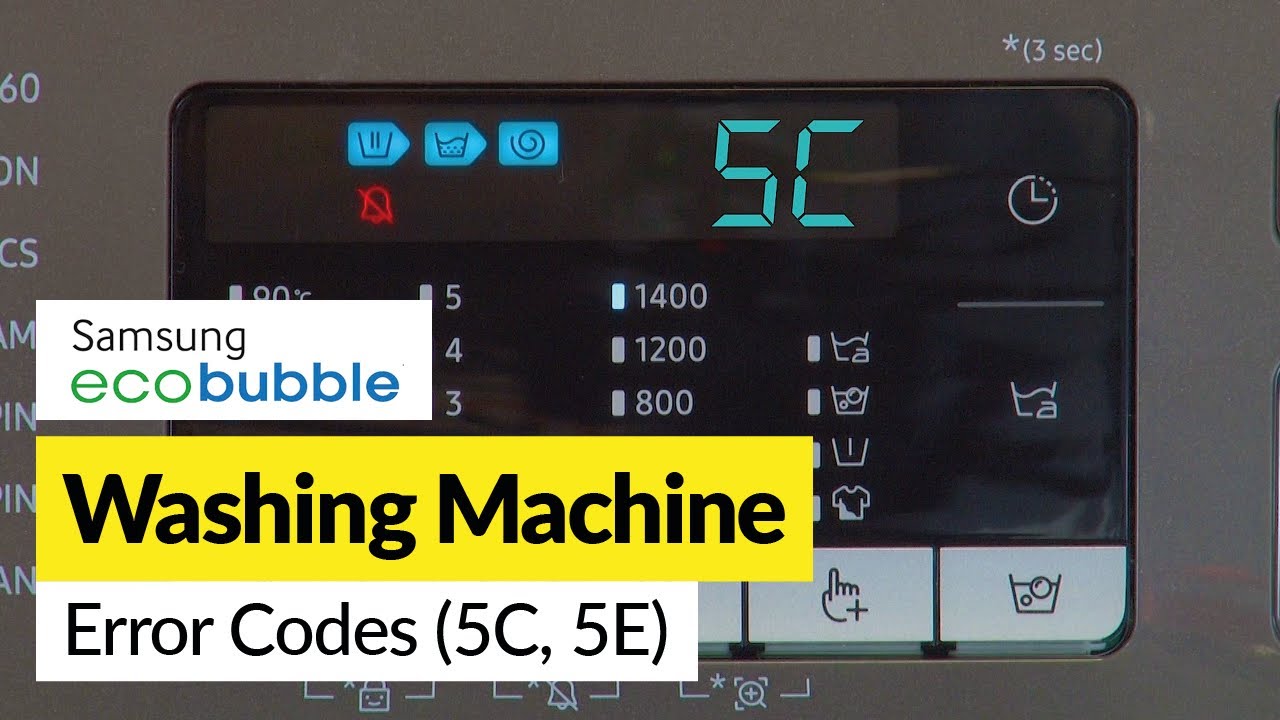
The 5C error shows when the washer fails to drain water. Blocked or kinked drain hoses often cause this issue. Dirt or debris can clog the drain pump filter. Sometimes, the pump itself might stop working. A loose or damaged hose connection can also trigger the code. Power interruptions or control board faults rarely cause it, but they are possible.
Regular checks help avoid these problems. A clean drain pump filter and clear hose keep the water flowing smoothly. Fixing any blockages promptly prevents the 5C error from appearing.
Common Symptoms To Watch For
Listen for unusual sounds during the drain cycle. A buzzing or humming noise may mean the pump is stuck. Water left inside the drum after a cycle is a clear sign. The washer may stop mid-cycle and display the 5C code on the screen. Slow draining or water leaking around the machine can also occur.
Noticing these symptoms early can prevent damage. Check the filter and hose as soon as you see any signs. Acting quickly helps keep your Samsung washer running well.
Credit: www.samsung.com
Safety First
Safety is the top priority when dealing with any washer error. The Samsung Washer 5C code often means a drainage problem. Handling this issue carefully prevents accidents and further damage.
Always prepare yourself before inspecting or fixing the washer. Simple steps can protect you from electric shocks and water spills. Follow these safety tips to work safely and confidently.
Unplugging The Washer
Start by unplugging the washer from the power outlet. This stops electricity flow and keeps you safe. Never work on the washer while it is still plugged in. Even a small electric shock can cause injury.
After unplugging, wait a few minutes before opening any parts. This allows internal components to cool down. It also reduces the risk of electric shock from stored energy.
Preparing Towels And Containers
Drainage issues can cause water to spill out. Lay towels around the washer to soak up any leaks. This keeps the floor dry and prevents slipping.
Have a shallow container or bucket ready to catch water. Use it when draining the emergency hose or cleaning the filter. This simple step stops water from spreading and causing a mess.
Remove all clothes from the drum before starting. Wet clothes can add weight and make handling the washer harder. Keeping the area dry and clear helps you work faster and safer.
Draining Excess Water
Draining excess water from your Samsung washer is crucial when the 5C error code appears. This code often signals a drainage issue. Removing the water prevents leaks and damage. It also helps you troubleshoot the washer effectively. Follow simple steps to drain water safely and easily.
Locating The Emergency Drain Hose
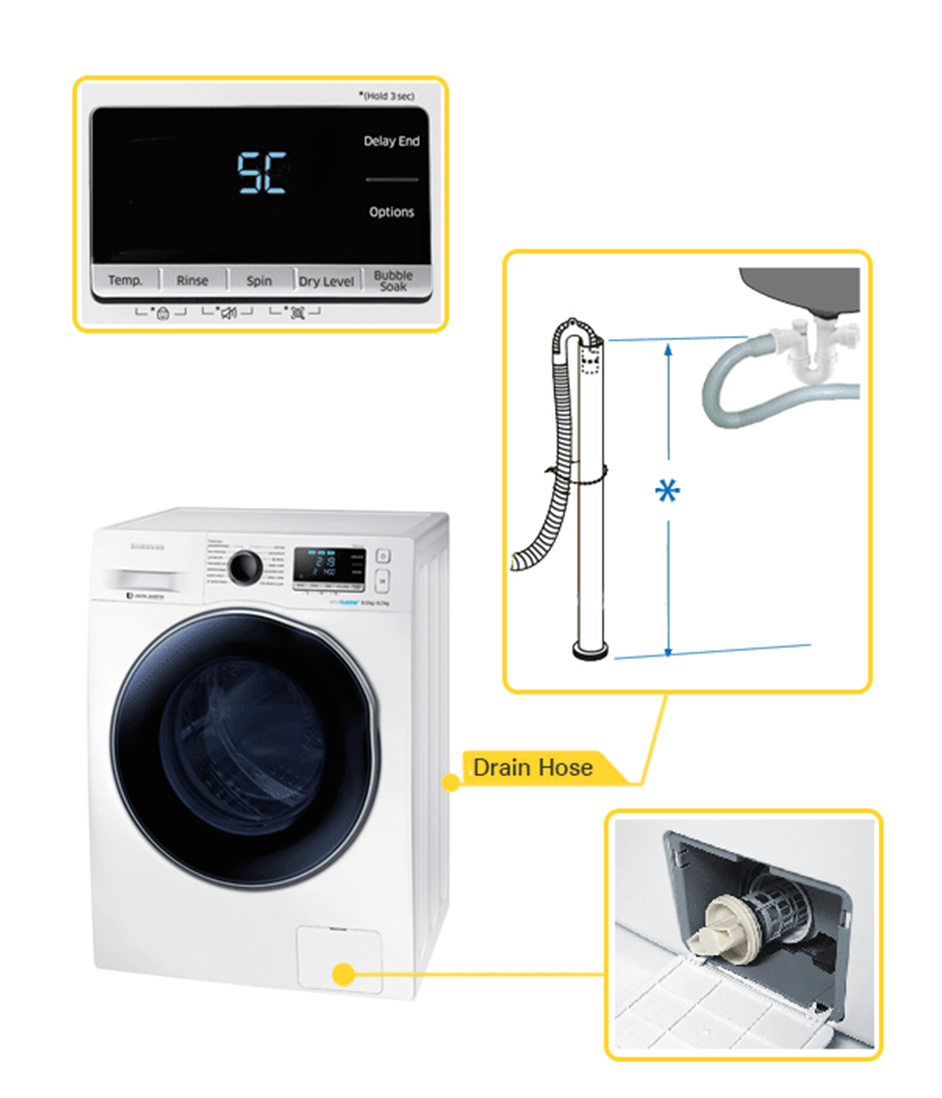
First, find the emergency drain hose on your washer. It is usually behind a small access panel at the bottom front. Open this panel carefully. Inside, you will see a small hose with a cap. This hose helps remove water quickly during a drain problem.
Using Towels And Pans To Catch Water
Prepare towels and a shallow pan or bucket before draining. Place towels around the washer base to catch spills. Put the pan under the emergency drain hose. This setup keeps your floor dry and clean. Be ready for water to flow out steadily.
Draining Procedure Step-by-step
- Turn off and unplug the washer from the power source.
- Open the access panel and pull out the emergency drain hose carefully.
- Remove the hose cap slowly to start draining water.
- Let the water flow into the pan until it stops completely.
- Replace the hose cap tightly and push the hose back in place.
- Close the access panel securely.
This simple procedure helps clear excess water safely. It prevents water damage and prepares your washer for further checks or repairs.
Credit: www.samsung.com
Cleaning The Drain Pump Filter
Cleaning the drain pump filter is essential for fixing the Samsung Washer 5C code. This error often means the drain pump is blocked or clogged. Regular cleaning prevents water drainage issues and improves washer performance.
Follow these simple steps to clean the drain pump filter safely and easily. Have towels and a shallow container ready, as some water may spill during the process.
Opening The Access Door
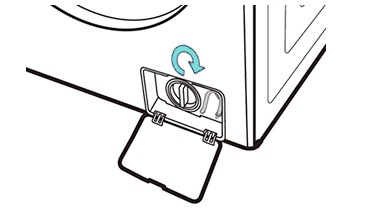
Locate the small access door at the bottom front of the washer. It usually has a small handle or indentation for easy opening. Pull the door open gently to reveal the drain pump filter area.
Inside, you will see a small emergency drain hose and the drain pump filter. Prepare your container to catch any water from the hose before proceeding.
Removing And Cleaning The Filter
First, pull out the emergency drain hose carefully. Remove the cap and drain any water into your container. Once drained, replace the cap and put the hose back in place.
Next, unscrew the drain pump filter by turning it counter-clockwise. Remove the filter slowly and check for lint, coins, or debris. Rinse the filter under running water to clean it thoroughly.
Inspecting The Filter Housing
Look inside the filter housing for any leftover dirt or objects. Wipe the inside carefully with a clean cloth or paper towel. Removing all blockages ensures smooth water flow and avoids future errors.
Reassembling The Filter
Place the cleaned filter back into its housing. Turn it clockwise to screw it in tightly. Make sure it is secure but do not overtighten.
Close the access door firmly. Your Samsung washer is now ready to drain water properly and avoid the 5C error code.
Checking The Drain Hose
Checking the drain hose is an important step to fix the Samsung Washer 5C code. This code usually means the washer cannot drain water properly. A blocked or bent drain hose often causes this issue. Examining the hose can help find and solve the problem quickly.
Pulling Out The Washer
First, unplug the washer from the power outlet. Move the washer away from the wall carefully. This gives you space to reach the drain hose behind the machine. Keep towels nearby to catch any water that might spill out.
Detaching The Drain Hose
Locate the drain hose connected to the wall pipe. Gently pull the hose off from the pipe. Be careful to avoid damage to the hose or pipe. Keep a bucket or pan ready to catch any water left in the hose.
Inspecting For Kinks And Blockages
Look along the full length of the drain hose. Check for any sharp bends or kinks that can stop water flow. Also, check inside the hose for dirt or objects blocking it. A flashlight can help see inside the hose clearly.
Clearing Obstructions
If you find a blockage, use a flexible tool like a clothes hanger. Gently push it through the hose to clear the clog. Rinse the hose with water to remove leftover debris. Reattach the hose firmly to the wall pipe once clear.
Inspecting The Drain Pump
Inspecting the drain pump is key to fixing the Samsung Washer 5C code. This error often means the washer cannot drain water properly. Checking the drain pump helps find blockages or damage. It also prevents more serious problems. Follow the steps below to inspect the drain pump safely and clearly.
Removing The Back Panel
First, unplug the washer from the power source. Pull the machine away from the wall to see the back. Use a screwdriver to remove the screws holding the back panel. Keep the screws safe for reassembly. Gently pull off the panel to expose the drain pump. This step gives full access to the pump and its parts.
Examining The Pump Impeller
Locate the pump impeller inside the drain pump housing. The impeller spins to push water out of the washer. Check if the impeller moves freely by turning it with your finger. It should spin smoothly without resistance. A stuck or broken impeller can cause the 5C code. Look closely for any signs of wear or damage.
Identifying Damage Or Debris
Inspect the pump and surrounding area for debris like coins, buttons, or fabric lint. Remove any objects that block the impeller or pump inlet. Check for cracks or broken parts in the pump housing. Small cracks can cause leaks and errors. Clean the pump area with a damp cloth to remove dirt. Clear debris and damage repair often restores normal function.
Testing After Maintenance
After completing maintenance on your Samsung washer, testing is crucial. This step confirms that the 5C error code issue is resolved. It also helps ensure the washer works safely and efficiently. Follow these simple steps to test your washer properly.
Plugging The Washer Back In
Reconnect the power cord to the electrical outlet. Make sure the outlet is working correctly. Avoid using extension cords for better safety. Check that the washer is firmly placed on the floor. This prevents vibrations during operation.
Running A Spin Or Drain Cycle
Choose the spin or drain cycle on the control panel. These cycles test the drain pump and water removal system. Start the cycle and listen for unusual noises. Watch if water drains completely without error. This confirms proper functioning of the drain system.
Evaluating If The Error Persists
Observe the washer’s display for any error codes. If the 5C code reappears, further checks are needed. Confirm that all hoses are clear and properly connected. Double-check the drain pump filter for debris. If no error shows, your maintenance was successful.
When To Call A Technician
Knowing when to call a technician for your Samsung washer 5C code can save time and prevent further damage. Some problems need expert help to fix them safely and correctly. Identifying key signs can guide you on when to seek professional service.
Signs Of Pump Failure
One sign is water not draining properly. You may hear strange noises during the drain cycle. The washer might stop mid-cycle without completing the wash. These symptoms often point to a pump problem. A technician can check the pump and replace it if needed.
Temperature Sensor Issues
The washer may show error codes related to temperature. Clothes might not get cleaned well if the sensor fails. Sometimes, the washer stops heating water or overheats. A technician can test the sensor and fix or replace it. This ensures the washer runs safely and efficiently.
Wiring And Connection Checks
Loose or damaged wires can cause error codes like 5C. The washer may not respond or turn on properly. Sparks or burning smells are signs of electrical issues. A technician will inspect wiring and connections carefully. They can repair or replace faulty parts to restore safe operation.
Preventing Future 5c Errors
Preventing future 5C errors on your Samsung washer requires simple, regular care. These errors often happen due to water drainage problems. Keeping your machine clean and using it properly reduces the risk. Follow these steps to avoid the 5C error and keep your washer running smoothly.
Regular Filter Cleaning
Clean the drain pump filter monthly to stop clogs. First, unplug the washer and prepare towels to catch water. Open the small access door at the bottom front. Pull out the emergency drain hose to drain leftover water. Unscrew the large drain pump filter and remove debris. Rinse the filter under running water and wipe the filter recess clean. Screw the filter back in and close the door securely.
Maintaining Drain Hose Health
Check the drain hose for blockages or kinks regularly. Pull the washer away from the wall to reach the hose. Disconnect the hose from the wall pipe and inspect it closely. Clear any clogs using a flexible tool like a clothes hanger. Make sure the hose has no bends that could block water flow. Reattach the hose firmly to prevent leaks and drainage errors.
Proper Washer Usage Tips
Avoid overloading your washer to ensure smooth drainage. Use the recommended amount of detergent to prevent residue buildup. Run a cleaning cycle once a month to keep the drum fresh. Always remove clothes promptly after the cycle ends. These habits help your washer drain water properly and reduce error codes.
Credit: www.youtube.com
Frequently Asked Questions
How Do I Fix Error Code 5c On Samsung Washer?
Unplug the washer and remove all laundry. Drain water using the emergency hose. Clean the drain pump filter and check the drain hose for clogs or kinks. Clear any blockages. Reassemble and run a drain cycle. Replace the pump if the error continues.
Can I Fix A 5c Error Myself?
Yes, you can fix a 5C error yourself by cleaning the drain pump filter and checking the drain hose for clogs or kinks. Unplug the washer, drain water using the emergency hose, remove debris from the filter, and clear any blockages in the hose.
What Does 5c Mean On A Samsung Washing Machine?
The 5C error on a Samsung washing machine indicates a drainage problem. Check the drain pump filter and hose for clogs or kinks. Clean the filter and remove any blockages in the hose. If the issue persists, the drain pump may need inspection or replacement.
How Do I Fix An E05 Error On My Washing Machine?
Unplug your washer and remove laundry. Drain water using the emergency hose. Clean the drain pump filter and check the drain hose for blockages or kinks. Reassemble and run a spin cycle. Replace the drain pump if the error continues.
What Does Samsung Washer 5c Code Mean?
The 5C code means your washer has a drainage problem. Water is not draining properly.
Conclusion
Samsung Washer 5C code usually signals a drainage problem. Cleaning the drain pump filter and checking the drain hose often solves it. Make sure no blockages or kinks restrict water flow. Removing debris from the pump impeller may also help.
Always unplug the washer before any inspection or cleaning. After maintenance, run a drain cycle to confirm the fix. Keeping these steps in mind can save time and repair costs. Your washer will work better with regular care and attention.