
Is your Samsung dryer not working the way it should? Maybe it’s not heating up, making strange noises, or taking forever to dry your clothes.
These problems can be frustrating, especially when you rely on your dryer every day. But don’t worry—you’re not alone, and many Samsung dryer issues have simple fixes you can try yourself. In this guide, you’ll learn how to troubleshoot common Samsung dryer problems quickly and easily.
By following these tips, you can save time, avoid costly repairs, and get your dryer back to working like new. Keep reading to discover the most common issues and how you can solve them today!
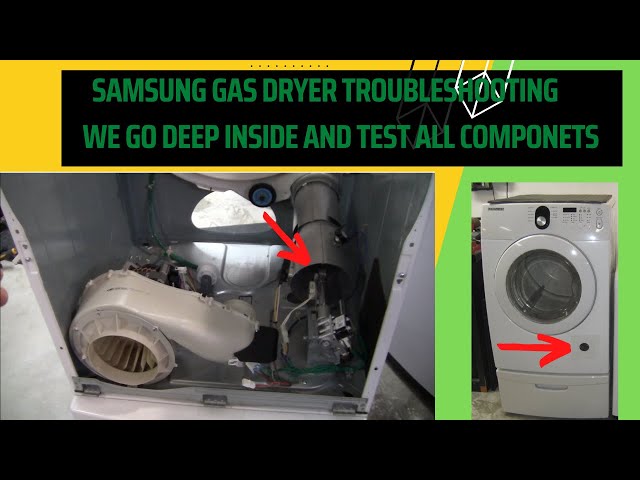
Credit: www.youtube.com
No Heat Or Poor Drying
Samsung dryers sometimes fail to heat or dry clothes properly. This issue reduces drying efficiency and increases drying time. Several common causes lead to no heat or poor drying performance. Identifying these problems helps fix the dryer quickly and safely.
Clogged Vent And Lint Buildup
Lint and debris can block the vent hose and dryer vents. This blockage stops hot air from escaping properly. The dryer cannot heat or dry clothes well with poor airflow. Cleaning the vent and lint filter regularly improves drying performance.
Faulty Heating Element
The heating element produces the heat inside electric dryers. Over time, it can break or burn out. A broken heating element means the dryer will not heat at all. Replacing the faulty element restores the dryer’s heating ability.
Blown Thermal Fuse
The thermal fuse protects the dryer from overheating. It cuts power to the heating element if the dryer gets too hot. A blown fuse stops the heating element from working. Testing and replacing the fuse solves this issue.
Malfunctioning Thermostat
The thermostat controls the dryer’s temperature. A faulty thermostat causes incorrect heating. It may cause the dryer to overheat or not heat enough. Replacing the malfunctioning thermostat ensures proper temperature control.
Dirty Moisture Sensors
Moisture sensors detect when clothes are dry. Dryer sheets and fabric softeners leave residue on sensors. Dirty sensors give false readings and stop the dryer early. Cleaning the sensors helps the dryer dry clothes completely.
:max_bytes(150000):strip_icc()/Troubleshooting-samsung-dryer-error-codes-2147296_color-2a4a811407904239b11b4adae5ce2b03.jpg)
Credit: www.thespruce.com
Strange Noises
Strange noises from a Samsung dryer often signal mechanical problems. These sounds can range from squeaks to rattles. Identifying the cause quickly helps avoid bigger repairs. Common causes include worn or broken parts inside the dryer. Understanding these issues improves your troubleshooting skills.
Broken Idler Pulley
The idler pulley keeps tension on the dryer belt. A broken pulley causes squeaking or screeching noises. The drum may stop spinning or turn unevenly. Replacing the idler pulley usually fixes these problems. Check the pulley for wear or damage to confirm.
Worn Drum Rollers Or Belt
Drum rollers support the drum’s rotation. Over time, they wear out or collect lint and hair. This wear creates grinding or squeaking sounds during drying. The belt can also fray or crack, causing noise and poor drum movement. Inspect rollers and belt for signs of damage or buildup.
Damaged Blower Wheel
The blower wheel moves air inside the dryer. Small objects can get stuck in the wheel, causing rattling sounds. A damaged or unbalanced blower wheel may make loud noises or reduce drying efficiency. Remove any debris and check the wheel for cracks or breaks.
Cleaning And Maintenance
Regular cleaning and maintenance keep your Samsung dryer working well. Dirt and lint reduce its efficiency and cause problems. Simple care steps help avoid costly repairs. This section explains key tasks to maintain your dryer.
Lint Filter Care
Remove the lint filter after each drying cycle. Clean off lint by hand or with a soft brush. Rinse the filter under water every few weeks to remove residue. Let it dry fully before reinserting. A clean lint filter improves airflow and drying speed.
Vent Hose Cleaning
Check the vent hose for blockages twice a year. Detach the hose from the dryer and wall vent. Use a vacuum or dryer vent brush to clear lint inside the hose. Reattach the hose securely to avoid leaks. Clean vents prevent overheating and fire risks.
Removing Lint Buildup
Lint can build up inside the dryer cabinet and vent system. Unplug the dryer and remove the back panel carefully. Use a vacuum to clean lint from inside the dryer and around the drum. Clean the vent opening outside your home as well. Removing lint buildup extends the life of your dryer.

Credit: www.youtube.com
Component Testing
Component testing is a key step in Samsung dryer troubleshooting. It helps identify faulty parts causing drying issues. Testing individual components saves time and money. It also ensures accurate diagnosis and effective repair.
Using simple tools like a multimeter, you can check critical parts. This process involves measuring electrical continuity and resistance. Understanding how to test components gives you control over the repair process.
Using A Multimeter
A multimeter measures electrical values like voltage, current, and resistance. It helps detect broken or malfunctioning parts in your dryer. Set the multimeter to the continuity or resistance mode. Touch the probes to the component terminals to check for a signal.
If the meter beeps or shows low resistance, the component works. No sound or infinite resistance means a break or fault in the part. Always unplug the dryer before testing to avoid shocks.
Testing Heating Element
The heating element warms the air inside the dryer. A broken element causes no heat or weak heat issues. Remove the element from the dryer casing carefully. Use the multimeter to check resistance across the terminals.
A good heating element shows a specific resistance value, usually low. Infinite or zero resistance means the element is faulty and needs replacement. Check for visible breaks or burn marks as well.
Checking Thermal Fuse
The thermal fuse protects the dryer from overheating. It cuts power to the heating element when triggered. Locate the thermal fuse on the blower housing or near the heating element. Test it with the multimeter for continuity.
No continuity means the fuse is blown and must be replaced. A good fuse shows continuity and no visible damage. Replace the fuse with an exact match to keep safety features intact.
Verifying Thermostat Function
The thermostat controls the dryer’s temperature. A faulty thermostat causes overheating or no heat. Remove the thermostat from the dryer and test it with the multimeter. Check for continuity at room temperature.
The thermostat should show continuity when cool. If it shows no continuity or erratic readings, replace it. Testing ensures the dryer heats correctly and safely.
Prolonged Drying Solutions
Prolonged drying times with your Samsung dryer can cause frustration and waste energy. Addressing simple issues often solves this problem quickly. Focus on key areas like lint buildup and airflow to improve drying efficiency. These solutions help your dryer work better and dry clothes faster.
Addressing Lint Filter Issues
The lint filter catches fibers and dust from clothes. If clogged, it blocks air circulation. This slows down drying and can cause overheating. Remove the lint screen after each load. Clean it thoroughly by hand or with a vacuum. Check for any tears or damage. Replace the filter if it is worn out. Clean lint also can build up inside the dryer drum. Use a soft brush or cloth to clear it. Keeping the lint filter clean improves heat flow and drying speed.
Ensuring Proper Airflow
Dryers need good airflow to remove moisture. Blocked vents trap hot, damp air inside. This extends drying times and risks damage. Disconnect the vent hose from the dryer. Inspect it for lint or debris buildup. Use a vent cleaning brush or vacuum to clear blockages. Make sure the vent hose is not crushed or kinked. Check the outside vent flap to see if it opens freely. Proper airflow helps your dryer run efficiently and dry clothes faster.
Frequently Asked Questions
What Is The Most Common Problem With Samsung Dryers?
The most common Samsung dryer problem is no heat or poor drying. Clogged vents, faulty heating elements, and blown thermal fuses often cause this issue.
How Do You Reset Your Samsung Dryer?
To reset your Samsung dryer, unplug it for 1 minute. Plug it back in and press the Power button to restart.
How Do I Run Diagnostics On My Samsung Dryer?
Press and hold the “Temp” and “Power” buttons simultaneously for 3 seconds. The display shows error codes to identify issues. Refer to the user manual for code meanings. Run tests by following on-screen prompts to diagnose heating, motor, and sensor problems effectively.
Why Does My Samsung Dryer Turn On But Not Start?
Your Samsung dryer turns on but won’t start due to a faulty door switch, broken belt, or a malfunctioning start switch. Check these parts for damage or wear.
Why Is My Samsung Dryer Not Heating Properly?
A clogged vent, faulty heating element, or blown thermal fuse often cause no heat issues.
Conclusion
Samsung dryer issues often stem from simple causes like clogged vents or worn parts. Regular cleaning helps keep your dryer running smoothly and safely. Checking components like the heating element or idler pulley can prevent bigger problems. Taking small steps early saves time and money later.
With basic care, your Samsung dryer can work efficiently for years. Stay attentive to sounds and drying performance for quick fixes. Troubleshooting becomes easier with these easy, clear tips. Keep your laundry routine hassle-free and your dryer in good shape.