
If you try to watch Netflix with a VPN, but suddenly it stops working, you’re not alone. Many people want to access Netflix content from other countries, but Netflix works hard to block VPNs. Sometimes, you may see a proxy error, a black screen, or content that just won’t play.
This problem is frustrating, especially if you pay for both Netflix and a VPN. But why does this happen, and what can you do about it?
Let’s explore why the Netflix VPN not working issue happens, how to fix it, and what you need to know for a smooth streaming experience. This guide will help you understand the problem, avoid common mistakes, and choose solutions that actually work.
Why Netflix Blocks Vpns
Netflix has to follow content licensing agreements. Movie and TV show rights are sold by country. For example, a show might be available in the US but not in Germany. Netflix uses your IP address to decide what you can watch. VPNs can change your IP address, making it look like you’re in another country. Because of this, Netflix tries to stop VPNs from bypassing these rules.
Netflix uses advanced technology to detect and block VPN traffic. They keep updating their methods, so even VPNs that worked last week may not work today. This is why users often face problems, even with popular VPN services.
How Netflix Detects And Blocks Vpns
Netflix uses several smart techniques to catch VPN users:
- IP address blacklists: Netflix tracks IP addresses used by many people at the same time. If too many accounts use the same IP, Netflix may block it.
- DNS leaks: Sometimes, a VPN hides your IP but does not hide your DNS queries. Netflix can use these leaks to see your real location.
- Geolocation mismatches: If your IP says you’re in Japan but your device’s clock or language settings suggest you’re elsewhere, Netflix can block you.
- Known VPN server lists: Netflix buys lists of IPs from cloud providers and VPN companies. They block these IPs as soon as they’re detected.
- Traffic patterns: Some VPNs send data in a way that looks different from normal home internet connections. Netflix can spot and block these patterns.
These methods make it harder for VPNs to stay ahead. However, some VPNs are better at avoiding detection than others.
Common Signs Your Vpn Is Not Working With Netflix
How do you know if Netflix has blocked your VPN? Here are the most common signs:
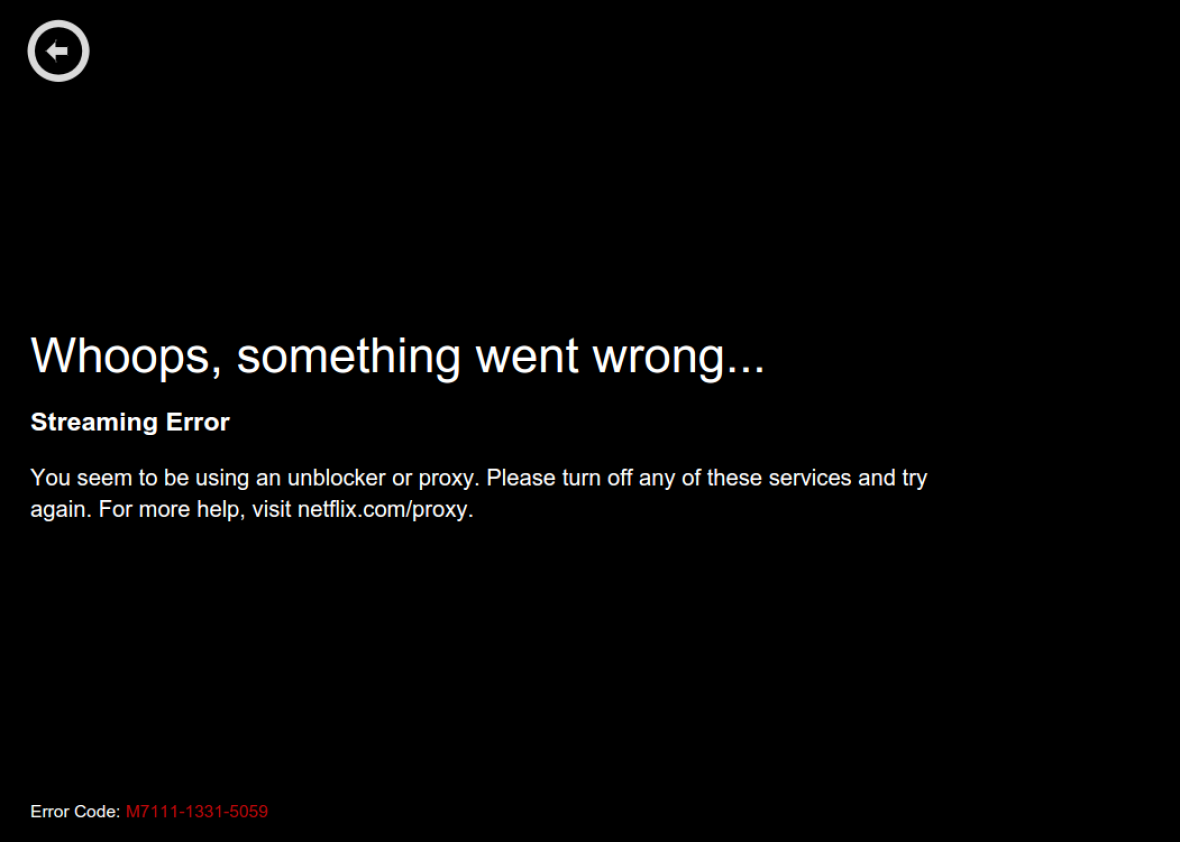
- You see a Netflix error message saying, “You seem to be using an unblocker or proxy.”
- You can’t play any video; the screen is black or loading forever.
- Content is missing, or you see a smaller library than expected.
- You can only watch Netflix Originals, but not local shows from the country you chose.
- Your account is suddenly logged out or asks for verification.
If you see these problems, your VPN is likely blocked by Netflix.
Why Your Vpn Stopped Working With Netflix
Not all VPNs are equal, and several reasons can cause the Netflix VPN not working issue:
1. Netflix Blocked Your Vpn’s Ip Address
Netflix regularly updates its list of blocked IPs. If your VPN server was flagged, you won’t be able to watch content from that country.
2. Your Vpn Provider Is Not Strong Enough
Some VPNs don’t invest in new IP addresses or advanced technology. Free or cheap VPNs often get blocked quickly.
3. Dns Or Webrtc Leaks
If your real location leaks through DNS or your browser, Netflix can see your real country, even if your IP looks correct.
4. Outdated Vpn App Or Server
If you haven’t updated your VPN app, it might use old methods Netflix can easily detect. Also, some servers become overloaded or outdated.
5. Wrong Netflix Region
Sometimes, your VPN server is in the right country, but your Netflix account is set to another region, causing a mismatch.
6. Device Or Network Settings
Your device or browser might be leaking data, or your router may not be set up for VPN traffic.
7. Browser Extensions Or Cookies
Old cookies and browser extensions can reveal your true location to Netflix, breaking the VPN’s protection.
Steps To Fix Netflix Vpn Not Working
Solving this problem takes a mix of technical steps and smart choices. Here’s what you can do:
1. Change To A Different Vpn Server
Switch to another server in your desired country. The VPN may have many servers; some are blocked, others are not.
2. Use A Vpn With Smart Unblocking Technology
Some VPNs use obfuscated servers or rotating IP addresses. These are harder for Netflix to detect.
3. Clear Browser Cookies And Cache
Cookies can store your old location. Clearing them can help the VPN work correctly with Netflix.
4. Try A Different Device Or Browser
Sometimes, the device or browser causes leaks. Test Netflix on another device to see if it works.
5. Update Your Vpn App
New versions often include better unblocking technology and bug fixes.
6. Use A Paid, Reliable Vpn
Free VPNs rarely work with Netflix for long. Paid providers invest in new servers and technology to keep up with Netflix blocks.
7. Check For Dns Or Webrtc Leaks
Use online tools to test for leaks. If you find any, fix your VPN settings, or use browser add-ons to stop leaks.
8. Contact Vpn Support
Many top VPNs have live chat or email support. Ask them which servers are working for Netflix in your country.
9. Set Up Vpn On Your Router
This can hide your traffic more effectively, as all devices in your house use the VPN.
10. Turn Off Location Services
Your phone or browser can share your real location with Netflix. Turn off location services before streaming.
11. Log Out And Back Into Netflix
Sometimes, logging out and then logging back in after changing your VPN server can help.
12. Reinstall The Netflix App
If the app is storing old data, reinstalling can clear problems and help the VPN work.
Best Vpns For Netflix In 2024
Not every VPN works well with Netflix. Here’s a comparison of popular services:
| VPN Provider | Netflix Unblocking | Number of Countries | Price (Monthly) | Speed |
|---|---|---|---|---|
| ExpressVPN | Excellent | 94 | $12.95 | Very Fast |
| NordVPN | Very Good | 60 | $11.99 | Fast |
| Surfshark | Good | 100+ | $12.95 | Fast |
| CyberGhost | Good | 91 | $12.99 | Moderate |
| Private Internet Access | Moderate | 84 | $11.99 | Moderate |
Insight: Many users don’t realize that even the best VPNs have some blocked servers. Always ask support for the latest working server.

Credit: www.reddit.com
Devices And Netflix Vpn Problems
Netflix blocks VPNs differently on various devices. The experience is not the same on all platforms.
Smart Tvs
Many smart TVs do not support advanced VPN apps. You may need to install the VPN on your router or use a “Smart DNS” feature.
Phones And Tablets
Android and iOS apps sometimes have more aggressive detection. Make sure you use the latest version of your VPN app.
Streaming Devices (roku, Apple Tv, Fire Stick)
These often have no built-in VPN support. You may need to set up the VPN on your home router or use a virtual router on your computer.
Laptops And Desktops
Windows and Mac computers usually work best with VPN apps. However, browser leaks or extensions can still reveal your real location.
| Device Type | VPN App Support | Netflix Detection Risk | Recommended Solution |
|---|---|---|---|
| Laptop/Desktop | High | Low | Use VPN app, clear browser data |
| Smart TV | Low | Medium | Set up VPN on router, or use Smart DNS |
| Streaming Stick | Low | High | Configure VPN on router |
| Phone/Tablet | High | Medium | Update VPN app, turn off location services |
Non-obvious tip: Many users forget that changing the device can bypass some Netflix blocks. Sometimes, Netflix blocks VPNs on a TV but not on a phone, or vice versa.
Legal And Ethical Considerations
Before you try to bypass Netflix blocks, you should know the legal and ethical issues.
- Terms of Service: Netflix’s terms do not allow using VPNs to access content from other countries. If they catch you, they could suspend your account. However, in practice, Netflix usually only blocks the VPN, not the account.
- Local Laws: In some countries, using a VPN is restricted or even illegal. Always check your local laws before using a VPN.
- Content Rights: The reason for blocks is that Netflix does not own global rights to all shows. Bypassing these rules can be seen as unfair to content creators.
Practical insight: Most users are not banned for VPN use, but there is always a small risk. Decide if the benefits are worth it for you.
Credit: slate.com
Vpn Alternatives For Watching Netflix Abroad
If your VPN keeps getting blocked, there are other ways to access Netflix content from other regions.
1. Smart Dns Services
Smart DNS changes your device’s DNS settings to make it look like you’re in another country. It does not encrypt your traffic, so it’s faster, but less private.
2. Proxy Services
Proxies can sometimes unblock Netflix, but they are often slower and less secure than VPNs.
3. Download Content Before Traveling
Netflix lets you download some shows for offline viewing. Download before you leave your home country.
4. Traveling With A Portable Router
Some users bring a pre-configured travel router with a VPN installed. This hides your location on all devices.
Caution: These methods are not always reliable, and Netflix may block them too.
Common Vpn Mistakes That Break Netflix
Many users make small mistakes that cause Netflix to detect their VPN. Avoid these common errors:
- Using the same server as thousands of other users
- Not updating the VPN app or Netflix app
- Forgetting to clear cookies and browser cache
- Leaving location services on
- Using a low-quality, free VPN
- Not checking for DNS or WebRTC leaks
- Using browser extensions that reveal your IP
- Connecting to the wrong country’s server
- Ignoring VPN customer support advice
- Streaming on devices without proper VPN support
Non-obvious mistake: Some users switch servers too quickly. Netflix can detect “rapid hopping” and block access. Wait a few minutes after changing servers.
How To Test If Your Vpn Works With Netflix
Here’s a quick way to check if your VPN is really hiding your location:
- Connect your VPN to a server in the country you want.
- Go to an IP location checker (like ipleak.net) and confirm your new location.
- Clear your browser’s cookies and cache.
- Open Netflix in a private/incognito window.
- Check if you see content from the new country.
- Try playing a title only available in that region.
If everything works, your VPN is not blocked. If not, try the fixes above.
The Reality Of Netflix And Vpns In 2024
Netflix is better at blocking VPNs than ever before. Many VPNs that worked last year now fail. Only a few premium VPNs stay ahead, and even they need to rotate servers often. No solution is perfect or permanent, so even the best VPN can stop working without warning.
Expert tip: If unblocking Netflix is your main goal, choose a VPN with a “no questions asked” refund policy. Test it for a few days, and switch if it stops working.

Credit: www.youtube.com
How Netflix Blocks Affect Other Streaming Services
Netflix is not alone. Other streaming sites like Hulu, Disney+, and BBC iPlayer also block VPNs. However, Netflix’s system is the most advanced and aggressive. If your VPN can unblock Netflix, it can usually unblock other platforms too.
Choosing The Right Vpn For Netflix
When picking a VPN for Netflix, focus on these features:
- Dedicated streaming servers: Some VPNs have servers just for Netflix.
- Fast customer support: You need help fast if a server is blocked.
- Money-back guarantee: Test the VPN risk-free.
- Strong privacy policy: Make sure your data is safe.
- Multiple device support: Watch on TV, phone, and laptop.
Tip: Check online reviews and forums for the latest updates. Blocked servers change all the time.
Real-world Example: User Experiences
Sam, a Netflix fan from Brazil, used a free VPN to watch US Netflix. It worked for two weeks, then stopped. He switched to a paid VPN, but chose the wrong server. Only after contacting support did he find a working server.
Maria, living in Spain, tried to watch Japanese Netflix. At first, she saw a proxy error. She cleared her cookies, switched browsers, and it worked. The next week, the server stopped working again. She learned to ask VPN support for updates.
These stories show that Netflix VPN not working is a moving target. You need to be flexible and ready to try different solutions.
Quick Reference: Troubleshooting Netflix Vpn Not Working
Here’s a simple checklist for quick fixes:
- Switch to a different VPN server.
- Update your VPN app and Netflix app.
- Clear browser cookies and cache.
- Turn off location services.
- Check for DNS/WebRTC leaks.
- Try a different device or browser.
- Contact VPN support for working servers.
| Problem | Possible Cause | Solution |
|---|---|---|
| Proxy error message | Blocked IP | Change server, clear cookies |
| Black screen | Old app, device issue | Update/reinstall apps |
| Missing content | Wrong region | Check IP location, switch server |
| Slow speeds | Overloaded server | Try another server, pick fast VPN |
Frequently Asked Questions
Why Does Netflix Block Vpns?
Netflix is required by content owners to restrict shows and movies by country. They block VPNs to follow these rules and protect their business agreements.
Can I Get Banned From Netflix For Using A Vpn?
While Netflix may block your VPN, they rarely ban accounts for VPN use. They usually just block access until you disconnect your VPN.
Which Vpn Works Best For Netflix?
VPNs like ExpressVPN, NordVPN, and Surfshark are known to work well. However, you should check the latest user reviews and contact support, as working servers change often.
Is Using A Vpn With Netflix Legal?
Using a VPN is legal in most countries, but accessing Netflix content from other regions may break their terms of service. Always check local laws and the Netflix agreement.
What Should I Do If My Vpn Suddenly Stops Working With Netflix?
First, try switching servers, clearing cookies, and updating your apps. If that fails, contact your VPN’s support team for advice. Sometimes, you may need to change VPN providers.
If you want more details about VPNs and streaming, you can read this Wikipedia VPN overview.
Netflix and VPNs are in a constant game of cat and mouse. But with the right strategies and tools, you can still enjoy your favorite shows from anywhere. Stay flexible, keep your apps updated, and don’t be afraid to ask for help. This way, you’ll have the best chance to solve the Netflix VPN not working problem and get back to streaming.