
If your Mendota fireplace remote control suddenly stops working, it can be frustrating—especially during the cold months. Many homeowners rely on these remotes for quick and easy access to comfort. When you press the button and nothing happens, it can feel like something complex is wrong. But in many cases, the solution is simple.
This guide will walk you through every reason why a Mendota fireplace remote might fail, how to fix it, and what to check before calling for help. You’ll learn how the remote works, the most common mistakes people make, and how to keep your fireplace running smoothly.
Even if you’re not a technical person, you’ll find clear steps here. Whether you’re a first-time Mendota owner or have used one for years, you’ll discover tips and insights to solve issues quickly.
How Mendota Fireplace Remotes Work
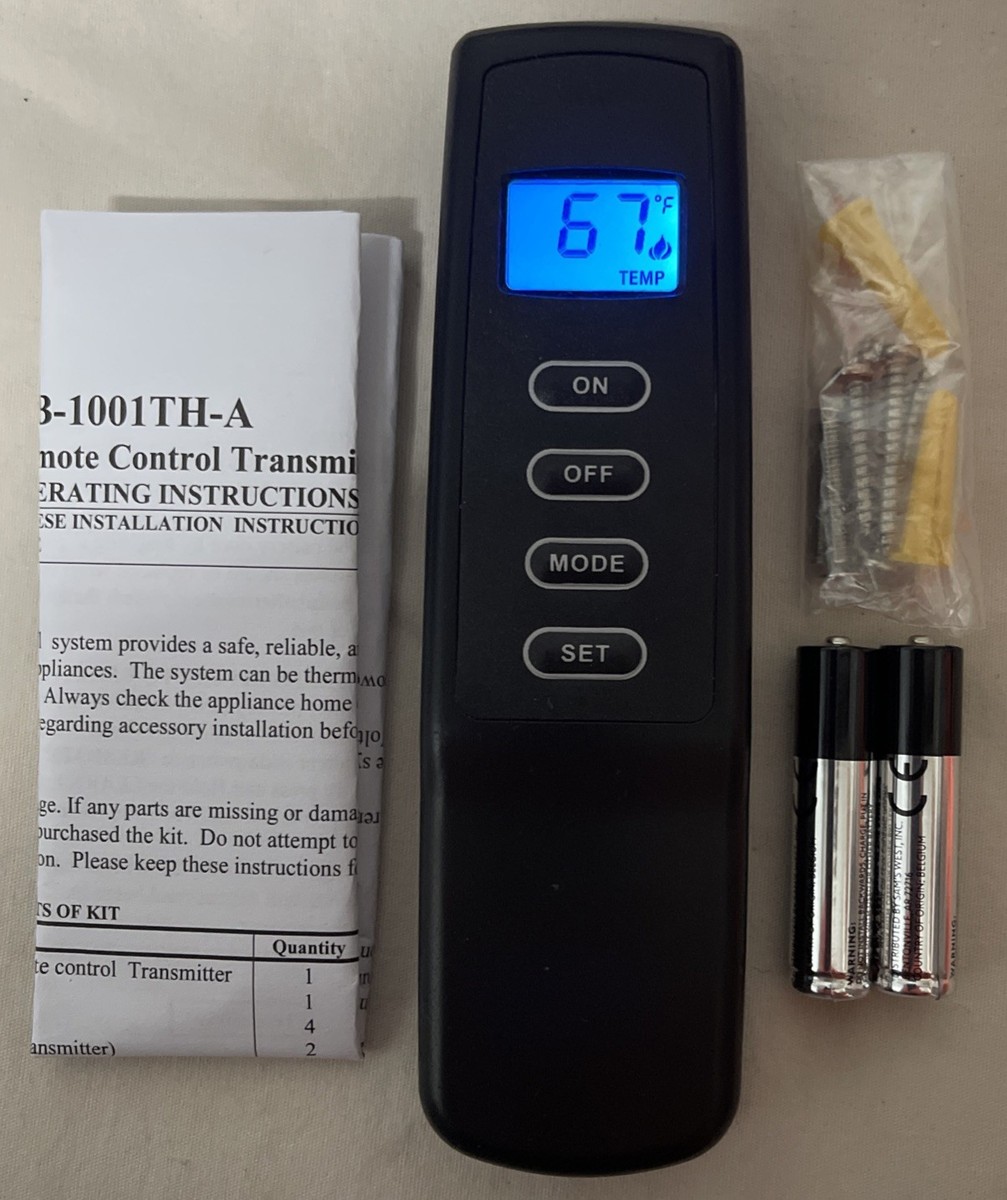
Understanding your Mendota fireplace remote control is the first step to troubleshooting. These remotes usually use radio frequency (RF) or sometimes infrared (IR) signals. When you press a button, the remote sends a signal to a receiver module connected to the fireplace. The receiver then starts or stops the fireplace, adjusts flame height, or controls the thermostat.
Most Mendota remotes have these main parts:
- Remote transmitter (the handheld device)
- Receiver box (inside or near the fireplace)
- Power source (batteries for both remote and receiver)
- Signal system (RF or IR technology)
Problems can happen at any step. If the remote fails, the fireplace won’t respond, even if everything else is fine.
Common Reasons A Mendota Fireplace Remote Stops Working
You might think your remote is broken, but often the problem is simple. Here are the most common reasons:
- Dead or weak batteries
- Signal interference
- Receiver problems
- Lost programming or pairing
- Physical damage
- Blocked or dirty receiver sensor
- Power interruptions
- Incorrect remote settings
- Thermostat mode confusion
- Wiring issues
- Remote compatibility problems
Let’s go deeper into each cause.
1. Dead Or Weak Batteries
This is the most common reason. Both the remote and receiver often use AA or AAA batteries. If batteries are weak or dead, the remote will not send a signal. Sometimes, old batteries cause strange behavior—like working only from very close range.
Tip: Always check batteries in both the remote and receiver. Many forget the receiver also needs fresh batteries.
2. Signal Interference
Mendota remotes use radio frequency to communicate. Other wireless devices—like WiFi routers, baby monitors, or even some LED lights—can interfere with the signal. Thick walls or metal objects between the remote and fireplace can also block communication.
3. Receiver Problems
The receiver is the “brain” that listens for the remote’s signal. If it’s unplugged, has loose wiring, or is faulty, the fireplace won’t work. Sometimes, the receiver gets too hot, especially after running the fireplace for hours, which can cause it to stop responding until it cools down.
4. Lost Programming Or Pairing
If you recently changed batteries, had a power outage, or moved the receiver, the remote and receiver might lose their connection. This means you may need to re-pair them.
5. Physical Damage
Remotes can fall, get wet, or have worn-out buttons. Even a small crack inside can stop it from working.
6. Blocked Or Dirty Receiver Sensor
Dust, pet hair, or soot can cover the receiver sensor. If the sensor can’t “see” the remote’s signal, it won’t respond.
7. Power Interruptions
If your fireplace or receiver is plugged into a wall outlet, any power outage or unplugged cord can stop the system from working. Sometimes, the outlet’s circuit breaker trips.
8. Incorrect Remote Settings
Many Mendota remotes have settings for manual, automatic, or thermostat modes. If the remote is not in the correct mode, the fireplace may not turn on.
9. Thermostat Mode Confusion
If your remote is set to thermostat mode, it will only turn on if the room is colder than the set temperature. If the room is already warm, the fireplace stays off even when you press ON.
10. Wiring Issues
Loose or disconnected wires between the receiver and the fireplace can prevent signals from working. This is rare but possible, especially after cleaning or repairs.
11. Remote Compatibility Problems
Not all Mendota fireplaces use the same remote. If you replaced the remote with a different model, it might not be compatible.

Credit: www.youtube.com
Step-by-step Troubleshooting Guide
Let’s walk through how to fix the most common issues. Start with the easiest steps.
Check The Batteries
- Remove the batteries from the remote.
- Replace with fresh, high-quality batteries (never mix old and new).
- If your receiver uses batteries, replace those too.
- Test the remote.
Non-obvious insight: Some receivers have a hidden battery compartment. Check the owner’s manual if you can’t find it.
Test The Receiver
- Look for a small “learn” or “reset” button on the receiver.
- Press the button. If a light blinks, the receiver has power.
- If nothing happens, check the wiring and power source.
Tip: Some receivers have a manual switch. Try flipping it to ON to see if the fireplace works without the remote.
Re-pair The Remote And Receiver
After battery changes or power outages, you may need to pair the remote again.
- Hold down the “learn” button on the receiver until a light blinks.
- Press the ON button on the remote.
- The receiver light should blink or stay solid, showing pairing is successful.
Example: If you just changed batteries and the remote stopped working, re-pairing usually solves the issue.
Clear Signal Interference
- Move other wireless devices (cordless phones, baby monitors) away from the fireplace.
- Try the remote from different angles.
- Test with doors open if you’re in another room.
Clean The Receiver Sensor
- Turn off the fireplace and let it cool.
- Use a dry cloth or compressed air to gently clean the receiver area.
- Remove any dust, soot, or pet hair.
Check Fireplace Power
- Make sure the fireplace is plugged in.
- Test the wall outlet with another device (like a lamp) to check for power.
- If using a battery-powered receiver, make sure batteries are fresh.
Inspect For Physical Damage
- Look for cracks, loose buttons, or signs of water damage on the remote.
- If the remote is damaged, you may need a replacement.
Check Remote Settings
- Make sure the remote is in the correct mode (manual or auto).
- If set to thermostat mode, lower the set temperature to force the fireplace ON.
Examine Wiring
- If you’re comfortable, check wiring connections at the receiver and fireplace.
- Look for loose or disconnected wires.
- Reconnect any loose wires securely.
Caution: Turn off power before touching any wires.
Test For Compatibility
- Check your Mendota fireplace’s model number.
- Compare it to the remote’s model in the manual.
- If they don’t match, contact Mendota support for the correct remote.
When To Call For Professional Help
If you’ve tried all the above and the remote still doesn’t work, it may be time to call a certified technician. Internal parts (like the control board or gas valve) may be faulty. Do not try to repair internal gas or electrical parts yourself unless you are trained.
Mendota Fireplace Remote Vs. Wall Switch: Comparison
Some Mendota fireplaces can use either a remote or a wall switch. Here’s a quick comparison:
| Feature | Remote Control | Wall Switch |
|---|---|---|
| Convenience | Operate from anywhere in room | Must be at wall location |
| Setup | Requires pairing, batteries | Wired directly, no pairing needed |
| Common Failures | Batteries, signal issues | Wiring, switch wear |
| Maintenance | Change batteries | Rarely needed |
| Cost | Usually higher (if replacing) | Lower |
Non-obvious insight: Some homeowners install both, so if the remote fails, the wall switch is a backup.
Preventing Remote Control Problems
Once your remote is working, you’ll want to avoid future problems. Here’s how:
- Use high-quality batteries and change them every year.
- Keep the receiver area clean and dust-free.
- Avoid dropping or spilling liquids on the remote.
- Store the remote away from direct heat and sunlight.
- Re-pair the remote after any power outage or battery change.
Mendota Remote Error Codes And What They Mean
Some advanced Mendota fireplace remotes display error codes. These codes help you quickly find the problem. Here are the most common codes and their meanings:
| Error Code | Meaning | Action |
|---|---|---|
| LoB | Low battery | Replace batteries |
| OFF | Remote is off | Press ON or check power |
| Er1 | Signal lost | Re-pair remote and receiver |
| Er2 | Receiver fault | Check wiring or replace receiver |
| Er3 | Thermostat error | Reset and reprogram |
Tip: If your remote shows a code not listed in your manual, call Mendota customer service.
Real-world Example: Solving A Mendota Remote Problem
Let’s look at a real situation. Sarah noticed her Mendota fireplace would not turn on with the remote. She checked the batteries, but the remote still didn’t work. She tried to re-pair the remote, but nothing happened.
On closer inspection, she found the receiver had fallen behind the fireplace during cleaning. The wires were loose, so the receiver had no power. After reconnecting the wires and re-pairing the remote, everything worked perfectly.
Lesson: Always check the receiver’s wiring and placement, especially after cleaning or moving things around.
Mendota Remote Replacement: What To Know
If your remote is lost or broken, you may want a replacement. Here’s what you need to consider:
- Model Compatibility: Check your fireplace’s model and serial number. Not all Mendota remotes work with all fireplaces.
- Receiver Type: Some remotes work only with specific receivers.
- Programming: Replacement remotes must be paired to your receiver.
- Cost: Official Mendota remotes are more expensive but more reliable than universal remotes.
- Where to Buy: Buy from official dealers or Mendota-approved suppliers to avoid counterfeits.
Example: Universal remotes may turn the fireplace on/off but may not control flame height or thermostat settings.
Advanced Troubleshooting: When The Basics Don’t Work
If you’ve tried everything and your remote still fails, here are advanced steps:
Check Voltage At The Receiver
If you have a multimeter, you can test the receiver’s voltage. The correct voltage is usually listed in your owner’s manual. If the voltage is low, the receiver or its power supply may be faulty.
Test Fireplace With Wall Switch
If your fireplace has a wall switch, try turning it on. If it works, the problem is with the remote system, not the fireplace itself.
Inspect Receiver Antenna
Some receivers have a small wire antenna. If it’s bent, broken, or missing, replace or repair it.
Reset The System
- Turn off the fireplace and unplug the receiver.
- Wait 2 minutes.
- Plug everything back in and re-pair the remote.
Upgrade To A New Remote System
If your remote is very old, newer models may offer better reliability and more features, like child lock or WiFi control.
How Weather And Environment Affect Remote Function
Most people don’t realize that humidity, static electricity, and temperature changes can all affect remote performance.
- In very dry air, static can disrupt signals.
- High humidity can cause corrosion on battery terminals.
- Extreme cold can lower battery performance.
Tip: Store your remote indoors during long periods of non-use.
Mendota Remote Control: Features And Options
Modern Mendota remotes offer features like:
- Thermostat mode: Keeps the room at a set temperature.
- Timer: Automatically turns off after a set time.
- Child lock: Prevents accidental use.
- Flame height control: Adjusts how high the fire burns.
- Backlit display: Easy to use in the dark.
Not all remotes have all features. Check your manual for details.
Choosing Between Mendota And Universal Remotes
Many homeowners ask if they can use a universal remote. Here’s a quick comparison:
| Feature | Mendota Remote | Universal Remote |
|---|---|---|
| Compatibility | Guaranteed | May be limited |
| Features | All fireplace functions | Usually on/off only |
| Warranty | Covered by Mendota | Not covered |
| Price | Higher | Lower |
Tip: For full control (thermostat, flame height), stick with the official Mendota remote.
Common Mistakes To Avoid When Troubleshooting
- Ignoring the receiver batteries: Many owners change the remote batteries but forget the receiver needs new ones too.
- Skipping re-pairing after battery change: Always re-pair after changing batteries in either unit.
- Forgetting about thermostat mode: If the room is warm, the remote may not turn the fireplace on in thermostat mode.
- Not checking for interference: New electronics in your home can suddenly block the signal.
- Assuming the remote is always the problem: Sometimes the receiver or even the fireplace itself is at fault.
How To Extend The Life Of Your Mendota Remote
You can make your remote last longer by:
- Storing it away from children and pets
- Cleaning it gently (never use water)
- Using quality batteries and changing them regularly
- Keeping the receiver away from extreme heat or cold
- Checking for software or firmware updates (for smart models)
Resources For Further Help
If you’re stuck, don’t guess. Use these resources:
- Mendota’s official support page
- Your fireplace’s owner’s manual
- Certified fireplace service technicians
- Online forums for Mendota owners
For deeper technical details, see Hearth, Patio & Barbecue Association for professional guidance.
Frequently Asked Questions
Why Does My Mendota Remote Work Only Sometimes?
Intermittent function usually means weak batteries, signal interference, or a loose receiver connection. Try replacing all batteries and moving other electronics away from the receiver.
How Do I Know If My Mendota Remote Is Paired To The Receiver?
After pressing the ON button, the receiver should respond (with a click, flame ignition, or indicator light). If nothing happens, try the pairing process as described in your manual.
Can I Use My Mendota Fireplace Without The Remote?
Yes, most models have a manual switch or wall switch option. Check your owner’s manual for the switch location. This is useful as a backup if the remote is lost or broken.
What Do I Do If My Remote Shows An Error Code?
Check the code in your manual. Common codes are for low battery, signal loss, or receiver errors. Replace batteries, re-pair the remote, or reset the system as needed.
Where Can I Buy A Replacement Mendota Remote?
Buy from authorized Mendota dealers or the official Mendota website. Avoid third-party sellers unless you confirm compatibility.
Conclusion
If you follow these steps, most remote control problems will be easy to solve. A little regular maintenance will keep your Mendota fireplace ready when you need it most. If you have a tricky problem, don’t hesitate to contact a professional—it’s the safest way to enjoy reliable warmth and comfort in your home.
Credit: www.ebay.com