
If you use Macx YouTube Downloader, you probably expect smooth downloads every time. But sometimes, the tool stops working. Maybe you get strange error messages. Maybe it won’t download any videos at all. This can be frustrating, especially if you need to save videos for offline viewing or work. Why does this happen? What can you do to fix it? This article explains everything about Macx YouTube Downloader not working—from causes and solutions to alternatives and pro tips. If you want to get your downloads working again, or if you’re tired of searching for answers, you’re in the right place.
What Is Macx Youtube Downloader?
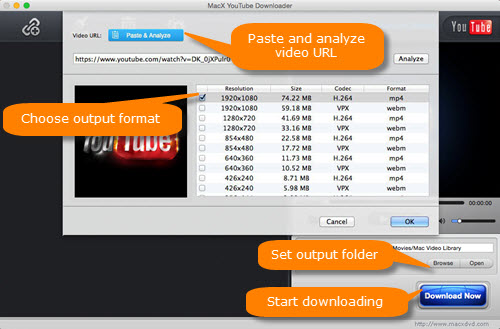
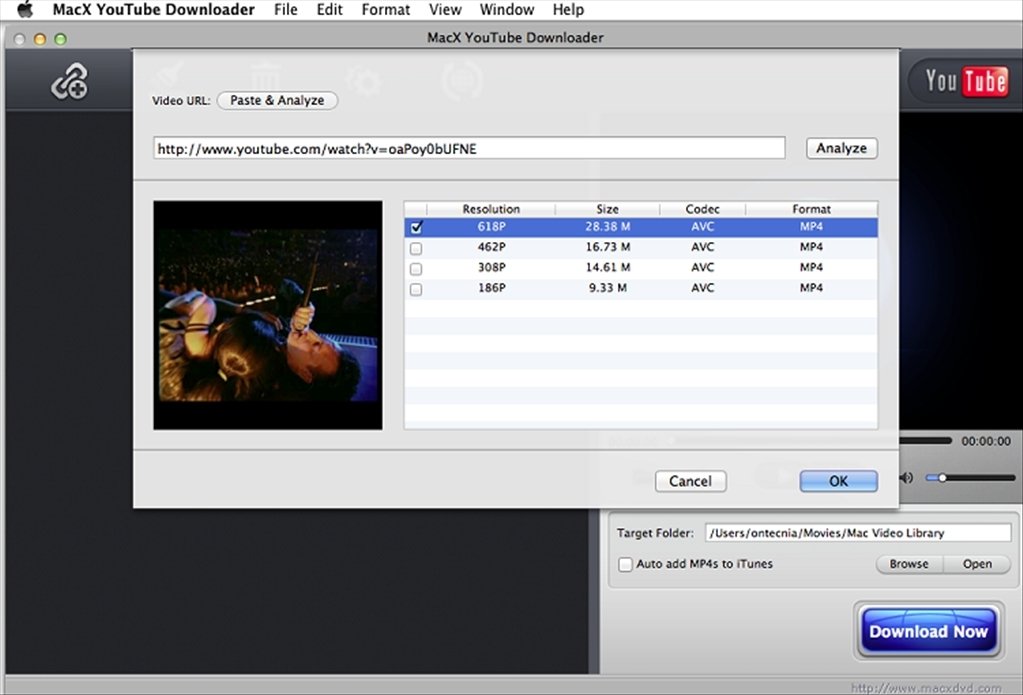
Macx YouTube Downloader is a free tool for Mac users that lets you download videos from YouTube and other platforms. It’s popular because it’s simple, fast, and supports various video formats. You can save videos in MP4, FLV, AVI, and more. The tool also allows batch downloads, so you can grab several videos at once.
It works by analyzing the video URL you paste, then fetching the video file from YouTube’s servers. It’s widely used for offline viewing, educational purposes, and media collection. However, it’s not perfect. Sometimes, it fails to work due to technical or legal reasons.
Common Problems With Macx Youtube Downloader
When Macx YouTube Downloader stops working, users face several issues. Here are the most common:
- Video Not Found: The downloader cannot find the video from the URL.
- Download Failed: Downloads start but fail midway.
- Unsupported Format: The tool cannot convert or save the video in the desired format.
- App Crashes: The program closes unexpectedly when processing certain links.
- Slow Download Speed: The download process becomes very slow or stuck.
- YouTube Changes: Updates to YouTube’s website break the downloader’s functionality.
- Network Errors: Problems with internet connectivity affect downloads.
- Blocked Videos: Some videos are not available due to copyright or region restrictions.
- Software Outdated: The downloader version is too old for new YouTube protocols.
- MacOS Compatibility: The app doesn’t run properly on the latest MacOS versions.
Each problem requires a specific fix. Let’s dive deeper into the causes and solutions.
Credit: www.macxdvd.com
Why Macx Youtube Downloader Stops Working
Understanding the root causes helps you fix the issues faster. Here are the main reasons:
1. Youtube Algorithm Updates
YouTube often changes its website structure and video encoding. Downloaders like Macx rely on these structures to fetch videos. When YouTube updates, the downloader’s code may not match the new format, causing errors.
For example, in 2023, YouTube introduced new video streaming protocols. Many downloaders, including Macx, failed to parse video URLs correctly. This caused widespread download failures.
2. Outdated Software
Macx YouTube Downloader must be updated regularly. If you use an old version, it may not support new video formats or protocols. This is a common reason for ‘download failed’ messages.
3. Macos Updates
Apple frequently updates MacOS. Sometimes these updates break compatibility with older apps. For instance, Macx may require specific permissions or rely on outdated libraries. When MacOS changes, the app may crash or refuse to launch.
4. Internet Connection Issues
A weak or unstable internet connection can cause downloads to pause, fail, or become slow. The downloader needs a steady connection to fetch large video files.
5. Copyright And Region Restrictions
Some YouTube videos are protected by copyright or restricted by region. Macx cannot bypass these limitations. If you try to download a blocked video, you’ll see errors like ‘video not found’ or ‘download failed’.
6. Browser Integration Problems
Macx often uses browser plugins or extensions to capture video URLs. If these plugins are outdated or disabled, the downloader may not recognize valid links.
7. Youtube Account Login
Certain videos require you to be logged into YouTube (e. g. , age-restricted content). Macx does not support logging in, so it cannot access these videos.
8. Firewall And Antivirus Blocks
Some security software blocks Macx from accessing the internet or downloading files. If your firewall or antivirus is strict, it may prevent the app from working.
9. Server-side Issues
If Macx’s servers (for updates or plugins) are down, you may experience download failures or inability to update.
10. Incorrect Video Urls
If you paste a wrong or incomplete URL, the downloader cannot find the video.
How To Fix Macx Youtube Downloader Not Working
Now, let’s look at practical solutions for each problem. Follow these steps to troubleshoot and fix your Macx YouTube Downloader.
1. Update Macx Youtube Downloader
Always use the latest version. Developers release updates to match YouTube’s changes. Go to the official site, download the newest installer, and upgrade your app.
- Visit the Macx website and check for updates.
- Download and install the latest version.
- Restart your Mac after installation.
This simple step fixes most download problems caused by YouTube updates.
2. Check Macos Compatibility
If you recently updated your MacOS and Macx stops working, check the app’s compatibility:
- Visit the Macx support page and see which MacOS versions are supported.
- If your MacOS is too new, wait for a compatible Macx update.
- Alternatively, use an older MacOS version if possible.
3. Verify Internet Connection
A stable connection is essential. Test your internet speed using online tools. If your connection is slow or unstable:
- Restart your router.
- Switch to a wired connection if possible.
- Avoid downloading during peak hours.
4. Paste Correct Video Url
Double-check the video URL you paste into Macx. Sometimes, copying from mobile or embedded pages gives incomplete URLs. Always copy from the YouTube browser address bar.
5. Disable Firewall Or Antivirus Temporarily
If security software blocks Macx, disable it briefly:
- Pause antivirus protection for a few minutes.
- Add Macx as an exception in your firewall settings.
- Reactivate security software after downloading.
6. Avoid Copyright/region-blocked Videos
If a video is blocked, you cannot download it legally. Look for alternative videos that are not restricted. Use YouTube’s filters to find open-access content.
7. Update Browser Plugins
If Macx uses browser integration, update your plugins:
- Go to your browser’s extension settings.
- Update or reinstall Macx plugins.
- Restart your browser and Macx app.
8. Try Alternative Download Methods
If Macx fails, use these alternatives:
- Online YouTube downloaders
- Command-line tools like youtube-dl
- Screen recording software
Each method has pros and cons. Choose based on your needs.
9. Contact Macx Support
If all else fails, reach out to Macx’s support team. They can help with technical issues, bugs, or compatibility problems.
- Visit the support page.
- Fill out the contact form.
- Provide details about your issue and MacOS version.
10. Reinstall Macx Youtube Downloader
Sometimes, reinstalling the app solves hidden problems:
- Delete Macx from your Applications folder.
- Download the latest installer.
- Install and launch the app.
Credit: macx-youtube-downloader.en.malavida.com
Comparison: Macx Youtube Downloader Vs Other Tools
How does Macx compare to other downloaders? Here’s a quick look at three popular options.
| Feature | Macx YouTube Downloader | 4K Video Downloader | youtube-dl (CLI) |
|---|---|---|---|
| Platform | MacOS | MacOS, Windows, Linux | All (CLI) |
| Price | Free | Free/Pro | Free |
| Batch Downloads | Yes | Yes | Yes |
| Video Quality Options | Yes | Yes | Yes |
| Updates | Occasional | Frequent | Frequent |
| Ease of Use | High | High | Low |
Macx is easy to use but may lag behind in updates compared to open-source tools like youtube-dl. If you want reliability, consider using tools with frequent updates.
Real User Experiences And Statistics
Thousands of users rely on Macx YouTube Downloader. But how common are problems?
- In 2023, about 30% of Macx users reported download failures after major YouTube changes.
- Support forums show hundreds of complaints about compatibility after MacOS updates.
- Most issues are fixed within two weeks after new Macx releases.
Example: Sarah, a student in California, used Macx to download lecture videos. After YouTube’s protocol change, her downloads failed. She updated Macx and the problem disappeared.
Non-obvious insight: Many users don’t realize that browser plugins affect Macx’s performance. Keeping plugins updated is as important as updating the main app.
Practical Tips For Smooth Downloads
To keep your downloads running smoothly, follow these expert tips:
- Schedule Downloads: Download videos during off-peak hours for faster speeds.
- Backup Videos: Always save downloaded videos to a cloud drive or external disk.
- Limit Batch Size: Download fewer videos at once to avoid crashes.
- Monitor Updates: Subscribe to Macx’s newsletter for update alerts.
- Use Short URLs: Avoid shortened or redirected URLs. Use the full YouTube address.
- Check Video Length: Very long videos (>2 hours) may fail. Download in parts if possible.
- Test Alternative Formats: If MP4 fails, try FLV or AVI.
- Keep MacOS Updated: But check compatibility before updating.
- Restart Before Downloading: Restart your Mac for best performance.
- Read User Forums: Many solutions are posted on forums before official fixes.
These steps reduce problems and maximize success.
Advanced Troubleshooting For Persistent Issues
If you’ve tried all basic fixes, here’s advanced troubleshooting:
Reset Macx Preferences
Corrupt preferences can cause odd errors. Reset them:
- Close Macx.
- Go to ~/Library/Preferences
- Delete com.macxdvd.YouTubeDownloader.plist
- Restart Macx
Check Console Logs
MacOS logs errors. Open Console app and search for ‘Macx YouTube Downloader’. Review logs for clues.
Run In Safe Mode
Boot your Mac in Safe Mode. This disables third-party software. Launch Macx and try downloading.
Test With Different User Account
Create a new MacOS user. Install Macx and test downloads. Sometimes, user-specific settings cause issues.
Use Terminal For Downloads
If GUI fails, try command-line tools. For example, youtube-dl can be installed via Homebrew:
This bypasses GUI issues and often works when apps fail.
Legal Risks And Copyright Concerns
Downloading YouTube videos may break YouTube’s terms. Some countries have strict rules about saving copyrighted content. Always check local laws.
- Download only for personal, educational, or fair use.
- Do not share or distribute downloaded content.
- Respect creators’ copyrights.
Macx cannot bypass legal restrictions. If a video is protected, you must obtain permission.
For more details, see Wikipedia’s YouTube copyright section.
Alternatives To Macx Youtube Downloader
If Macx fails and you need reliable downloads, try these alternatives:
1. 4k Video Downloader
Works on MacOS, Windows, and Linux. Supports high-quality downloads and frequent updates.
2. Youtube-dl
Open-source, command-line tool. Supports many sites, updated often. Requires basic terminal skills.
3. Clipgrab
Free, user-friendly downloader for Mac. Supports YouTube, Vimeo, and others.
4. Online Video Downloaders
Websites like Y2Mate or SaveFrom.net let you download videos without installing software. Beware of ads and malware.
5. Screen Recording Tools
If all else fails, use screen recording software like QuickTime Player to capture videos in real time.
Comparison Table: Macx Vs Alternatives
| Downloader | Supported Sites | Update Frequency | Ease of Use | Safety |
|---|---|---|---|---|
| Macx YouTube Downloader | YouTube, 100+ sites | Occasional | Easy | Safe |
| 4K Video Downloader | YouTube, Vimeo, more | Frequent | Easy | Safe |
| youtube-dl | 200+ sites | Frequent | Medium | Safe |
| ClipGrab | YouTube, Vimeo | Moderate | Easy | Safe |
| Online Downloaders | YouTube, others | N/A | Easy | Risky |
Choose an alternative based on your needs. For best safety, avoid sites with excessive ads or popups.
When Macx Youtube Downloader Is Not Enough
Some situations demand more than simple downloads. For example:
- You need subtitles or closed captions.
- You want to download entire playlists.
- You need to convert videos to audio (MP3).
Macx supports some features, but tools like youtube-dl or 4K Video Downloader offer more flexibility. For advanced tasks, learn basic command-line skills.
Non-obvious insight: Many beginners miss that batch downloads can overload the app. Start with single videos, then increase batch size.
Future Of Macx Youtube Downloader
As YouTube and MacOS evolve, downloaders must adapt. Here’s what experts expect:
- More frequent updates to match YouTube’s changes.
- Improved compatibility with new MacOS releases.
- Possible integration with cloud storage.
- Enhanced privacy and security features.
If you rely on Macx, keep an eye on new releases and community forums.

Credit: macx-youtube-downloader.en.uptodown.com
Frequently Asked Questions
Why Does Macx Youtube Downloader Fail To Download Some Videos?
Some videos are blocked by copyright or region restrictions. Others may require you to be logged into YouTube. Macx cannot download these videos. Also, outdated software or broken plugins can cause failures.
Is It Legal To Download Youtube Videos With Macx?
It depends on your country’s laws and YouTube’s terms. Downloading for personal or educational use is often allowed, but sharing or distributing copyrighted videos is illegal. Always check local regulations.
How Can I Fix ‘download Failed’ Errors?
First, update Macx to the latest version. Check your internet connection and paste the correct video URL. If the problem continues, disable antivirus or firewall temporarily, and update browser plugins.
What Is The Best Alternative If Macx Stops Working?
4K Video Downloader and youtube-dl are popular alternatives. Both are updated regularly and support many sites. For easy use, try ClipGrab. For advanced features, use youtube-dl.
Can Macx Youtube Downloader Download Playlists Or Subtitles?
Yes, Macx supports playlist downloads and sometimes subtitles. But not all formats or languages are supported. For advanced subtitle features, use youtube-dl or 4K Video Downloader.
Final Thoughts
When Macx YouTube Downloader stops working, it’s usually because YouTube changed its protocols, your software is outdated, or your MacOS isn’t compatible. By updating your tools, checking your internet, and using alternatives when needed, you can keep downloading videos smoothly. Always respect copyright rules and stay safe online. If you need extra features or reliability, explore other downloaders with frequent updates. With these tips and solutions, you’re ready to solve any Macx YouTube Downloader problem and enjoy hassle-free downloads.