
If you’ve just seen the “dE” error code flash on your LG washer’s display, you’re likely feeling frustrated and unsure what to do next. This error usually means your washer’s door isn’t locking properly, which stops the cycle and leaves your laundry waiting.
But don’t worry—fixing this problem is often simpler than you think. You’ll learn easy steps to troubleshoot and resolve the “dE” error code, helping you get your washer back to working smoothly. Keep reading, and you’ll find practical tips that anyone can follow, whether you’re a DIY enthusiast or prefer knowing when it’s time to call in a pro.

Credit: www.lg.com
Common Causes Of De Error
The DE error on LG washers signals a door issue. It stops the machine from starting. Several common problems cause this error. Knowing them helps fix the washer fast and avoid damage.
Obstructions Around Door Seal
Objects stuck around the door seal block proper closing. Small clothes or items may get caught. The washer senses the door as open. This triggers the DE error code. Check and clear any debris or fabric from the seal.
Faulty Door Lock Mechanism
The door lock might fail to engage correctly. Broken or worn parts stop the lock from securing. The washer thinks the door is unlocked. The DE code appears to warn you. Inspect the latch for damage and replace if needed.
Misaligned Door Hinge
A door hinge out of place stops the door from closing tightly. The seal does not press firmly against the frame. This misalignment causes the DE error code. Adjust or tighten hinges to restore proper door fit and function.
Magnet Issues On Top-load Models
Top-load LG washers use a magnet to detect door closure. The magnet may fall off or lose strength. Without it, the machine thinks the door is open. The DE error then shows on the display. Reattach or replace the magnet to fix this problem.
Credit: www.lg.com
Basic Troubleshooting Steps
The “dE” error code on an LG washer signals a door issue. Basic troubleshooting helps clear this error quickly. Follow these steps to check your washer’s door and reset the machine. This can save time and avoid unnecessary repairs.
Check For Laundry Trapped In Door
Open the washer door fully. Look closely between the door seal and glass. Remove any clothes caught in this space. Even small items can trigger the error. Make sure no fabric blocks the door from closing.
Ensure Door Closes Firmly
Close the door with steady pressure. Press firmly near the handle side. The latch must engage properly for the washer to start. A loose or partially closed door often causes the “dE” error. Confirm the door fits snugly against the frame.
Power Cycle The Washer
Unplug the washer from the power outlet. Wait for about five minutes. Plug it back in. This resets the machine’s electronics and may clear error codes. Power cycling is a simple, effective step before further checks.
Run A Short Test Cycle
After power cycling, start a short wash cycle. Watch if the “dE” error appears again. If the cycle runs without issues, the problem is likely fixed. This test confirms the door latch and sensors work correctly.
Advanced Repairs
Advanced repairs for the LG washer dE error code focus on fixing door-related issues. The dE code often points to a door locking problem that stops the washing cycle. Simple fixes might not work if parts are damaged or worn out. This section covers steps to inspect and repair key components that keep the door secure during operation. These repairs require some care but can restore the washer’s function.
Inspect And Adjust Door Latch
Start by checking the door latch for damage or misalignment. A bent or broken latch can cause the dE error. Adjust the latch to ensure it fits snugly into the lock mechanism. Clean any dirt or debris that may block the latch. A properly aligned latch helps the washer detect a securely closed door.
Tighten Loose Door Hinges
Loose door hinges can stop the door from closing tightly. Inspect the hinges for wobbling or gaps. Use a screwdriver to tighten any loose screws. A firm hinge keeps the door aligned and prevents error codes. Regularly checking hinges can avoid future issues.
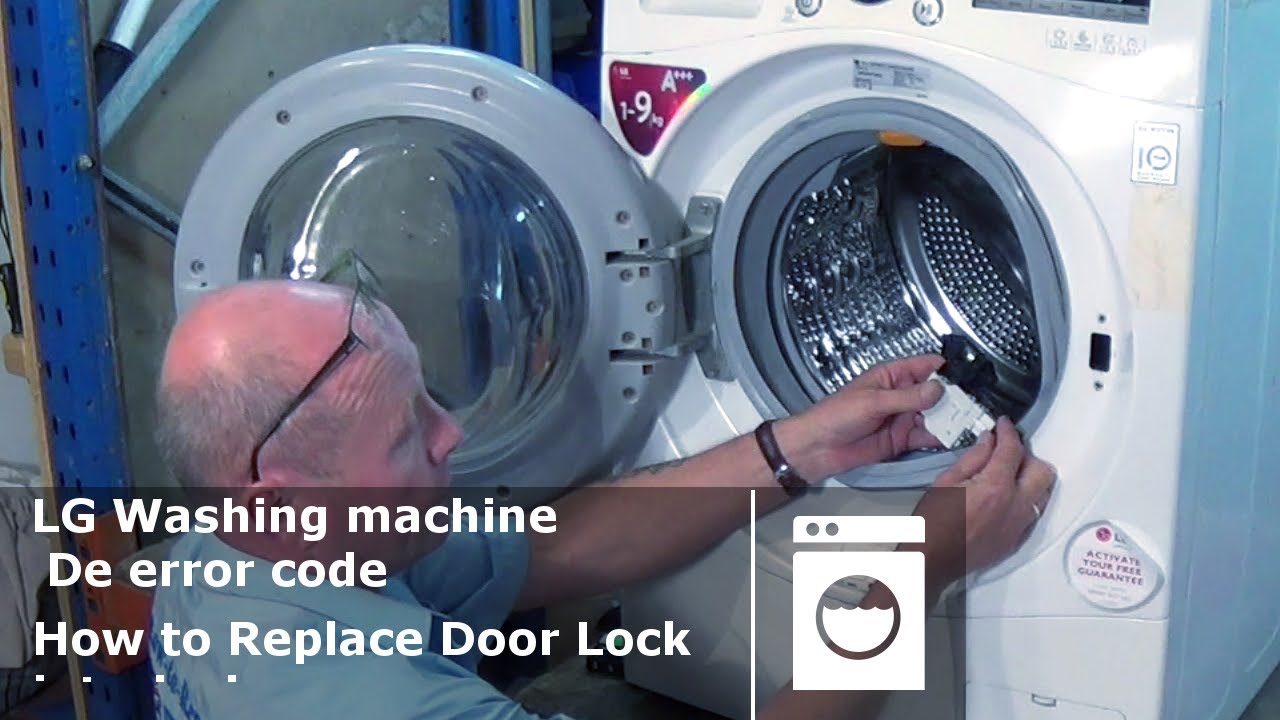
Replace The Door Lock Assembly
The door lock assembly can fail over time. If the latch and hinges are fine, the lock may be defective. Remove the old lock assembly carefully. Install a new, compatible door lock part. This repair often clears the dE error code and restores normal washer operation.
Remagnetize Or Replace Magnet On Top-load Washers
Top-load LG washers use a magnet to detect the door’s closed position. This magnet can lose strength or fall off. Try remagnetizing it with a strong magnet. If that fails, replace the magnet with a new one. This step ensures the washer senses the door properly and avoids dE errors.
Credit: www.youtube.com
Door Lock Replacement Guide
Replacing the door lock on your LG washer is a task that can solve the “dE” error code. This guide helps you replace the door lock safely and correctly. Follow each step carefully to restore your washer’s function.
Safety Precautions And Unplugging
Always unplug the washer before starting any repair. This prevents electric shock. Work in a dry area to avoid accidents. Wear gloves to protect your hands. Keep tools and parts organized for easy access.
Accessing The Door Lock
Open the washer door fully. Remove the screws around the door frame using a screwdriver. Carefully pull the door panel away from the machine. Locate the door lock assembly near the edge of the door. Take note of how the lock is fixed for reassembly.
Removing And Installing The Lock
Disconnect the wires from the old door lock gently. Unscrew the lock from its place. Take out the old lock carefully. Position the new lock in the same spot. Screw the new lock securely. Reconnect the wires to the new lock exactly as before.
Reassembling And Testing
Place the door panel back on the washer. Tighten all screws firmly. Plug in the washer and close the door. Run a short wash cycle to test the lock. Check if the “dE” error disappears. The door should lock and unlock smoothly.
When To Call A Technician
Knowing when to call a technician for your LG washer’s dE error is important. Some problems go beyond simple fixes. Professional help can save time and avoid damage. Watch for signs that require expert attention.
Persistent De Errors After Repairs
Sometimes the dE error returns even after repairs. This shows the problem is not fixed. Repeated errors can mean a deeper issue. Calling a technician helps find the root cause. They have the tools to fix stubborn problems.
Potential Control Board Issues
The control board controls the door lock and other parts. If this board fails, the dE error may appear. This is hard to diagnose without experience. A technician can test the control board properly. Replacing it requires skill and safety knowledge.
Professional Diagnostic Services
Technicians use special tools to diagnose LG washers. They check sensors, locks, and electrical parts. These tests are not easy to do at home. Professionals provide accurate results and proper repairs. Using their service ensures your washer works well again.
Preventive Maintenance Tips
Proper care of your LG washer can reduce the chances of the dE error code appearing. Preventive maintenance keeps the door and its parts working smoothly. Small steps taken regularly help avoid expensive repairs and save time.
Focus on cleaning, load management, and inspecting door parts. These actions improve the washer’s performance and extend its life.
Regular Door Seal Cleaning
The door seal collects dirt, detergent, and moisture. Cleaning it prevents mold and blockages that cause the dE error. Use a soft cloth and mild soap. Wipe the seal gently every week. Dry the seal after each wash to stop mold growth.
Avoid Overloading Washer
Overloading stresses the door lock and hinges. It also traps clothes between the door and seal. Load the washer with only the recommended amount. Give clothes space to move freely. Proper loading helps the door close tightly and avoid the dE code.
Routine Inspection Of Door Components
Check the door latch, hinges, and lock regularly. Look for cracks, bends, or loose parts. Tighten screws if needed to keep parts secure. Replace any damaged components quickly. This prevents the door from failing to lock, which triggers the dE error.
Frequently Asked Questions
How Do I Fix The Code De On My Lg Washer?
Check and remove any laundry caught in the door seal. Close the door firmly and unplug the washer for 5 minutes. Inspect and tighten the door latch or hinge. Replace the door lock if needed. Contact a technician if the error persists.
Can I Still Use My Lg Washer With A De1 Error?
You should not use your LG washer with a DE1 error. This error indicates a door lock issue preventing safe operation. Fix the door latch or lock before running the machine to avoid damage or safety risks.
Should I Call A Technician For A De Error?
Call a technician if the dE error persists after clearing obstructions, ensuring the door closes firmly, and power cycling. Faulty door locks or internal issues need professional repair.
What Is The Dde Error On My Lg Washing Machine?
The DDE error on an LG washing machine means the door isn’t locking properly. Check for obstructions, close the door firmly, and power cycle the machine. Inspect or replace the door lock if the error continues. Seek professional help if needed.
What Does The Lg Washer De Error Code Mean?
The dE error means the washing machine door is not properly closed or locked.
Conclusion
The LG washer dE code signals a door error that needs attention. Start by checking for trapped clothes or debris around the door seal. Make sure the door closes firmly and try unplugging the machine to reset it. If the error continues, inspect the door latch, hinge, or lock for damage.
Tighten loose parts or replace the door lock if necessary. Following these steps often solves the problem and gets your washer working again. Regular care helps avoid this error in the future.