
If you enjoy cold drinks with crystal-clear ice spheres, the LG ThinQ Craft Ice Maker is a luxury feature that adds a special touch to your kitchen. But what happens when this advanced ice maker stops working? For many LG refrigerator owners, a malfunctioning craft ice maker is a frustrating experience. You expect perfect ice balls for your cocktails or iced coffee, not half-frozen lumps or no ice at all. This guide will walk you through every detail: why your LG ThinQ Craft Ice Maker may not be working, how to troubleshoot the most common problems, and what you can do to fix them on your own—before calling in a repair service. If you want to understand your appliance better and get your craft ice back, keep reading.
How The Lg Thinq Craft Ice Maker Works
Understanding the craft ice maker helps you spot issues more easily. This appliance uses a separate ice mold and slow freezing process to produce round, clear ice balls—different from regular crescent or cube ice. The system includes a dedicated water line, a freezing chamber, sensors, and a motor to release the finished ice balls.
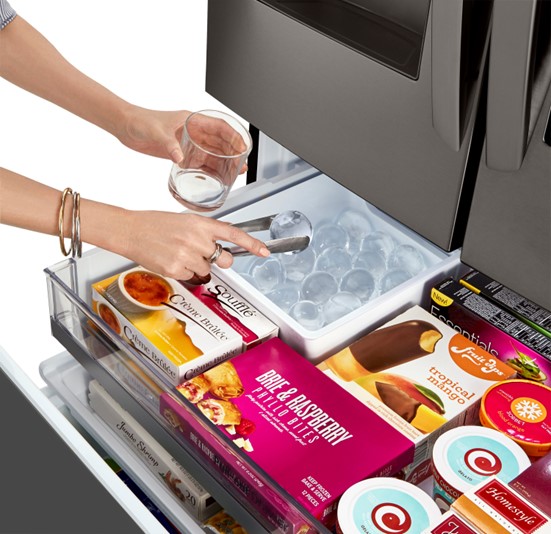
Once you select the craft ice option, water fills the mold. The ice maker then slowly freezes the water to reduce air bubbles, creating clear spheres. After freezing, a motor twists the mold and drops the finished ice balls into a special bin.
Sensors detect when the bin is full or if the ice is stuck.
Unlike standard ice makers, the craft ice process takes longer—usually 18 to 24 hours for a full batch of three ice balls. The system is controlled by the LG ThinQ app and the refrigerator’s main control panel.
Most Common Reasons The Lg Thinq Craft Ice Maker Stops Working
When the craft ice maker fails, the problem can come from many sources. Here are the most frequent causes:
- Water supply issues: Low pressure, a kinked hose, or a blocked filter can stop water from reaching the ice maker.
- Temperature too high: If the freezer is above 9°F (-13°C), ice making may slow down or stop.
- Full or jammed ice bin: If the bin is full or ice balls are stuck, new ice cannot be released.
- Sensor or control board failure: Faulty sensors can prevent the ice maker from cycling properly.
- Dirty or clogged components: Mineral buildup or dirt can block water flow or freeze sensors.
- Mechanical failure: Problems with the mold, motor, or ejector can stop production.
- Software or firmware glitches: Errors in the LG ThinQ app or the refrigerator’s firmware can affect ice production.
- User settings: The craft ice feature may be accidentally turned off or paused.
- Door not closed properly: The ice maker will not operate if the door is open or the door switch is faulty.
Each issue has unique signs and solutions, which we’ll cover in detail next.
Signs Your Lg Thinq Craft Ice Maker Is Not Working
Not all problems look the same. Here are the most common symptoms:
- No craft ice is produced for more than 24 hours.
- Only regular cubes are made; no spheres appear.
- Ice spheres are small, hollow, or cracked.
- The ice bin is empty or stuck.
- The LG ThinQ app shows error codes or warnings.
- Water leaks inside the freezer near the ice maker.
Recognizing these signs early can help you avoid bigger issues later.
Step-by-step Troubleshooting For Lg Thinq Craft Ice Maker
Start with the simplest checks before moving to advanced solutions. Here is a proven troubleshooting path:
1. Check The Water Supply
- Ensure the water line is connected securely to the fridge.
- Look for kinks, bends, or pinched hoses.
- Test the water pressure (should be at least 20 psi). Low pressure can cause slow or no ice production.
- Replace the water filter if it’s older than six months or if the flow is weak.
2. Confirm Freezer Temperature
- Set the freezer to 0°F (-18°C) for best ice production.
- Avoid setting above 9°F (-13°C); higher temperatures slow or stop ice making.
- Use a thermometer to check for accuracy.
3. Inspect The Ice Bin And Molds
- Remove the ice bin and check for stuck ice balls. Gently free any jammed ice.
- Make sure the bin is properly seated.
- Clean any frost or ice buildup from the area.
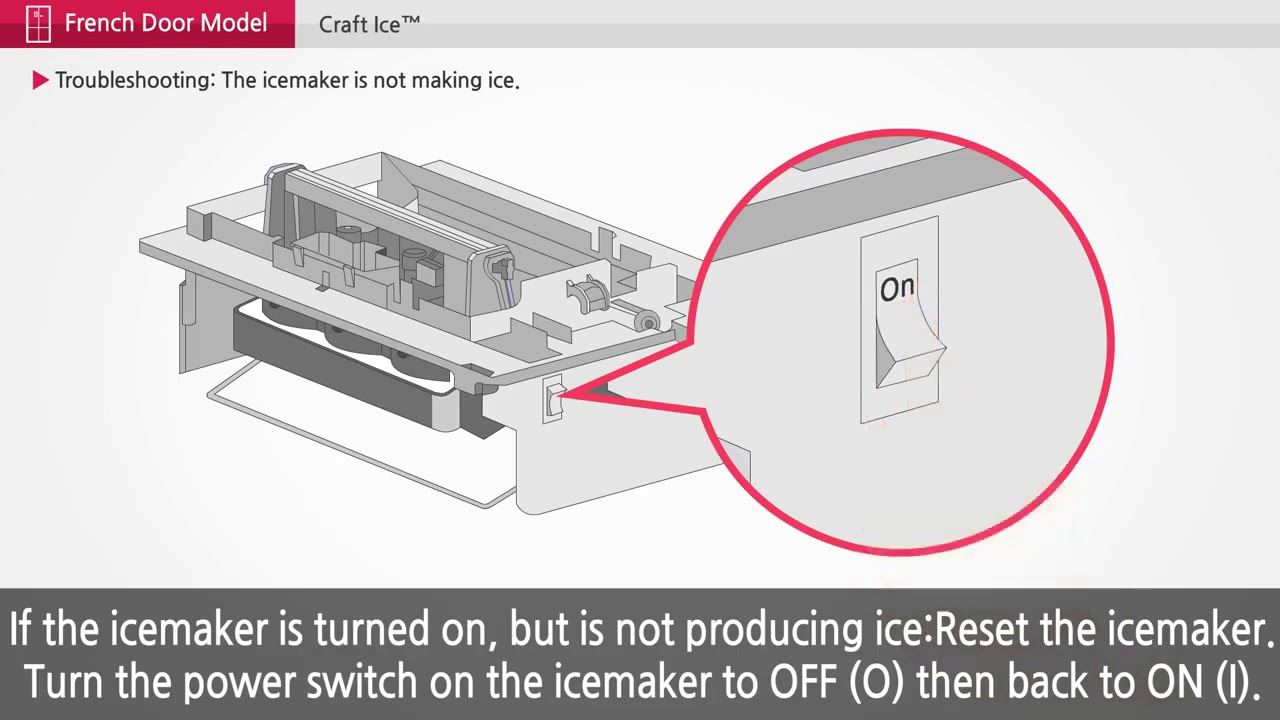
4. Reset The Craft Ice Maker
Sometimes, the system needs a reset:
- Locate the craft ice maker reset button (usually near the mold or on the side).
- Hold the button for 3–5 seconds until you hear a chime.
- Wait 24 hours to see if production resumes.
5. Clean The Ice Maker
Dirt and mineral deposits can cause blockages:
- Remove the ice bin and wipe down surfaces with warm, soapy water.
- Rinse the mold gently.
- Never use harsh chemicals or sharp tools.
6. Update The Lg Thinq App And Firmware
- Open the LG ThinQ app and check for updates.
- Follow instructions to update refrigerator firmware if available.
- Restart the app and reconnect to your fridge.
7. Check User Settings
- Confirm the craft ice feature is enabled in the app or on the control panel.
- Make sure the “Ice Plus” or “Craft Ice” option is not paused.
- If you have scheduled ice making, ensure the schedule is correct.
8. Inspect The Door
- Make sure the freezer door closes fully.
- Check if the door switch works—press it manually to test if the light turns off.
- Remove any items blocking the door.
9. Look For Error Codes
- The LG ThinQ app or the fridge display may show error codes.
- Common codes: Er IF (ice fan), Er 1F (ice maker fan), Er FF (freezer fan).
- Refer to your user manual or LG’s support page for code meanings.
10. Power Cycle The Refrigerator
- Unplug the fridge for 2 minutes, then plug it back in.
- This resets the control board and may clear software errors.
Credit: www.youtube.com
Detailed Solutions For Common Craft Ice Maker Issues
Sometimes, quick fixes don’t solve the problem. Let’s look closer at each major problem and its solution.
Water Supply Problems
A blocked or low-pressure water line is the top cause of ice maker failure. If your water filter is clogged, replace it. Most LG refrigerators use filters that last 6 months, but hard water can shorten this time. Always use LG-approved filters to avoid leaks or damage.
If the water line is frozen, unplug the refrigerator for a few hours and let the line thaw. Installing a water line heater can prevent freezing in cold climates.
Temperature Not Cold Enough
If your freezer is too warm, the ice maker cannot freeze water properly. Move foods away from the vents for better airflow. Too much food can block cold air and raise the temperature.
If the temperature display is inaccurate, the sensor may need replacing. A faulty sensor is harder to diagnose without tools, but if your fridge is not cold enough even after adjustments, consider professional help.
Stuck Or Full Ice Bin
Ice balls sometimes stick together if not used regularly. Remove the bin, separate the balls, and wipe away any frost. For best results, use craft ice often. If the bin is out of place, the sensors may not detect it and ice production will stop.
Faulty Sensors Or Control Board
The craft ice maker uses sensors to detect water level, ice position, and bin fullness. A failed sensor can stop the system from cycling. If you suspect a sensor failure, check for error codes, as most models report sensor issues.
Only experienced users should try to replace sensors; otherwise, call LG support.
Mechanical Or Mold Failure
If you hear grinding or clicking noises, the ejector or mold motor may be stuck. Gently inspect the mold for cracks or broken pieces. Do not force the mechanism. If parts are broken, order replacements from LG or an authorized dealer.
Software Or Firmware Problems
Sometimes, the LG ThinQ app loses connection or the fridge firmware has bugs. Updating the app and firmware can solve these glitches. If the problem started after a recent update, report it to LG, as they may need to patch the software.
When To Call For Professional Repair
Not all craft ice maker problems are easy to fix at home. If you notice:
- Persistent error codes even after resets
- Water leaks inside the appliance
- No ice after 48 hours of troubleshooting
- Loud grinding or burning smells
- Physical damage to the ice maker or components
It’s time to call for help. LG offers support by phone and through their website. Many repairs, especially electrical or water line issues, should be handled by a licensed technician.
Comparing Lg Craft Ice Maker With Standard Ice Makers
Knowing how the LG ThinQ Craft Ice Maker compares to regular models helps you understand its unique needs. Here’s a side-by-side look:
| Feature | LG Craft Ice Maker | Standard Ice Maker |
|---|---|---|
| Ice Shape | Round spheres | Crescent or cubes |
| Ice Production Time | 18–24 hours for 3 balls | 3–4 hours for multiple cubes |
| Water Filtration | Advanced filter needed | Basic filter or none |
| Control | App + panel | Panel only |
| Common Issues | Sensor, mold, app errors | Jams, leaks |
The craft ice maker is more sensitive to temperature, water quality, and user settings.
Preventing Problems: Maintenance Tips For Lg Craft Ice Maker
Regular care keeps your craft ice maker running smoothly. Here’s what to do:
- Change the water filter every 6 months, or sooner in hard water areas.
- Wipe down the ice bin and mold once a month with warm, soapy water.
- Keep the freezer at 0°F (-18°C) for optimal performance.
- Use the craft ice feature regularly—unused ice can clump and jam the system.
- Avoid overfilling the freezer, which blocks airflow.
- Install a surge protector to protect the electronics from power spikes.
- Check for firmware updates every 3–6 months using the LG ThinQ app.
Credit: www.classaction.org
Real-world Example: Diagnosing A Craft Ice Maker Problem
Let’s look at a real example. Sarah noticed her LG ThinQ Craft Ice Maker stopped making ice spheres after a recent move. She checked the water supply and found a kinked hose behind the fridge. After straightening it and running a reset, the ice balls returned within 24 hours. This shows that even minor issues, like a twisted hose, can stop production.
Another owner, Mike, had small, cracked ice balls. He found the freezer temperature was set at 12°F instead of 0°F. After lowering the temperature, the quality of the ice improved. These cases highlight how simple checks can solve big problems.
Common Mistakes That Cause Craft Ice Maker Failure
Many users make small mistakes that have big impacts:
- Ignoring water filter changes: Old filters reduce water flow.
- Setting the wrong freezer temperature: Above 9°F, ice making slows or stops.
- Not cleaning the ice bin: Dirt and frost can cause jams.
- Forgetting to use the craft ice feature: Unused molds can freeze together.
- Blocking freezer vents: Overpacked freezers block cold air.
- Skipping firmware updates: Old software may have bugs.
- Not seating the ice bin correctly: Sensors won’t detect the bin.
Avoiding these mistakes keeps your ice maker healthy.
Lg Thinq App: How It Helps Diagnose Ice Maker Issues
The LG ThinQ app is more than a remote control. It can:
- Show ice maker status (on/off, paused, errors)
- Send alerts if ice production stops
- Let you adjust ice making schedules and settings
- Notify you when the water filter needs changing
- Connect you to LG support for troubleshooting
If you see an error, tap the notification for more details. The app often gives solutions or links to support articles. This digital helper makes diagnosing problems much easier.
When To Replace Your Lg Craft Ice Maker
Sometimes repairs are not enough. You should consider replacing the craft ice maker if:
- It’s over 5 years old and has repeated failures.
- Replacement parts are unavailable or too expensive.
- The refrigerator control board is damaged beyond repair.
- There are frequent leaks or electrical issues.
Before replacing, check your warranty. LG refrigerators usually have a 1-year warranty, but some parts (like compressors) may have longer coverage. Always use LG-authorized replacement parts.
Cost Breakdown: Repair Vs Replacement
Repair costs vary based on the issue. Here’s a rough comparison:
| Repair/Replacement | Estimated Cost | Time Required |
|---|---|---|
| Water filter replacement | $40–$70 | 10 min |
| Ice maker reset/cleaning | $0 (DIY) | 30–60 min |
| Sensor or motor replacement | $100–$300 | 1–2 hours |
| Full ice maker replacement | $250–$450 | 2–3 hours |
| Professional service visit | $100–$200 | 1–2 hours |
DIY fixes save money, but complex repairs may need a professional.
Lg Support Resources And Warranty Information
LG offers a range of support options:
- Phone support: 1-800-243-0000 (US)
- Online chat and guides at the LG official support site
- The LG ThinQ app for self-diagnosis and repair tips
- Local authorized service centers
Warranties typically cover parts and labor for one year. Some models extend coverage for sealed systems or compressors. Always keep your purchase receipt and register your product online.
For more details on warranty and troubleshooting, visit the LG Official Support page.
Upgrades And Alternatives To Craft Ice Makers
If you find your craft ice maker unreliable, consider alternatives:
- Countertop craft ice makers: These machines sit on your counter and make round ice balls quickly.
- Ice molds: Manual silicone molds allow you to make ice spheres in your freezer.
- Professional undercounter units: More expensive, but produce larger amounts of clear ice.
These options give you flexibility if you want more or better ice production.
Frequently Asked Questions
How Long Does It Take For The Lg Thinq Craft Ice Maker To Produce Ice?
The craft ice maker usually needs 18 to 24 hours to make a full batch of three ice balls. Production is slower than standard ice makers because the process is designed to make clear, round spheres. Using the “Ice Plus” feature may speed up production slightly, but craft ice will always take longer than regular cubes.
Why Are My Craft Ice Balls Small Or Cracked?
Small or cracked ice balls are often caused by a freezer temperature that is too high, or by low water pressure. Make sure your freezer is set to 0°F (-18°C) and that the water line is not kinked or blocked. Also, old filters can reduce water flow, leading to incomplete ice formation.
Can I Use My Lg Refrigerator Without The Craft Ice Maker?
Yes, you can still use your fridge and the regular ice maker even if the craft ice maker is off or not working. The two systems are separate. You can disable the craft ice feature from the control panel or the LG ThinQ app.
How Do I Reset The Craft Ice Maker?
To reset, find the reset button on the craft ice maker assembly. Hold it for 3–5 seconds until you hear a chime. This will restart the ice making cycle. Wait 24 hours to see if normal ice production resumes.
Does The Craft Ice Maker Have A Warranty?
Most LG refrigerators include a 1-year warranty for parts and labor. Some models may cover the craft ice maker for a longer period. Check your user manual or contact LG support to confirm the specific warranty for your model.
Conclusion
Getting your LG ThinQ Craft Ice Maker back in action may take patience, but following the steps above can help you avoid expensive repairs and long waits. With the right maintenance and a little troubleshooting, you can enjoy perfect craft ice whenever you want. If you need more help, LG’s support and the ThinQ app are always good resources.