
Is your LG dishwasher showing the dreaded “AE” error code? If you’ve noticed this flashing message, you’re probably wondering what it means and how to fix it quickly before your kitchen turns into a mini swimming pool.
The good news is that you don’t need to be a repair expert to tackle this issue. You’ll learn exactly what causes the AE error, simple steps to reset your dishwasher, and how to identify leaks or other problems that might be triggering it.
Keep reading, and you’ll be able to get your dishwasher back to spotless cleaning in no time—without costly service calls or frustration.
Ae Code Meaning
The AE code on an LG dishwasher signals a water leakage issue. This error alerts you that water has pooled inside the base of the machine. The dishwasher’s safety float switch detects this water and stops the cycle to prevent damage.
Understanding the AE code helps you act quickly to fix leaks. Ignoring this error can cause more serious problems. Knowing what triggers the AE code saves time and repair costs.
What Triggers The Ae Code?
The AE code appears when water leaks inside the dishwasher’s base. Possible causes include:
- Loose or damaged hoses
- Improperly installed drain hose
- Clogged or kinked drain hose
- Excessive suds from wrong detergent
- Dishwasher not level, causing water to collect
How To Reset The Ae Code
Start by unplugging the dishwasher and turning off the water supply. Then, drain any standing water by tilting the dishwasher forward gently. Wait until the water fully drains from the base.
Next, plug the dishwasher back in to reset the error code. If the AE code does not disappear, the leak issue still exists and needs inspection.
Steps To Inspect For Leaks
Check the dishwasher base carefully for any water pooling. Inspect all hoses for cracks or loose connections. Make sure the drain hose is properly installed without bends or blockages.
Use only the recommended detergent amount to avoid excessive suds. Also, ensure the dishwasher sits level to prevent water from collecting in unwanted areas.

Credit: www.lg.com
Initial Reset Steps
The initial reset steps are crucial for addressing the LG dishwasher AE error code. This error usually indicates a leak or water overflow issue. Performing a simple reset can clear the error if the problem is minor. Start by safely disconnecting power and handling any trapped water.
These steps help prevent further damage and allow the dishwasher’s system to reset. Follow each step carefully to avoid complications. Resetting the dishwasher might fix the error temporarily, giving you time to inspect the cause.
Unplug And Drain Water
First, unplug the dishwasher from the power source. This action ensures your safety during the reset. Next, turn off the water supply connected to the dishwasher.
Now, carefully tilt the dishwasher forward to drain any water collected at the base. Removing this water stops the overflow sensor from triggering the AE error. Make sure to collect the drained water with a towel or container.
Wait And Restart
After draining the water, wait for about 5 minutes. This pause lets the dishwasher’s internal sensors reset fully. Avoid plugging it back immediately to ensure the system clears the error.
Finally, plug the dishwasher back in and turn on the water supply. Start a short cycle to check if the AE code disappears. If the error returns, further inspection of leaks or hose issues is necessary.
Common Leak Causes
Leaks often trigger the LG dishwasher AE error code. Finding the cause helps prevent damage and repeated errors. Common leak sources include water escaping from seals, hoses, or detergent issues. These leaks activate the float sensor, stopping the cycle and showing the AE code.
Check these common leak causes carefully to fix the problem. Understanding each point can save time and avoid costly repairs.
Check For Water Leaks
Look under the dishwasher for water puddles or damp spots. Inspect the door seal and edges for cracks or wear. A damaged seal lets water escape during cycles. Clean the seal to remove debris that prevents a tight close.
Inspect Drain Hose
Examine the drain hose for kinks, cracks, or loose connections. A bent or clogged hose stops water from draining properly. Water may leak back into the dishwasher base. Secure the hose tightly to avoid leaks.
Assess Detergent Use
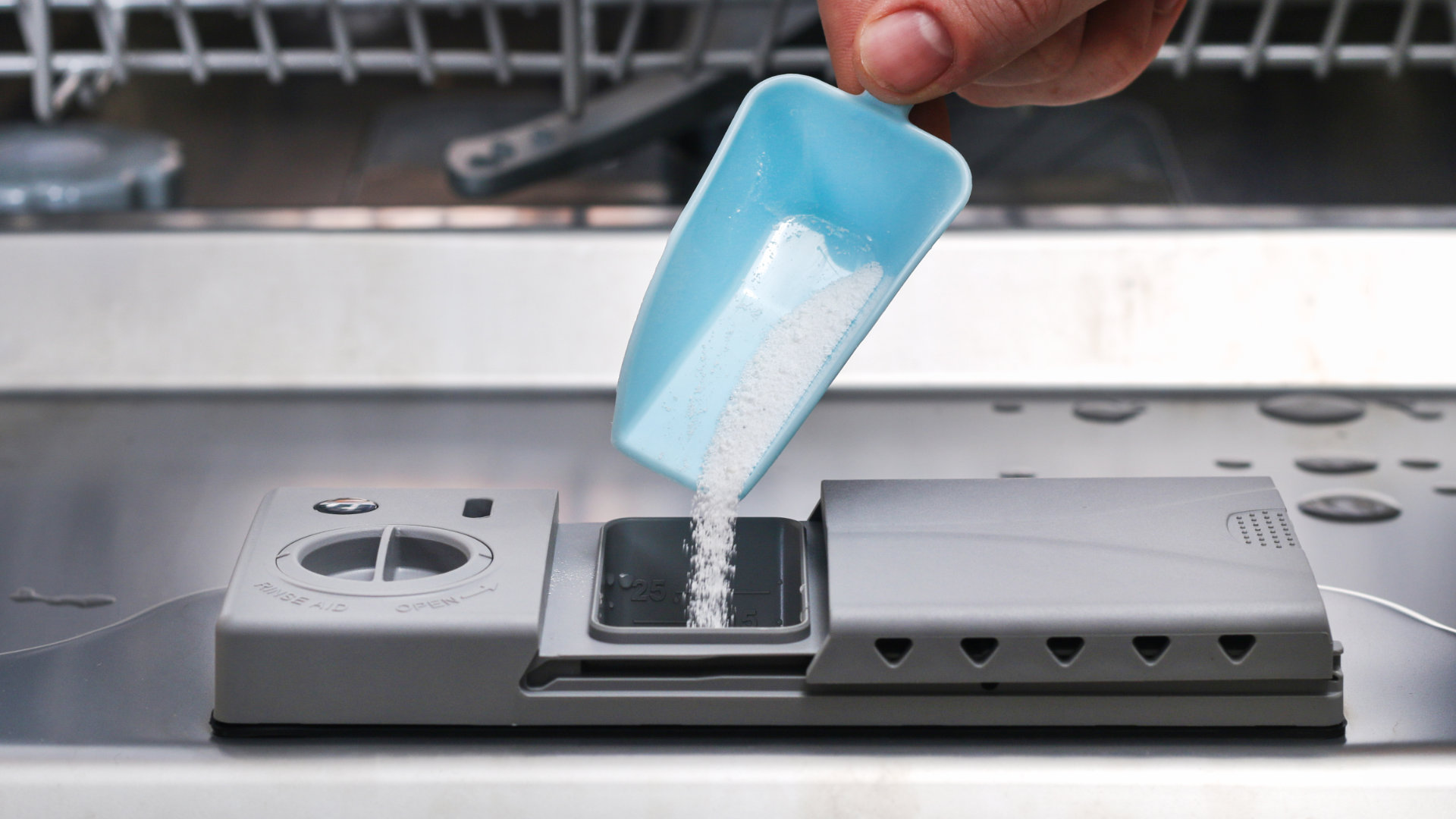
Use only dishwasher-approved detergent in the correct amount. Too much soap creates excess suds that overflow and leak. Avoid using regular dish soap or too much powder. Suds trigger the float sensor and cause the AE error.
Verify Dishwasher Level
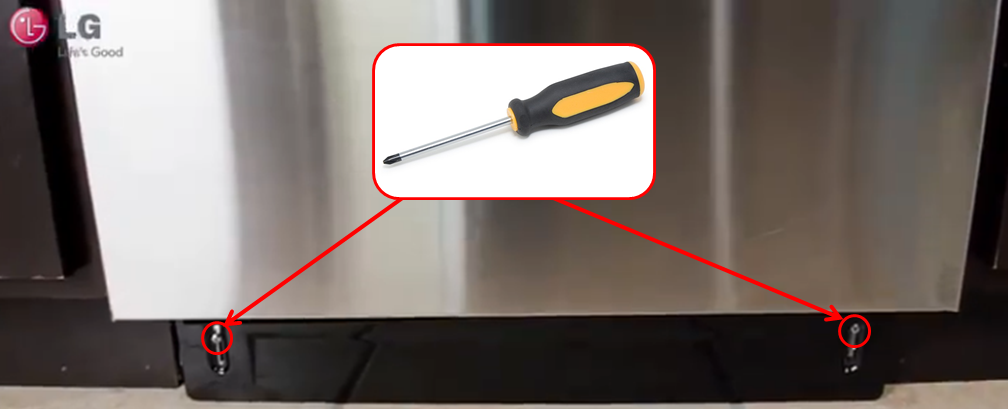
Check if the dishwasher sits flat and level on the floor. An uneven dishwasher lets water pool and leak outside. Adjust the feet to balance the machine. A level dishwasher runs smoothly and stops leaks.
Credit: applianceexpresstx.com
Manual Water Removal
Manual water removal is a key step to fix the LG dishwasher AE error code. This error often means the dishwasher detects water where it should not be. Removing water by hand stops the error temporarily. It also helps find the leak source.
Start by unplugging the dishwasher from power. Turn off the water supply to avoid spills. Next, carefully tilt the dishwasher forward to let the water drain out from the base. Wait until all water is drained before moving on.
Unplug The Dishwasher And Turn Off Water Supply
First, unplug the dishwasher from the electrical outlet. This cuts power and makes it safe to work on. Turn off the water supply valve connected to the dishwasher. Stopping water flow prevents more water from leaking inside.
Drain The Water Completely
Slowly tilt the dishwasher forward to let water drain from the base. Be gentle to avoid damaging parts. Allow all standing water to flow out. This reduces pressure on the safety float switch that triggers the AE code.
Reset The Dishwasher
After draining, plug the dishwasher back in. This resets the system and clears the error code temporarily. Run a short cycle to check if the error returns. If it does, water may still be leaking inside.
Inspect For Leaks And Other Causes
Look under and around the dishwasher for water pools. Check all hoses for cracks or kinks. Ensure the drain hose is not clogged or bent. Using the wrong detergent can cause too many suds and trigger the error. Finally, check the dishwasher’s level. An uneven dishwasher may cause water to pool inside.
Testing After Fixes
After fixing the AE code issue on your LG dishwasher, testing is essential. Testing confirms whether the repair was successful or if further action is needed. It helps avoid repeated errors and potential damage. Follow simple steps to ensure your dishwasher runs smoothly again.
Run Empty Wash Cycle
Start by running an empty wash cycle. This allows the machine to operate without water or dishes. It helps clear out any leftover water and resets the internal sensors. Running this cycle checks if the dishwasher drains and fills correctly. Listen for unusual sounds and watch for leaks during this process.
Monitor For Error Return
After the empty cycle ends, watch the dishwasher closely. Check if the AE error code appears again on the display. If the error returns, the problem may still exist or another issue might be present. Continue to inspect hoses, seals, and the float switch. Repeat testing until the error no longer shows.
Credit: www.lg.com
When To Call A Technician
The LG dishwasher AE code signals a leak inside the machine. Some problems you can fix yourself. Simple steps like unplugging and draining water help sometimes. Other times, the issue is more complex. Knowing when to call a technician saves time and prevents damage.
If the AE code stays after resetting, the leak might be serious. A professional can find hidden leaks and fix parts safely. Trying to fix complicated leaks alone can cause more harm. The technician has tools and skills for proper repairs.
Persistent Ae Code After Reset
Unplug the dishwasher and drain excess water. Plug it back in to reset. If the AE code returns, the leak is ongoing. This is a clear sign to call a technician. They will check the float switch and internal parts.
Visible Water Leaks Under Or Around The Dishwasher
Spotting water on the floor or under the dishwasher is a strong warning. Leaks may come from hoses, seals, or the door. A technician can safely inspect and replace broken parts. Avoid running the dishwasher until repairs happen.
Drain Hose Issues You Cannot Fix
Kinks or clogs in the drain hose cause leaks and error codes. Straightening or cleaning the hose helps sometimes. If the problem stays, a technician can replace or reposition the hose correctly. This avoids water damage and error repeats.
Excessive Suds Or Detergent Problems
Using wrong detergent causes suds that trigger the AE code. Rinsing the dishwasher may stop the issue temporarily. If suds keep returning, call a technician. They check the drain system and sensors to fix the root cause.
Dishwasher Not Level Or Poor Installation
An uneven dishwasher leads to water pooling and leaks. Adjusting the level may solve small leaks. When you cannot fix the level or installation, a technician’s help is best. They ensure the dishwasher sits correctly to avoid leaks and errors.
Preventing Future Ae Errors
Preventing future AE errors on your LG dishwasher helps keep it running smoothly. These errors often signal leaks or drainage issues. Taking simple steps reduces the chance of seeing this error again. Proper care and attention extend your dishwasher’s life. Follow key tips on installation, detergent use, and maintenance.
Proper Installation Tips
Install the dishwasher on a flat, stable surface. Uneven placement can cause water to pool inside. Check that all hoses connect firmly and are free from bends or kinks. Secure the drain hose at the correct height to prevent backflow. Make sure the water supply is steady and free of leaks. Proper setup avoids water escaping and triggering the AE code.
Correct Detergent Usage
Use only detergents made for dishwashers. Avoid using regular dish soap as it creates too many suds. Follow the detergent manufacturer’s instructions on the correct amount. Too much detergent leads to excessive foam. Foam can activate the leak sensor and cause the AE error. Proper detergent choice helps your dishwasher work efficiently.
Routine Maintenance Advice
Clean the dishwasher filter regularly to prevent blockages. Check and clear the drain hose of debris every few months. Inspect the door seals for cracks or damage that might cause leaks. Run a cleaning cycle with dishwasher cleaner once a month. Regular upkeep helps detect issues early and prevents AE errors from occurring.
Frequently Asked Questions
How Do I Fix My Lg Dishwasher Error Code Ae?
Unplug the LG dishwasher and tilt it to drain excess water. Check for leaks, kinked drain hose, or wrong detergent causing suds. Ensure the dishwasher is level. Plug it back in to reset. If the AE error continues, contact an authorized LG technician.
How Do I Clear The Ae Code On My Lg Washer?
Unplug the LG washer and tilt it to drain excess water. Check for leaks, kinked drain hoses, or wrong detergent use. Plug it back in to reset the AE code. If the error persists, inspect for leaks or call an authorized LG technician.
How Do I Force My Lg Dishwasher To Reset?
Unplug your LG dishwasher and turn off the water supply. Wait several minutes, then plug it back in to reset. If the error persists, check for leaks, hose issues, or detergent problems before running an empty cycle.
What Does Ae Stand For In A Dishwasher?
AE in a dishwasher stands for “Auto Error” or “Water Leakage Error. ” It signals detected water leaks or drainage issues.
What Does The Lg Dishwasher Ae Code Mean?
The AE code means the dishwasher has detected a water leak inside.
Conclusion
The LG dishwasher AE code signals a leak or overflow issue. Start by unplugging and draining excess water carefully. Check hoses for kinks or leaks and ensure the dishwasher sits level. Use only the recommended detergent to avoid suds buildup.
After fixes, run an empty cycle to test. Persistent errors may need professional help. Keeping your dishwasher well-maintained prevents future problems. Simple steps can save time and avoid costly repairs. Stay alert to small signs to keep your dishwasher running smoothly.