
Is your Keurig K Iced Essentials suddenly not working? It’s frustrating when you’re craving a refreshing iced coffee and your machine just won’t cooperate.
Maybe it’s not brewing, won’t power on, or the buttons aren’t responding. You’re not alone—and the good news is, most of these issues can be fixed quickly at home. You’ll discover simple, step-by-step solutions to get your Keurig K Iced Essentials back up and running.
Keep reading to unlock easy fixes that save you time, money, and the disappointment of missing out on your perfect iced coffee.
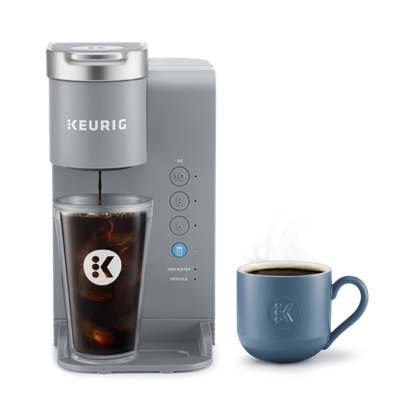
Credit: www.keurig.ca
Common Issues
The Keurig K Iced Essentials is a popular choice for quick, refreshing iced coffee. Still, it may face some common problems that stop it from working properly. Understanding these issues helps with faster troubleshooting and fixes.
This section covers frequent problems users report. These include power failures, water flow troubles, button errors, and light indicator faults. Each issue affects the machine’s performance differently.
No Power Problems
The machine may not turn on due to power supply issues. Check if the power cord is fully plugged into the outlet. Sometimes, a loose connection causes no power. Try a different outlet to rule out socket problems. If the power button feels stuck, press it firmly. A tripped circuit breaker can also cut power to the machine.
Water Not Pumping
Water flow problems often happen because of clogs. Mineral buildup inside the water lines blocks water movement. Descaling the machine regularly removes these deposits. Also, trapped air bubbles in the water reservoir can stop pumping. Running a few water-only brewing cycles helps clear blockages. Cleaning or replacing the water filter can improve flow as well.
Button Malfunctions
Buttons may stop responding or work intermittently. Dirt or spills can cause sticky buttons. Wipe the control panel gently with a damp cloth. Avoid harsh cleaners that damage the electronics. Resetting the machine by unplugging it for a few minutes can restore button function. In rare cases, a faulty control board may require professional repair.
Light Indicator Issues
Light indicators guide users during brewing. If lights blink or stay off, the machine may signal an error. Check the user manual for specific light codes. A steady light usually means normal operation. Flickering lights might indicate a power or sensor problem. Cleaning the sensors and ensuring proper water levels often fix these issues.
Basic Fixes
Basic fixes often solve common issues with the Keurig K Iced Essentials. These simple resets can restore normal function without needing tools or technical knowledge. Trying these steps can save time and avoid frustration. Follow each method carefully to get your machine working again.
Power Cycle Reset
Start by turning off the Keurig and unplugging it from the outlet. Wait for about 60 seconds to clear any residual power. Plug the machine back in and turn it on. This process refreshes the internal system. It often resolves power or responsiveness problems quickly.
Button Combination Reset
Press and hold the brew and iced buttons together for 5 to 10 seconds. Release the buttons once the lights flash or the machine restarts. This reset helps clear minor software glitches. It can fix issues like buttons not working or brewing errors.
Thermostat Reset
Unplug the Keurig and remove the water reservoir. Wait 10 minutes to allow the thermostat to cool down. Reattach the reservoir and plug the machine back in. Turn it on and let it warm up. This reset targets heating problems and temperature errors.
Cleaning And Maintenance
Regular cleaning and maintenance keep your Keurig K Iced Essentials running smoothly. Dirt, mineral buildup, and old filters cause common problems. Simple steps help avoid errors and improve coffee taste. Follow these tips to maintain your machine’s performance and extend its life.
Descaling The Machine
Mineral deposits build up inside the machine over time. These deposits block water flow and affect brewing. Use a descaling solution or white vinegar to clean the inside. Fill the water reservoir with the solution. Run several brew cycles without a pod. Repeat until the machine is clear of buildup. This process restores water flow and brewing speed.
Cleaning Water Lines
Water lines can get clogged with debris and air bubbles. This stops water from reaching the pod. Remove and rinse the water reservoir. Flush the lines by running plain water through the machine. Use a paperclip to clear the needle that punctures pods. Clean the drip tray and needle area regularly. This keeps water flowing smoothly and prevents blockages.
Replacing Water Filters
Water filters remove impurities and improve coffee taste. Filters get clogged and lose effectiveness over time. Replace the water filter every two months or as needed. Soak the new filter in water for five minutes before installing. Insert it properly in the reservoir slot. Clean filters ensure fresh water and better coffee quality.

Credit: cheltenhamnaacp.com
Advanced Troubleshooting
Advanced troubleshooting helps fix Keurig K Iced Essentials issues beyond basic steps. It digs deeper into problems that simple resets cannot solve. This section guides you through thorough fixes to get your machine working again.
Factory Reset Process
Start by performing a factory reset on your Keurig K Iced Essentials. It clears all settings and errors. To reset, unplug the machine and wait for one minute. Plug it back in and press the power button. Hold the brew button for five seconds until the light flashes. Release the button and wait for the machine to restart. This process often fixes software glitches and resets internal controls.
Checking Internal Components
Inspect the internal parts if the reset did not help. Open the water reservoir and check for blockages or mineral buildup. Clean the water line with a descaling solution. Look inside the machine for loose or damaged wires. Check the pump by listening for strange noises during brewing. Replace any worn-out parts to restore function. This step ensures mechanical and electrical components work properly.
When To Contact Support
Contact Keurig support if problems continue after advanced troubleshooting. They provide expert advice and repair options. Have your model number and purchase details ready. Support can guide you through warranty claims or direct you to authorized service centers. Do not attempt major repairs yourself to avoid voiding the warranty or causing more damage.
Preventive Tips
Preventing issues with your Keurig K Iced Essentials keeps your coffee maker working smoothly. Regular care stops many common problems before they start. Follow these simple tips to extend your machine’s life and enjoy perfect iced coffee every time.
Regular Cleaning Schedule
Clean your Keurig every week. Remove and wash the water reservoir and drip tray. Use a soft cloth to wipe the exterior. Run a descaling cycle monthly using a descaling solution. This removes mineral buildup inside the machine. Clean the needle that punctures the K-Cup gently with a paperclip. This avoids clogs and keeps water flowing properly.
Using Filtered Water
Always use filtered or bottled water. Tap water has minerals that cause scale buildup. Filtered water reduces deposits inside the machine. This helps prevent clogs and extends the brewer’s life. It also improves the taste of your iced coffee. Avoid using distilled water as it can harm some parts.
Proper Storage Practices
Store your Keurig in a dry, cool place. Avoid areas with high humidity or direct sunlight. If not using for a long time, empty the water reservoir. Dry all parts completely before storing. Keep the machine covered to prevent dust buildup. Proper storage prevents mold and electrical issues.

Credit: www.walmart.com
Frequently Asked Questions
How To Reset Keurig K Essentials?
To reset Keurig K Essentials, unplug the machine, wait 5 minutes, then plug it back in. Press and hold the power button for 5 seconds. Release and power on the brewer. This clears minor glitches and resets the system.
Why Is My Keurig K Essentials Not Pumping Water?
Your Keurig K Essentials may not pump water due to mineral buildup or clogged lines. Descale the machine, soak the water filter in vinegar, and run a water-only brew cycle to clear blockages or air bubbles.
How Do I Force My Keurig To Reset?
To force reset your Keurig, unplug it, wait 30 seconds, then plug it back in and power on. For some models, press specific button combos after plugging in. If it won’t power on, locate and press the internal thermostat reset button.
Why Does My Keurig Turn On But Not Brewing?
Your Keurig turns on but doesn’t brew likely due to clogged water lines or a faulty pump. Descale the machine to clear mineral buildup. Check the water reservoir for proper placement and refill if empty. Perform a power reset by unplugging, then plugging back in to fix glitches.
Why Is My Keurig K Iced Essentials Not Turning On?
Check if the brewer is properly plugged into a working outlet. A power interruption or faulty cord may cause no power. Try resetting the machine by unplugging it for a minute.
Conclusion
Troubles with your Keurig K Iced Essentials can feel frustrating. Simple steps like resetting or cleaning often fix the issue. Checking water lines and descaling helps maintain smooth brewing. Keep the machine clean and follow basic troubleshooting tips. A little care extends your coffee maker’s life.
Enjoy iced coffee without long delays or errors. Stay patient and try the easy fixes shared here. Your perfect iced coffee is just a few steps away.