
If your Kenmore oven suddenly shows the F10 error code and starts beeping, you’re probably feeling frustrated and unsure what to do next. This error often signals a problem with your oven’s temperature sensor or control board, which can disrupt your cooking and cause safety concerns.
But don’t worry—you’re in the right place to understand exactly what the F10 error means, why it happens, and how you can fix it. Keep reading, and you’ll learn simple steps to troubleshoot the issue yourself or know when it’s time to call in a professional.
Let’s get your oven back to working perfectly without the stress and confusion.
F10 Error Code Causes
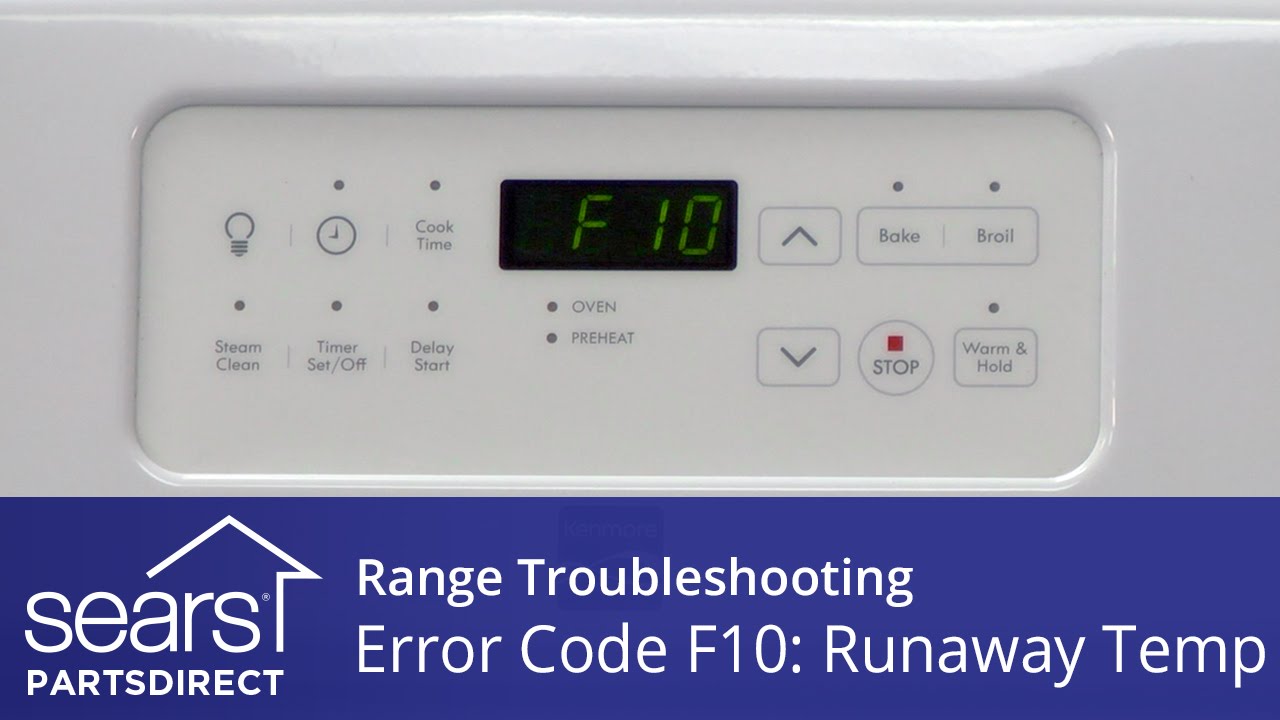
The F10 error code on a Kenmore oven signals a temperature control problem. This code often appears with beeping sounds. It means the oven’s temperature is not behaving as expected. Several parts can trigger this issue. Understanding these causes helps in fixing the oven quickly and safely.
Some causes are simple, like loose wires. Others might need part replacements. Knowing the exact reason saves time and money on repairs.
Runaway Temperature Issues
A runaway temperature happens when the oven heats uncontrollably. It can get too hot without stopping. This issue can damage food or cause safety risks. Often, the oven’s thermostat fails to regulate heat properly. This failure causes the temperature to rise beyond set levels.
The control system tries to correct this but can’t. When the oven senses this, it shows the F10 error code. The oven may beep to alert you of the danger.
Faulty Temperature Sensor
The temperature sensor monitors oven heat. It sends data to the control board. If the sensor breaks or gives wrong signals, the oven cannot control heat. This causes the F10 error code to appear. The sensor looks like a thin metal rod inside the oven cavity.
Damage or loose wiring can cause sensor failure. Testing the sensor’s resistance helps find issues. Replacing a bad sensor often solves the problem.
Control Board Malfunction
The control board manages oven functions and temperature. A damaged control board may misread signals or fail to stop heating. This malfunction leads to runaway heat and the F10 error code. Signs include burning smells or visible damage on the board.
Fixing control board problems usually needs professional help. Replacing the board restores proper oven operation and stops errors.
Keypad And Control Panel Problems
Sometimes, the keypad or control panel causes false error codes. Stuck buttons or moisture can confuse the oven’s control system. This can trigger the F10 error code and beeping sounds.
Cleaning the control panel gently removes dirt and moisture. Checking for stuck keys also helps. If problems persist, the control panel may need repair or replacement.
Credit: www.youtube.com
Initial Reset Steps
Facing the Kenmore oven F10 error code and beeps can be frustrating. Start with simple reset steps before trying complex fixes. These initial actions often clear minor glitches and get the oven back to work.
Follow these steps carefully to reset your oven safely and effectively.
Power Off And Cool Down
Begin by turning off the oven. Unplug it from the wall outlet or switch off the power at the circuit breaker. This cuts all power to the oven and stops any ongoing processes.
Let the oven cool down completely. This helps avoid any damage and allows the internal parts to reset properly.
Circuit Breaker Reset
Locate the circuit breaker that controls your oven’s power. Flip it off to cut electricity. Wait about 30 seconds and then flip it back on.
This action resets the oven’s main control board. It can clear error codes like F10 and stop the beeping sound.
Waiting Period Before Restart
After restoring power, wait a few minutes before turning the oven back on. This pause lets the control board fully reset and stabilize.
Once the wait is over, turn the oven on and check if the error code and beeps are gone. If the problem remains, further troubleshooting may be needed.
Temperature Sensor Check
The temperature sensor plays a key role in your Kenmore oven’s performance. It measures the oven’s heat and sends data to the control board. A faulty sensor can cause the F10 error code and beeping sounds. Checking the temperature sensor helps find this problem fast and avoid costly repairs. Follow these steps to inspect and test the sensor carefully.
Locating The Sensor
The temperature sensor usually sits inside the oven cavity. Look at the back wall, near the top. It looks like a thin metal rod with wires attached. Find it before turning off the power to your oven. Always disconnect the oven from electricity to stay safe.
Visual Inspection
Check the sensor for any visible damage. Look for cracks, bends, or burn marks. Examine the wires connected to the sensor. Loose or broken wires can cause errors too. A clean and intact sensor should have no signs of wear or damage.
Resistance Testing
Use a multimeter to test the sensor’s resistance. Set the meter to the ohms setting. Disconnect the sensor’s wires carefully. Touch the meter probes to the sensor terminals. A normal sensor shows about 1,100 ohms at room temperature. Readings far from this value mean the sensor is faulty.
Sensor Replacement
Replace the sensor if it fails the resistance test or looks damaged. Order the exact part for your Kenmore oven model. Turn off power before removing the old sensor. Unscrew it from the oven wall and disconnect wires. Install the new sensor and reconnect wires securely. Restore power and test the oven to ensure the error is gone.
Control Board Inspection
The control board is the brain of your Kenmore oven. It manages all oven functions. Inspecting this board helps find causes of the F10 error code and beeps. A careful inspection can spot wiring issues or physical damage. This prevents further problems and costly repairs. Follow these simple steps to check the control board safely and effectively.
Checking Wiring Connections
Start by turning off the oven power. Unplug the oven or switch off the breaker. Look closely at all wiring connected to the control board. Check for loose wires or connectors. Make sure each wire fits snugly in its terminal. Wiggle wires gently to find any hidden faults. Faulty wiring can cause error codes and strange beeping sounds.
Signs Of Damage Or Burn Marks
Look for burn marks or discoloration on the control board. Burn marks show overheating or short circuits. Small black spots or melted parts are serious warning signs. Also, check for cracked or swollen components. Any visible damage means the board is not working properly. Clean dust or debris carefully before inspecting again. Damage often causes the F10 error and repeated beeps.
When To Replace The Control Board
Replace the control board if wiring is fine but errors continue. Physical damage or burn marks mean replacement is needed. Also, if the oven still beeps after resets, the board may be faulty. Control board replacement is a job for a professional technician. Using a damaged board risks further oven failure. Timely replacement restores oven function and stops error codes.
Control Panel Maintenance
Knowing when to call a technician for the Kenmore oven F10 error code and beeps is important. Some problems need expert help to avoid damage or injury. Simple checks and resets can be done at home, but certain issues require a professional. This section explains key reasons to contact a technician.
Complex Repairs
Some repairs need special skills and tools. Replacing the electronic control board or fixing wiring issues can be tricky. These tasks involve opening the oven and handling electrical parts. A technician has the training to do this safely and correctly. Avoid trying complex fixes on your own to prevent further damage.
Safety Considerations
Ovens run on high voltage electricity and get very hot. Faulty parts may cause electric shocks or fires. If the oven shows the F10 error and keeps beeping, it could signal a serious problem. Do not ignore safety risks. Calling a technician ensures the repair meets safety standards and protects your home and family.
Professional Diagnostic Tools
Technicians use special tools to find the exact cause of the F10 error. They can test sensors, wiring, and control boards accurately. These tools give precise readings that help diagnose hidden faults. DIY methods often miss subtle issues. Professional diagnostics lead to faster and more reliable repairs.
When To Call A Technician
Preventing the Kenmore oven F10 error code and beeps requires simple care and attention. Following basic tips can help keep your oven working well. These steps reduce the chance of errors and extend your oven’s life. Use these preventive tips to avoid the common causes of the F10 error.
Regular Maintenance
Clean your oven regularly to remove grease and food residue. Dirt buildup can cause sensor issues. Check the temperature sensor for damage or dirt. Replace any worn or broken parts quickly. Inspect wiring connections to ensure they are tight and undamaged. Schedule professional check-ups to keep the control board in good condition.
Avoiding Overheating
Do not use the oven at very high temperatures for too long. Overheating can damage the sensor and control board. Allow the oven to cool down between long cooking sessions. Avoid blocking oven vents to ensure proper airflow. Use cookware that suits the oven’s temperature limits. These steps help prevent overheating and sensor failure.
Safe Usage Practices
Follow the user manual instructions carefully. Do not force buttons or use the control panel with wet hands. Avoid slamming the oven door, which can damage internal parts. Use the oven only for cooking, not for storage. Turn off the oven and unplug it during cleaning or repairs. Safe use prevents many common errors and beeps.

Credit: www.youtube.com
Frequently Asked Questions
How To Fix F10 Error On Kenmore Oven?
Turn off and unplug the oven or flip the circuit breaker. Reset the oven by restoring power after two minutes. Check the temperature sensor for damage or incorrect resistance and replace if faulty. Inspect sensor wiring for loose connections. If all is fine, the control board may need professional replacement.
Why Is My Oven Beeping And Saying F10?
Your oven beeps and shows F10 due to a faulty temperature sensor or control board. Reset power first. Check and replace the sensor if needed. Call a technician if the error persists.
How To Fix F10 Error Code?
Turn off the oven and unplug it or flip the circuit breaker. Wait two minutes, then restore power. Check the temperature sensor for damage or loose wires. Test sensor resistance and wiring. Replace the sensor or control board if faulty.
Call a technician if unsure or problems persist.
How To Get Kenmore Oven To Stop Beeping?
Turn off the oven and unplug it or switch off the circuit breaker. Wait two minutes, then restore power to reset the oven. Check the temperature sensor and wiring for damage. Replace faulty parts or call a professional if beeping continues.
What Does The Kenmore Oven F10 Error Code Mean?
The F10 error shows a temperature sensor or control board problem in the oven.
Conclusion
The Kenmore oven F10 error code signals a temperature problem inside. Start by turning off power and resetting the oven. Check the temperature sensor for damage or loose wires next. If the sensor looks fine, inspect the wiring and control board carefully.
Replace any faulty parts to fix the error. Regular cleaning of the control panel helps prevent issues. When unsure, ask a professional technician for help. Following these steps keeps your oven working safely and efficiently.