
Is your UPS really protecting your valuable devices, or is it running on borrowed time? Knowing when your UPS battery needs replacing can save you from unexpected power failures and costly data loss.
You might notice warning lights, hear persistent beeping, or find your backup time shrinking. But how do you tell for sure? In this guide, you’ll discover simple signs and easy tests that help you spot when it’s time to replace your UPS battery — before it’s too late.
Keep reading to protect your equipment and keep your power backup reliable.

Credit: nationwidepower.com
Ups Battery Lifespan
A UPS battery is essential for providing backup power during outages. Knowing its lifespan helps avoid unexpected failures. Batteries wear out over time and lose their ability to hold a charge. Monitoring battery health keeps your equipment safe and running smoothly.
Understanding how long a UPS battery lasts guides timely replacements. It prevents downtime and protects sensitive electronics from damage.
Typical Battery Life Expectancy
Most UPS batteries last between three and five years. This period varies depending on the battery type and usage. Sealed lead-acid batteries are common in UPS units and usually fall within this range. Some high-quality batteries may last longer with proper care.
Battery life decreases naturally as the battery ages. After a few years, the backup time shortens and performance drops. Regular testing can reveal if the battery still meets your needs.
Factors Affecting Battery Life
Heat is a major factor that reduces battery life. Batteries kept in hot environments degrade faster than those in cool places. Avoid placing UPS units near heat sources or in direct sunlight.
Frequent full discharges also shorten battery lifespan. Deep discharging stresses the battery and reduces its cycles. Try to keep the battery charged and avoid running it down completely.
Power quality impacts battery health. Frequent power surges or outages cause more charge-discharge cycles. This wears out the battery quicker than steady power supply.
Regular maintenance extends battery life. Checking connections, cleaning terminals, and testing voltage helps catch issues early. A well-maintained battery lasts longer and performs better.
Common Battery Issues
UPS batteries power your devices during outages. Over time, they wear out and show signs of failure. Recognizing common battery issues helps prevent unexpected shutdowns. Early detection protects your equipment and data.
Battery Swelling And Physical Damage
Swollen batteries look bloated or misshapen. This happens due to internal chemical reactions. Physical damage like cracks or leaks also signals battery failure. Such issues can cause safety hazards and reduce battery life.
Reduced Backup Runtime
The UPS runs for a shorter time than before. This means the battery holds less charge. Reduced runtime often indicates an aging or failing battery. Testing the battery capacity can confirm the problem.
Frequent Ups Alarms And Warning Lights
The UPS sounds alarms or flashes warning lights often. These alerts warn of battery problems or failures. Ignoring alarms can lead to sudden power loss. Check the battery status and replace it if needed.
Testing Ups Battery Health
Testing the health of your UPS battery helps ensure reliable backup power. Regular checks prevent unexpected failures. Several simple methods reveal the battery’s condition. These tests help decide if replacement is necessary.
Using A Multimeter
A multimeter measures the battery’s voltage directly. First, turn off and unplug the UPS. Open the battery compartment carefully. Set the multimeter to DC voltage mode. Touch the probes to the battery terminals. Compare the reading to the battery’s rated voltage. A significantly lower voltage means the battery is weak or dead. Repeat the test after charging the battery fully.
Built-in Self-test Features
Many UPS units have a self-test button. Press this button to start the test. The UPS checks the battery’s ability to hold and deliver power. Listen for alarms or watch indicator lights during the test. A fail signal or warning light means the battery has issues. Run this test regularly for ongoing battery health monitoring.
Performing Runtime Tests
Runtime tests show how long the battery supports your devices. Disconnect the UPS from the power source. Keep the connected devices running on battery power. Use a timer to measure how long the UPS lasts. Short runtime compared to the original specification signals battery wear. This test gives a clear idea of real-world battery performance.
Credit: www.perfectupsbattery.com
Signs To Replace Ups Battery
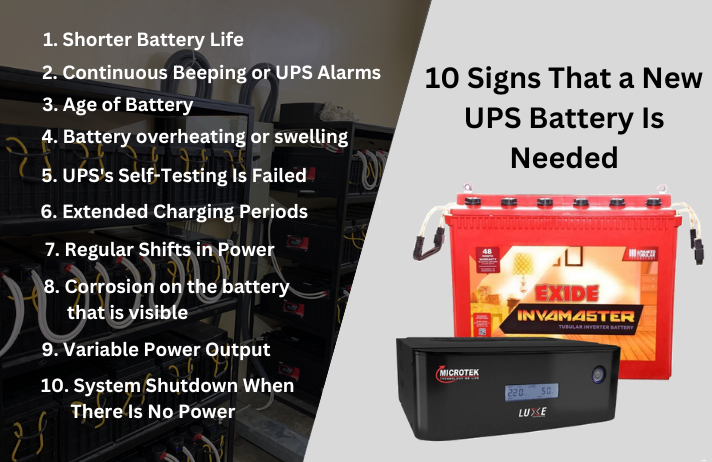
Knowing when to replace your UPS battery helps avoid sudden power failures. UPS batteries lose efficiency over time and can fail without notice. Watching for specific signs ensures your equipment stays protected and powered.
Check the UPS regularly for warning signals. Early detection saves you from data loss and hardware damage. The following signs show when a UPS battery needs replacing.
Audible Beeping Sounds
UPS units use beeping sounds to alert users of battery problems. Continuous or repeated beeping often means the battery is weak. This sound warns you to test or replace the battery soon. Ignoring these beeps risks sudden shutdowns.
Visual Alert Indicators
Most UPS devices have lights to signal battery status. A blinking or red light usually signals a battery issue. These visual alerts help you spot problems quickly. Always check your UPS manual for specific indicator meanings.
Battery Age And Usage Cycles
UPS batteries have a limited lifespan, usually 3 to 5 years. Frequent power outages shorten battery life by using more cycles. If your battery is old or used often, its performance drops. Replace the battery to keep your UPS reliable and safe.
Extending Battery Life
Extending the life of your UPS battery saves money and ensures reliable power backup. Proper care can delay the need for replacement. Simple steps help keep the battery healthy and efficient over time.
Optimal Temperature Conditions
UPS batteries work best in cool, stable environments. High temperatures speed up battery wear. Avoid placing the UPS near heat sources or in direct sunlight. Ideal temperatures range between 20°C and 25°C (68°F to 77°F). Too cold conditions also reduce battery performance. Maintain a dry area with good airflow around the UPS.
Avoiding Deep Discharges
Deep discharges shorten battery lifespan significantly. Try to keep the battery charge above 50% whenever possible. Frequent full discharges cause internal damage. Use the UPS regularly to keep the battery active but avoid running it down completely. Charge the battery soon after a power outage to restore its capacity.
Regular Maintenance Tips
Check the battery status often to spot problems early. Clean battery terminals and connections to prevent corrosion. Test the battery voltage with a multimeter every few months. Replace the battery if it shows swelling or leaks. Keep firmware and UPS software updated for better battery management.

Credit: unifiedpowerusa.com
Battery Replacement Process
Replacing a UPS battery is important to keep your device working well. The battery replacement process is simple but requires care. Follow clear steps to ensure safety and proper function. Understanding this process helps you avoid damage and downtime.
Choosing The Right Replacement Battery
Pick a battery that matches your UPS model exactly. Check the voltage and capacity ratings. Use batteries from trusted brands for reliability. Avoid cheap or unverified batteries. They may cause damage or fail quickly. Consult the UPS manual or manufacturer website for specifications.
Safe Removal And Installation
Turn off and unplug the UPS before starting. Open the battery compartment carefully. Disconnect the old battery’s terminals, noting positive and negative ends. Remove the old battery gently to avoid damage. Insert the new battery, connecting the terminals correctly. Close the compartment and secure it. Plug in and power on the UPS to test the new battery.
Disposal Of Old Batteries
Old UPS batteries contain harmful chemicals and must be disposed of properly. Do not throw them in regular trash. Take them to a recycling center or battery disposal site. Many stores and recycling programs accept used batteries. Proper disposal helps protect the environment and complies with local laws.
Frequently Asked Questions
How Do I Know If My Ups Battery Is Still Good?
Check for frequent alarms, shorter backup time, or warning lights on your UPS. Test battery voltage with a multimeter. Replace batteries older than five years.
What Is The Lifespan Of A Ups Battery?
A UPS battery typically lasts 3 to 5 years. High temperatures and frequent discharges reduce its lifespan. Regular maintenance extends battery life. Replace it if alarms sound or backup time shortens noticeably.
How Often Do You Need To Replace An Ups Battery?
Replace a UPS battery every 3 to 5 years or sooner if alarms sound, runtime shortens, or physical damage appears.
How To Check Battery Health In Ups?
Check UPS battery health by running the built-in self-test or measuring voltage with a multimeter. Watch for warning lights or alarms. Replace batteries after five years or if backup time significantly drops.
How Long Does A Ups Battery Usually Last?
A UPS battery typically lasts 3 to 5 years depending on usage and environment.
Conclusion
A UPS battery shows clear signs when it needs replacing. Frequent alarms or warning lights mean trouble. Shorter backup times also signal a weak battery. Physical damage or swelling never lies. Keep the UPS cool and dry to help battery life.
Regular checks catch problems early and save headaches. Replacing the battery on time protects your devices. Don’t wait for a full failure to act. Stay alert and keep your power backup reliable.