
Are you finding it tricky to adjust the power level on your Samsung microwave? Knowing how to set the right power level can make a huge difference in how your food cooks—whether you want to gently defrost, heat evenly, or cook thoroughly.
If you’ve ever ended up with cold spots or overcooked edges, this guide is for you. In the following steps, you’ll learn exactly how to change the power settings easily and quickly, so you can get perfect results every time.
Keep reading to unlock the full potential of your Samsung microwave and cook smarter, not harder.
Credit: www.samsung.com
Power Levels And Their Uses
Understanding power levels on your Samsung microwave helps you cook food evenly and safely. Each power level controls how much energy the microwave uses. Adjusting power settings prevents overcooking or undercooking your meals. Using the right power level enhances texture and flavor. It also saves energy and keeps your microwave in good condition.
What Power Levels Mean
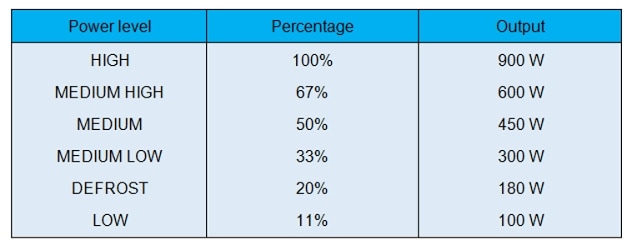
Power levels show the strength of microwave heating. Level 10 means full power, cooking food quickly. Lower levels reduce power, allowing gentler cooking. For example, level 5 uses half power, good for simmering or softening. Levels range from 1 to 10 on most Samsung models. Each step changes how fast or slow the microwave cooks food.
When To Use Different Settings
Use high power for boiling water or reheating leftovers fast. Medium power is best for cooking vegetables or melting cheese without burning. Low power works well for defrosting frozen food gently. Use the lowest setting to keep food warm without drying it out. Different foods need different power levels for best results. Adjust power based on food type and cooking time.
Locating Controls On Samsung Microwaves
Understanding the controls on your Samsung microwave helps you set the power level easily. Samsung microwaves have a user-friendly design. Controls are grouped clearly for quick access. Knowing where each button and display is located saves time. It also reduces cooking errors and improves meal results.
Keypad Layout
The keypad on Samsung microwaves has numbered buttons from 0 to 9. These buttons let you enter cooking time and power levels. There are also special function keys like “Power Level,” “Start,” and “Stop.” The “Power Level” button lets you change microwave strength. Each button is labeled with clear text or icons. This layout makes it simple to find the right control.
Display Panel Functions
The display panel shows cooking time, power level, and other settings. It uses clear numbers and letters for easy reading. When you press the “Power Level” button, the display shows the current power setting. The display also indicates if the microwave is running or paused. This helps you monitor cooking progress at a glance. Bright and clear, the panel guides you through the cooking process.
Step-by-step Power Level Adjustment
Adjusting the power level on your Samsung microwave is simple and quick. This step-by-step guide will help you cook your food just right. Changing the power level can prevent overcooking or undercooking. Follow these easy instructions to set the power level accurately.
Entering Cooking Time
First, press the number buttons to enter the cooking time. For example, press 3-0 for 30 seconds. Make sure to input the correct time for your recipe. The time will show on the microwave display clearly.
Selecting Power Level
Next, press the “Power Level” button on your microwave. A number pad will appear or the display will show options. Choose the power level from 1 to 10, where 10 is the highest power. Select a lower number for gentle cooking or defrosting.
Starting The Microwave
Finally, press the “Start” button to begin cooking. The microwave will run at the power level you set. You can stop or pause anytime by pressing the “Stop” button. This method ensures your food cooks evenly and safely.
Tips For Cooking With Power Levels
Adjusting power levels on your Samsung microwave helps cook food evenly and correctly. Using the right power setting prevents food from burning or staying cold inside. Understanding how to use power levels improves your cooking results.
Avoiding Overcooking
High power cooks food quickly but can cause overcooking. Use medium or low power for delicate foods like fish or eggs. Stir food halfway through cooking to heat it evenly. Check food often to prevent burning. Setting the power level lower helps keep food moist and tender.
Defrosting And Reheating Tips
Defrosting on low power thaws food without cooking edges. Use the defrost setting or set power to 30%. Turn or flip food during defrosting for even thawing. For reheating, choose medium power to warm food gently. This stops hot spots and keeps texture fresh. Cover food with a microwave-safe lid to keep moisture inside.
Troubleshooting Power Level Issues
Power level issues can disrupt cooking and cause uneven heating. Troubleshooting helps fix these problems quickly. Simple checks often solve the issue without professional help. Focus on basic steps to restore proper microwave function.
Resetting The Microwave
Unplug the microwave from the power outlet. Wait for about one minute before plugging it back in. This resets the internal system and clears minor errors. After resetting, try setting the power level again. This step often fixes power level glitches.
Checking Door Latch And Panel
Ensure the microwave door closes properly. A loose or broken latch can stop the microwave from working correctly. Check the door panel for any damage or dirt. Clean the latch area gently to ensure it locks securely. Proper door closure is crucial for power level settings to work.
Cleaning And Maintenance
Clean the microwave interior regularly to avoid food buildup. Wipe the control panel with a soft, damp cloth. Dirt on buttons can prevent correct power level selection. Also, check the vents for dust and clean them carefully. Good maintenance supports smooth microwave operation.

Credit: www.youtube.com
Customizing Settings For Best Results
Customizing the power level on your Samsung microwave helps you cook food evenly and preserve its texture. Different foods need different heat intensities. Learning to adjust power settings can improve your meal quality and reduce overcooking or undercooking. Follow simple steps to tailor the microwave settings to your recipe requirements for the best results.
Using Preset Cooking Modes
Samsung microwaves come with preset cooking modes designed for common foods. These modes automatically select the best power level and time. Choose a preset mode like popcorn, beverage, or frozen dinner for quick and easy cooking. The microwave adjusts power to avoid overheating or drying out your food. Using these modes saves time and ensures consistent results.
Adjusting Power For Recipes
Many recipes need specific power levels for perfect cooking. Use the microwave’s power level button to change settings manually. Enter the cooking time, press the power level button, then select a level from 1 (low) to 10 (high). Low power melts chocolate or softens butter. Medium power cooks casseroles or reheats leftovers. High power heats food quickly but can cause uneven cooking. Adjust power based on food type and texture for best results.

Credit: www.wikihow.com
Frequently Asked Questions
How Do I Change The Power Level On My Samsung Microwave?
Press the “Power Level” button, enter a number from 1 (low) to 10 (high), then press “Start” to set it.
How Do I Set The Power Level On My Microwave?
Enter the cooking time using the number pad. Press the “Power Level” button. Select a level (1-10). Press “Start” to cook.
What Is The Default Power Level For A Samsung Microwave?
The default power level for a Samsung microwave is 10, which means full power. This setting ensures quick and efficient cooking.
How To Reset Samsung Microwave?
Press and hold the “Stop/Clear” button on your Samsung microwave for about three seconds. This resets the control panel and clears errors. Use this to fix unresponsive buttons or unlock the control lock.
How Do I Change The Power Level On My Samsung Microwave?
Press the Power Level button, enter a number (1-10), then start cooking.
Conclusion
Setting the power level on your Samsung microwave is simple and quick. Use the number keypad to choose the right power for your food. Adjusting power helps cook meals evenly and avoid overcooking. Remember to press the start button after setting the time and power.
Practice makes perfect, so try different levels to find what works best. Enjoy cooking with more control and better results every time.