
Is your Samsung refrigerator ice maker not working like it used to? You’re not alone, and the good news is that resetting it is often a simple fix you can do yourself.
Imagine enjoying perfectly chilled drinks again without the hassle of calling a technician or waiting for repairs. In this guide, you’ll discover easy, step-by-step instructions to reset your Samsung ice maker quickly and safely. Whether the ice stopped making suddenly or it’s just acting up, these tips will help you get it back on track.
Keep reading to learn exactly what to do and get your ice flowing again in no time!
Locate Ice Maker Test Button
Locating the ice maker test button is the first step to reset your Samsung refrigerator ice maker. This button allows you to manually start or stop the ice making process. Knowing its exact position helps you troubleshoot ice maker issues quickly. Follow these simple steps to find the test button inside your fridge.
Remove Ice Bucket
Open the freezer door and pull out the ice bucket carefully. The ice bucket holds the ice cubes and blocks access to the ice maker components. Take out the ice bucket to see the ice maker clearly. Place the bucket on a flat surface to avoid spills or damage.
Find Blue Test Button
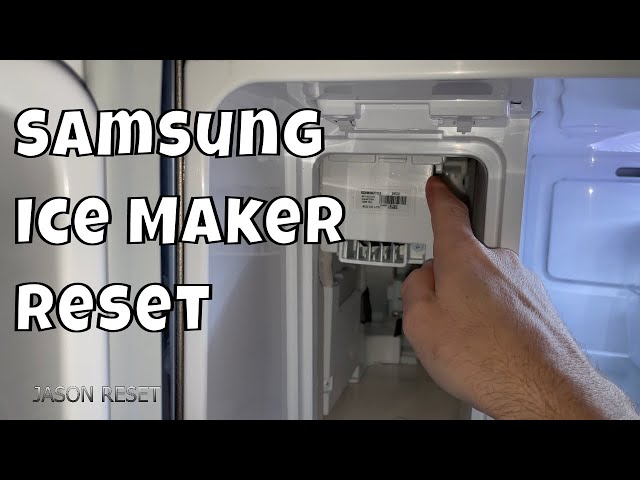
Look inside the ice maker assembly for a small blue button. This test button is usually located near the ice maker motor or on the side panel. Press the blue test button firmly to activate the ice maker’s cycle. You will hear a click sound confirming the reset process has started.
Credit: www.samsung.com
Reset Ice Maker
Resetting the ice maker on your Samsung refrigerator can solve common issues like no ice production or slow ice making. The reset process is simple and quick. It helps the ice maker restart its cycle properly.
Follow these easy steps to reset your Samsung ice maker and get it working again.
Press And Hold Test Button
First, locate the test button on the ice maker. It is usually inside the ice compartment. Press and hold this button firmly. Hold it for about 10 seconds. This action triggers the ice maker to start a test cycle. You may need to press harder than expected to activate it.
Listen For Chime Or Movement
After pressing the test button, listen carefully for a chime sound. This sound confirms the reset is working. Also, watch for any movement in the ice maker parts. The motor should start turning. If you hear or see this, the reset is successful. The ice maker will begin making ice again soon.
Power Cycle Refrigerator
Power cycling your Samsung refrigerator is a simple way to reset the ice maker. This process cuts off power briefly, allowing the system to restart fresh. It can clear minor glitches that stop the ice maker from working properly. Follow these steps carefully to perform a power cycle and give your ice maker a fresh start.
Unplug For Two Minutes
First, unplug the refrigerator from the power outlet. Leave it unplugged for at least two minutes. This pause helps reset the internal electronics. Avoid rushing this step. The short break allows the ice maker’s control board to clear any errors.
Plug Back And Retry Reset
After two minutes, plug the refrigerator back into the power source. Wait for it to power on completely. Then, try resetting the ice maker again. This simple restart often fixes frozen or stuck ice maker problems. The ice maker should begin producing ice normally within a few hours.
Credit: www.youtube.com
Check Ice Maker Components
Checking the ice maker components is an important step to reset your Samsung refrigerator ice maker. This helps find any parts that might block ice production. Careful inspection can save time and avoid costly repairs.
Each part plays a role in making ice. A small issue with one can stop the whole system. Let’s look at key components to check.
Inspect Water Filter And Valve
The water filter cleans water before it reaches the ice maker. A clogged filter reduces water flow. Replace the filter if it looks dirty or old.
The water inlet valve controls water entering the ice maker. Check if it is stuck or blocked. A frozen or faulty valve stops water from filling the ice tray.
Examine Ejector Arm
The ejector arm pushes ice cubes out of the tray. Sometimes, it can get stuck in the up position. Make sure it moves freely and is not blocked by ice or debris.
If the arm is frozen or jammed, gently free it. This allows the ice maker to continue the cycle properly.
Test Thermostat And Control Module
The thermostat senses the ice tray temperature. If it fails, the ice maker may not cycle correctly. Use a multimeter to check its continuity.
The control module runs the ice maker’s operation. A faulty module can stop ice production. Inspect it for signs of damage or wear.
Reinsert Ice Bucket
Reinserting the ice bucket is a simple step in resetting your Samsung refrigerator ice maker. It ensures the ice maker aligns properly with the water supply and the sensor. This helps the ice maker resume normal operation after a reset.
Without the ice bucket in place, the ice maker may not detect it and fail to start making ice. Proper reinsertion avoids sensor errors and mechanical jams that stop ice production.
Remove The Ice Bucket Carefully
First, slide out the ice bucket gently from the freezer compartment. Avoid forcing it to prevent damage to the bucket or the ice maker. Set it on a flat surface for easy handling.
Check For Ice Blockages
Look inside the ice bucket and the ice maker area for any ice clumps or debris. Clear out any blockages that might prevent the bucket from fitting back correctly. This step supports smooth operation.
Align The Ice Bucket Correctly
Hold the ice bucket with the chute facing the ice maker. Align the bucket rails with the freezer tracks. Proper alignment ensures the bucket slides in easily and locks into place.
Slide The Ice Bucket Back In
Push the ice bucket slowly into the freezer until it stops. You should feel a slight click or resistance when it locks in place. This confirms the bucket is secure and ready to work.
Test The Ice Maker Operation
After reinserting the ice bucket, press the ice maker’s “Test” button if available. The ice maker should start producing ice within a few hours. Monitor for any unusual noises or errors.
Troubleshooting Tips
Troubleshooting a Samsung refrigerator ice maker can fix many common problems. Simple steps often restore ice production without calling a technician. Understanding what to do when the ice maker stops working helps save time and effort.
Follow these tips carefully. They guide you through common issues and help avoid mistakes that worsen the problem.
When Reset Doesn’t Work
Check the water supply first. Make sure the water line is connected and not frozen or blocked. Inspect the water filter; replace it if clogged. A dirty filter stops water flow to the ice maker.
Look at the ice maker’s ejector arm. It should move freely without obstruction. If stuck, gently free it to allow ice to drop. Also, check the freezer temperature. It must be between 0°F and 5°F for ice production.
Examine the control module. Sometimes it needs a power cycle. Unplug the refrigerator for five minutes, then plug it back in to reset the system. If the ice maker still won’t work, the thermostat or motor may be faulty and need professional repair.
Avoid Common Mistakes
Do not press buttons too hard when resetting. A firm but gentle press is enough. Forcing controls can damage the panel or buttons. Avoid removing parts without guidance, as this might break delicate components.
Never use sharp tools to clear ice jams. Use warm water or a hairdryer on low setting to melt ice safely. Always replace filters on schedule to keep water clean and flow steady.
Do not ignore strange noises or leaks. These signs show internal problems that need attention before resetting. Following proper steps keeps your ice maker running smoothly and prevents larger issues.
Credit: www.samsung.com
Frequently Asked Questions
How Do I Reset My Ice Maker On My Samsung?
Remove the ice bucket from your Samsung refrigerator. Press and hold the blue “Test” button on the ice maker until you hear a chime. If no chime, unplug the fridge for two minutes, plug it back in, and press the button again to reset the ice maker.
Will Unplugging My Samsung Fridge Reset It’s Ice Maker?
Unplugging your Samsung fridge for two minutes can help reset the ice maker. Press the ice maker’s blue “Test” button after plugging it back in to confirm reset.
Why Is My Samsung Fridge Suddenly Not Making Ice?
Your Samsung fridge may stop making ice due to a clogged water filter, frozen or blocked inlet valve, or a stuck ejector arm. Check these parts first. Also, test the thermostat and control module for faults. Reset the ice maker by pressing the blue “Test” button until you hear a chime.
How Do I Force My Samsung Ice Maker To Cycle?
Remove the ice bucket from the Samsung ice maker. Press and hold the blue “Test” button until you hear a chime. This forces the ice maker to cycle. If no chime sounds, unplug the fridge for two minutes and try again.
How Do I Reset My Samsung Refrigerator Ice Maker?
Remove the ice bucket, then press and hold the reset button until you hear a chime.
Conclusion
Resetting your Samsung refrigerator ice maker is simple and quick. Start by pressing the blue “Test” button firmly until you hear a chime. If the ice maker does not respond, unplug the fridge for two minutes and try again. Regular resets can fix common ice maker issues and keep ice production steady.
Remember to check the water filter and inlet valve for blockages. Following these easy steps helps ensure your ice maker works smoothly. Keep your fridge running well with small, simple fixes like this.