
Is your Samsung refrigerator’s control panel acting up? Maybe it’s frozen, unresponsive, or showing error codes that confuse you.
Don’t worry—you can often fix these issues yourself by resetting the control panel. Resetting your fridge’s control panel is a quick and easy way to clear glitches and get everything working smoothly again. In this guide, you’ll learn simple, step-by-step methods to reset your Samsung refrigerator’s control panel so you can avoid costly repairs and keep your fridge running like new.
Keep reading to discover how to take control back and solve the problem fast!
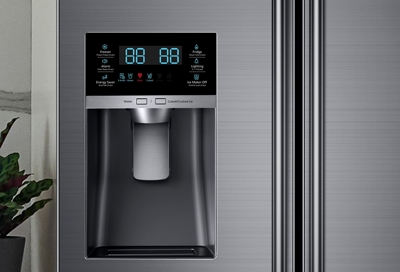
Credit: www.samsung.com
Reset By Unplugging
Resetting your Samsung refrigerator control panel by unplugging is a simple and effective method. It helps clear minor glitches and refreshes the system. This method requires no special tools and can be done quickly.
Follow these easy steps to reset your fridge control panel by unplugging it.
Disconnect Power Source
First, locate the power cord of your Samsung refrigerator. Pull the plug out from the wall socket. This cuts off the power and stops the control panel.
Wait And Reconnect
Wait for about five minutes. This pause allows the internal system to reset fully. After waiting, plug the refrigerator back into the power source. The control panel will light up again.
Restart Normal Cycle
The refrigerator will restart its cooling and other functions automatically. Check if the control panel is working correctly. This reset often fixes display or control errors easily.

Credit: www.wikihow.com
Button Combination Reset
The Button Combination Reset is a simple and quick way to fix your Samsung refrigerator control panel. It helps clear minor errors and refreshes the system without unplugging the fridge. This method works by pressing specific buttons together in a sequence. Follow these easy steps carefully to reset your control panel using button combinations.
Press Fridge And Freezer Buttons
Locate the “Fridge” and “Freezer” buttons on your control panel. Press both buttons at the same time. Hold them firmly for a few seconds. This action starts the reset process inside the control system.
Hold Buttons Together
Keep pressing the “Fridge” and “Freezer” buttons together. Hold them for about 10 seconds. Do not release early or press other buttons. This ensures the control panel registers the reset command correctly.
Release And Observe Panel
After holding the buttons, release them carefully. Watch the control panel closely. It should blink or turn off briefly. This shows the reset is working. The panel will restart and return to normal function shortly.
Reset After Power Outage
Power outages can disrupt your Samsung refrigerator’s control panel. This may cause the display to freeze or show errors. Resetting the control panel helps restore normal operation quickly. The process is simple and does not require special tools. Follow these steps to reset after a power outage and get your fridge working smoothly again.
Check Display For Errors
Start by looking at the control panel display. Note any error codes or blinking lights. These signals show if the fridge detected a problem. Write down the error code for reference. This helps identify the issue and guides the reset process. If the display is blank or frozen, proceed to reset the panel.
Use Specific Button Sequences
Samsung refrigerators often use button combinations to reset the control panel. Locate the “Power Freeze” and “Power Cool” buttons. Press and hold both buttons simultaneously for about 10 seconds. Release the buttons when the display turns off or beeps. This action resets the control board and clears errors caused by power loss.
Restart Control Panel
Unplug the refrigerator from the power outlet. Wait for at least 5 minutes to let the system fully reset. Plug the fridge back in and watch the display. The control panel should restart and display normal settings. This hard reset clears temporary faults caused by the outage. Your Samsung refrigerator should now work properly again.

Credit: www.youtube.com
Troubleshoot Common Issues
Troubleshooting common issues with your Samsung refrigerator control panel can save time and prevent costly repairs. Identifying problems early helps keep your fridge running smoothly. Focus on simple checks before calling for service. Follow these steps to diagnose and fix control panel issues effectively.
Document Error Codes
Error codes appear on the control panel to signal specific problems. Write down the exact code shown on the display. These codes help identify the issue quickly. Use your refrigerator’s manual or Samsung’s website to understand each error code. Knowing the code guides your next troubleshooting steps and speeds up repairs.
Inspect For Physical Damage
Look closely at the control panel and buttons for cracks or damage. Check if any buttons are stuck or unresponsive. Physical damage can disrupt the panel’s functions. Examine the wiring connections inside if you feel comfortable. Damaged parts may need professional replacement to restore proper operation.
Check For Moisture Or Corrosion
Moisture or corrosion on the control panel or its connections can cause faults. Inspect the area for water droplets or rust. Clean gently using a dry cloth to remove any moisture. Avoid using liquids that can worsen the problem. Moisture often occurs near the door or water dispenser, so check these areas carefully.
When To Seek Professional Help
Knowing when to seek professional help is important for your Samsung refrigerator’s control panel issues. Some problems need expert care to avoid damage. Quick fixes might not solve every problem, especially if the control panel keeps malfunctioning.
Acting early can save time and money. Recognizing signs of serious trouble helps you decide when to call a professional. Safety is also a key reason to seek expert help instead of trying complex repairs yourself.
Persistent Control Panel Problems
Sometimes, the control panel won’t respond even after resetting. Buttons may stay unresponsive or the display might show error codes. These issues can mean a deeper electrical or software fault. Continued problems after basic troubleshooting suggest professional diagnosis.
Contact Samsung Support
Samsung offers dedicated support for refrigerator issues. Contacting them can provide official guidance and troubleshooting tips. They may offer software updates or instructions that fix the problem. Support can also verify if your fridge is under warranty for free repairs.
Find Qualified Technician
Certified technicians have the right tools and knowledge for complex repairs. They can safely handle electrical components inside your refrigerator. Using a qualified technician reduces the risk of further damage. Search for Samsung-certified repair services in your area for reliable help.
Adjusting Temperature Controls
Setting the right temperature keeps food fresh longer. Samsung refrigerators have simple buttons to control temperatures. Knowing how to adjust these controls helps maintain optimal cooling.
Small changes can make a big difference in food preservation. Let’s explore how to use the temperature buttons and reset settings.
Using Refrigerator Button
Press the Refrigerator button to change the fridge temperature. Each press lowers or raises the temperature by one degree. The display shows the current setting clearly. Adjust until you reach your desired temperature.
Using Freezer Button
To change the freezer temperature, press the Freezer button. Like the fridge button, each press changes the temperature by one degree. Watch the display for the new setting. Keep the freezer cold enough to keep food frozen solid.
Resetting Temperature Settings
Resetting returns temperatures to factory defaults. Press and hold both the Refrigerator and Freezer buttons together for about 10 seconds. The display will blink or reset. This clears any custom settings and fixes minor errors.
After resetting, adjust the temperatures again as needed. This simple step helps solve cooling problems and keeps your fridge working well.
Preventive Tips For Control Panel
Maintaining your Samsung refrigerator’s control panel helps avoid frequent resets and malfunctions. Small efforts keep the system running smoothly. Follow simple care steps to protect the control panel from damage and errors. These preventive tips extend the life of your appliance and ensure reliable performance.
Avoiding Power Surges
Power surges can harm electronic parts of the control panel. Use a surge protector to shield your refrigerator. Unplug the unit during storms or power outages. This simple step reduces risk of electrical damage. Protecting your fridge from sudden power changes keeps the control panel stable.
Regular Cleaning
Keep the control panel clean and free from dust and dirt. Use a soft, damp cloth for wiping the surface gently. Avoid harsh chemicals or abrasive materials that can scratch or damage the panel. Clean panels respond better and prevent malfunction caused by dirt buildup. Regular cleaning maintains clear, easy-to-use controls.
Monitoring Error Messages
Pay attention to error messages on the control panel display. These alerts help identify small problems early. Consult your user manual to understand the codes shown. Addressing errors quickly prevents bigger issues and keeps the fridge working well. Regular monitoring helps you act before a reset or repair becomes necessary.
Frequently Asked Questions
How Do I Reset My Samsung Refrigerator Control Panel?
Unplug your Samsung refrigerator for 5 minutes, then plug it back in to reset the control panel. Alternatively, press and hold the Fridge and Freezer buttons together for 10 seconds. Note error codes before resetting, as a reset clears them.
Contact support if problems continue.
How Do I Reset My Control Panel On My Fridge?
Unplug your fridge for 30 seconds, then plug it back in to reset the control panel. Alternatively, press and hold the Fridge and Freezer buttons together for 10 seconds. Note error codes before resetting, as they will clear. Contact a technician if problems continue.
How Do I Do A Hard Reset On My Refrigerator?
Unplug your refrigerator from the power outlet for 5 minutes. Plug it back in to restart and clear temporary glitches. If needed, press and hold the Fridge and Freezer buttons together for 10 seconds to reset the control panel.
Will Unplugging A Fridge Reset It On Samsung?
Yes, unplugging a Samsung fridge resets it by restarting the control panel and clearing minor glitches. Plug it back in to resume normal operation.
How Do I Reset My Samsung Refrigerator Control Panel?
Unplug the fridge from the power outlet for 5 minutes. Then plug it back in to restart the system.
Conclusion
Resetting your Samsung refrigerator control panel helps fix many common issues fast. Unplugging the fridge for a few minutes often clears glitches. Using button combinations can also restore normal function. Regular resets keep your appliance running smoothly. Remember to follow your model’s specific steps carefully.
This simple fix can save you time and service costs. Keep your fridge working well with easy control panel resets.