
Is your GE air conditioner control panel not working? It’s frustrating when you press the buttons and nothing happens.
You rely on your AC to keep cool, especially when the Texas heat is unforgiving. But don’t worry—you’re not alone, and there are simple steps you can take to get it back up and running. You’ll discover easy troubleshooting tips and quick fixes that anyone can try before calling a professional.
Keep reading, and you’ll learn how to regain control of your GE air conditioner without the headache.
Common Power Issues
Power problems often cause the GE air conditioner control panel to stop working. Simple issues with electricity can block the panel from turning on or responding.
Checking common power problems can save time and money. Many fixes do not require a professional. Start by looking at the breaker, wiring, and power switch.
Tripped Breaker
The circuit breaker may have tripped due to overload or a short circuit. This stops power to the air conditioner. Open your breaker box and look for the switch that is off or in the middle.
Flip the tripped breaker fully off and then back on. This can restore power and reset the control panel. If the breaker trips again, call an electrician.
Loose Wiring
Loose or damaged wires can cut power to the control panel. Check the power cord and wiring inside the unit carefully. Make sure all connections are tight and secure.
Turn off the power before inspecting wires to avoid shock. If you find frayed or broken wires, replace them or get professional help. Proper wiring ensures steady electricity flow.
Power Switch Check
The power switch on the air conditioner might be off or faulty. Check the switch position and toggle it off and on. This simple step can reset the control panel.
If the switch feels loose or does not click properly, it might be broken. Replacing a bad switch can fix power flow problems and restore panel function.

Credit: suncityjakarta.id
Resetting The Control Panel
Resetting the control panel can fix many issues with your GE air conditioner. It helps clear errors and restore normal function. This process is simple and often resolves control panel problems quickly.
Knowing where the reset button is and how to use it is important. Some models have the reset button on the power cord. Others place it on the control panel itself. You can also try a power cycle reset if the button is missing or not working.
Locating The Reset Button
The reset button is usually easy to find. Check the power cord plug first. Look for a large button labeled “RESET.” It often sits next to a “TEST” button. On some units, the reset button is on the control panel.
Sometimes, you may need to open a small service panel to see it. The button may be red or yellow. Always turn off the power before opening any panels. This keeps you safe from electric shock.
Reset Button On Power Cord
The power cord reset button is common on many GE air conditioners. It is a big, easy-to-press button. Press and hold it for a few seconds. This resets the power supply to the unit.
After pressing, release the button and wait a moment. Then turn the air conditioner on again. This often clears minor control panel glitches and restores proper operation.
Reset Button On Control Panel
Some GE models have the reset button on the control panel. It may be marked with the word “RESET” or a reset icon. Press this button gently and hold it for a few seconds.
If you do not see the button, check the user manual. It may show the exact location or how to access it behind a panel. Always turn off the unit before pressing the reset button.
Power Cycle Reset Steps
If the reset button does not work or is missing, try a power cycle reset. First, turn off the air conditioner using its power button. Next, unplug it from the wall outlet.
Wait about 5 minutes. This allows the system to fully shut down. After waiting, plug the unit back in. Turn the power on and check if the control panel works again.
Inspecting The Control Panel
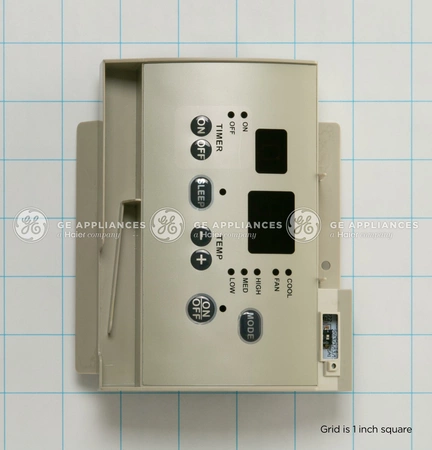
Inspecting the control panel is a key step in fixing your GE air conditioner. The control panel controls all the settings and functions of the unit. If it stops working, the air conditioner will not respond properly. A careful inspection can reveal loose connections or damaged parts. This helps you know what needs repair or replacement.
Checking Display Ribbon Cable
The display ribbon cable connects the control panel to the main board. This thin, flat cable carries signals for the buttons and display. A loose or damaged ribbon cable can cause the control panel to stop working.
First, unplug the air conditioner from the power source. Next, gently remove the control panel cover. Look for the ribbon cable linking the display to the circuit board. Check if it is securely attached at both ends.
If the cable looks loose, carefully press it back into place. If the ribbon cable is torn or worn out, it needs replacing. Using a damaged cable will not fix the problem. Always handle the cable with care to avoid further damage.
Accessing Internal Components Safely
Before opening the air conditioner, turn off the power completely. Unplug the unit from the wall outlet to avoid electric shock. Use a screwdriver to remove screws holding the control panel or service panel.
Keep screws in a safe place to avoid losing them. Avoid touching circuit boards or components with wet hands. Use a dry cloth to clean dust or dirt inside the panel gently.
After inspection or repair, carefully reassemble the panel. Plug the air conditioner back in and test the control panel functions. Safe handling ensures your repair process is smooth and risk-free.

Credit: roarmag.org
Troubleshooting Internal Components
Troubleshooting internal components is key when the GE air conditioner control panel stops working. The control panel might not respond due to faults inside the unit. Checking these parts can save time and repair costs. This section covers common internal issues that affect the control panel.
Faulty Control Board
The control board acts as the brain of your air conditioner. It sends signals to operate the panel and other parts. If the board is faulty, the control panel may not work at all. Signs of a bad control board include unresponsive buttons and no display lights. Testing the board requires a multimeter and some technical skill. Replace the board if it shows damage or fails tests.
Blown Fuse
A blown fuse can stop power from reaching the control panel. The fuse protects the air conditioner from electrical surges. Look for a small glass or ceramic fuse near the control board. If it looks dark or broken, it needs replacement. Always unplug the unit before checking the fuse. Using the correct fuse type is crucial for safety and function.
When To Call A Professional
Some issues need expert help to avoid damage or injury. Call a professional if you cannot find the problem or fix it safely. Also, seek help for complex parts like the control board. A technician has the tools and knowledge to diagnose and repair internal faults. Professional service ensures your GE air conditioner runs smoothly again.
Tips To Prevent Future Issues
Preventing future problems with your GE air conditioner control panel helps save time and money. Simple steps keep your unit running smoothly. Consistent care reduces the risk of control panel failure. Follow these tips to extend your air conditioner’s lifespan and avoid repair headaches.
Regular Maintenance
Clean the air filter every month during use. Dust and dirt block airflow and strain the system. Schedule professional check-ups once a year to inspect electrical parts and controls. Early detection of issues stops bigger damage. Keep the outdoor unit free from debris and leaves. This ensures proper cooling and prevents overheating.
Proper Unit Usage
Set the thermostat to a moderate temperature to avoid overworking the unit. Turn off the air conditioner when not needed. Avoid frequent switching on and off, which can harm the control panel. Use the remote or control panel buttons gently to prevent button failure. Follow the manufacturer’s instructions for operation and care.
Avoiding Power Surges
Power surges can damage the control panel and other components. Use a surge protector designed for appliances to protect your air conditioner. Avoid plugging the unit into overloaded electrical outlets. Unplug the unit during storms or when not in use for long periods. Proper electrical care prevents unexpected failures and extends unit life.
Credit: www.reliableparts.com
Frequently Asked Questions
Where Is The Reset Button On A Ge Air Conditioner?
The reset button on a GE air conditioner is usually on the power cord plug. It is a large button next to a “TEST” button. Some models may have a reset button on the control panel or behind a service panel.
Press and hold the button for a few seconds to reset.
Why Did My Ac Control Panel Stop Working?
Your AC control panel may stop working due to power issues, a tripped breaker, loose wiring, or a faulty control board. Try resetting the unit by turning off power for several minutes. If the problem persists, contact a professional for repair.
How Do I Reset My Ge Control Board?
Press and hold the large RESET button on the GE control board or power cord for a few seconds. If unavailable, unplug the unit, wait a minute, then plug it back in to reset.
How To Reset Ac Control Panel?
Locate the reset button on the power cord or control panel. Press and hold it for 3-5 seconds. If unavailable, turn off, unplug, wait 5 minutes, then plug in and power on the AC.
Why Is My Ge Air Conditioner Control Panel Not Working?
The control panel may fail due to power issues, a blown fuse, or a faulty control board.
Conclusion
A GE air conditioner control panel not working can be frustrating. Start by checking the reset button on the power cord or unit. Press and hold it for a few seconds to restart the system. If that does not help, unplug the AC, wait a moment, then plug it back in.
This simple power cycle often fixes many control panel issues. Always ensure the unit is off before doing any resets. Following these steps can help restore your AC’s control panel quickly and easily.