
Is your garage door opener clicker suddenly not working when you need it most? It’s frustrating when you press the button and nothing happens, leaving you stuck outside or wasting time trying to get your door to respond.
But don’t worry—this is a common problem, and there are simple steps you can take to fix it quickly. Whether it’s dead batteries, signal interference, or a need to reprogram your remote, understanding the root cause can save you time and hassle.
Keep reading to discover easy, effective solutions that will get your garage door opener clicker working again in no time.
Credit: www.bankogaragedoors.com
Battery Replacement
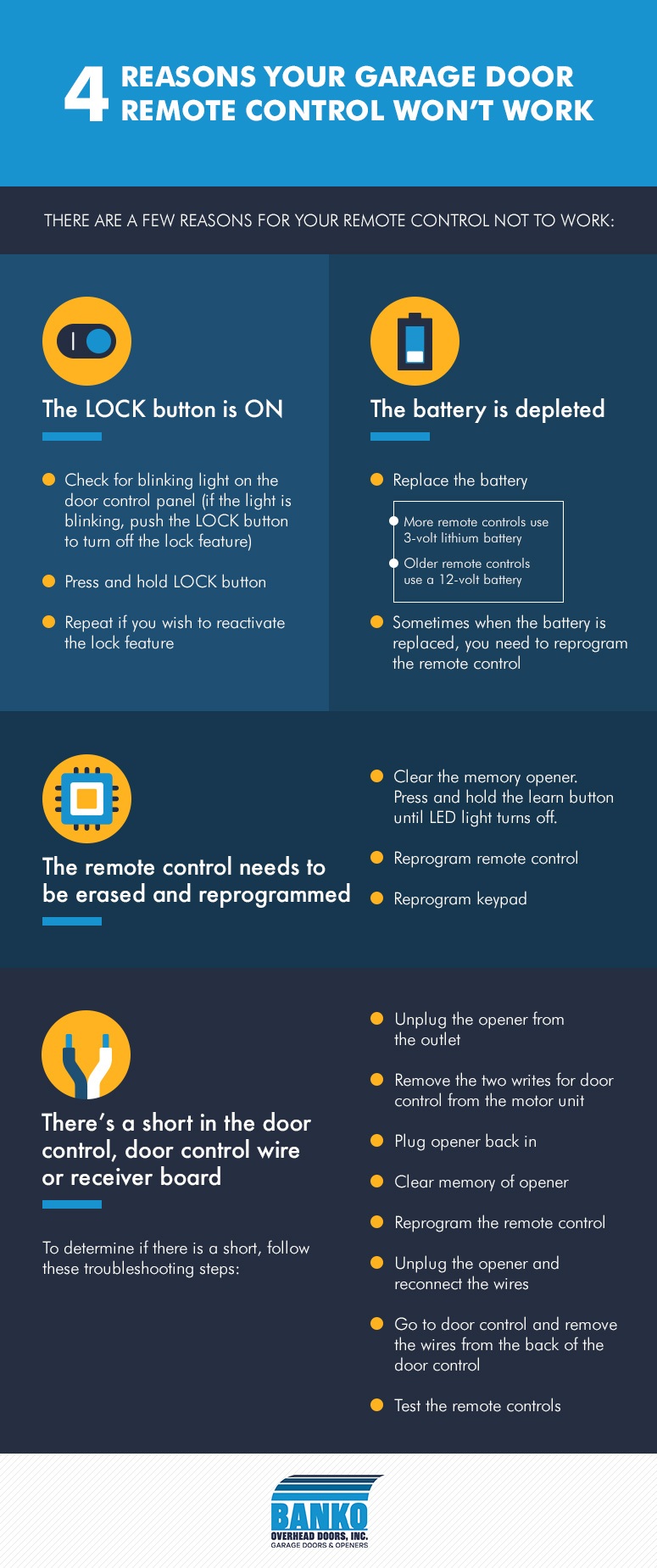
Battery replacement is often the easiest fix for a garage door opener clicker not working. Over time, batteries lose power and stop sending signals to the opener. Changing the battery can restore full function quickly. Knowing how to spot dead batteries and replace them correctly saves time and frustration.
Signs Of Dead Batteries
The clicker stops working or works only intermittently. The LED light on the remote dims or does not light at all. Pressing buttons feels less responsive than usual. The garage door opener does not respond to clicks. These signs suggest the battery is weak or dead and needs replacement.
Choosing The Right Battery
Check the clicker’s manual for the battery type. Most garage door remotes use small coin cell batteries like CR2032 or CR2025. Use fresh batteries from a reliable brand to ensure long life. Avoid mixing old and new batteries as this can cause malfunctions. Keep spare batteries handy for quick replacement.
Step-by-step Battery Change
Locate the battery compartment on the back of the clicker. Use a small screwdriver or coin to open the compartment cover. Remove the old battery carefully without touching other components. Insert the new battery with the correct polarity, usually marked + and -. Close the compartment securely. Test the clicker by pressing a button to confirm it works.
Reprogramming The Clicker
Reprogramming the garage door opener clicker can solve many common problems. Sometimes the clicker loses connection with the opener. This stops the door from responding. Reprogramming restores the link quickly. It is a simple process that anyone can do. Follow the right steps to get your clicker working again.
When To Reprogram
Reprogram the clicker if it suddenly stops working. It also helps if you change the batteries but the door does not open. Another reason is after replacing the garage door opener unit. Sometimes, interference from other devices makes the clicker lose its code. Reprogramming fixes this issue and improves signal strength.
Basic Reprogramming Steps
Start by finding the “Learn” button on your garage door opener motor. Press and hold this button until the indicator light turns on. Next, press the button on your clicker that you want to program. Hold it for a few seconds until the motor light blinks or turns off. This means the code is saved. Test the clicker by pressing the programmed button to open or close the door.
Clearing Old Codes
Clearing old codes is important before programming a new clicker. It removes any previous signals that may cause conflict. To clear codes, press and hold the “Learn” button for about 10 seconds. The indicator light will turn off, showing codes are erased. After this, proceed to program your clicker with fresh codes. This step ensures only your clicker controls the garage door.
Checking Signal Interference
Signal interference often causes a garage door opener clicker to stop working. The remote sends a radio signal to the garage door unit. If this signal gets blocked or weakened, the door may not respond. Checking for interference is a crucial step in fixing this problem.
Common Interference Sources
Several devices can interfere with your garage door remote. Wireless routers, cordless phones, and baby monitors use similar frequencies. Metal objects and walls also block signals. Nearby power lines or fluorescent lights might create noise that affects the remote. Knowing these sources helps to spot the problem quickly.
How To Identify Signal Blocks
Stand close to the garage door and try the remote. If it works nearby but not farther away, interference is likely. Move around the garage and watch for dead spots. Check if any new electronics or appliances were added near the garage. Notice if strong sunlight or thick walls might block the signal.
Reducing Interference Effects
Remove or move devices that cause interference. Change the position of your wireless router or other electronics. Keep the remote’s path to the garage door clear of metal objects. Try changing the frequency on the garage door opener if the model allows it. Use fresh batteries in the remote for a stronger signal.
Inspecting The Antenna
The antenna on your garage door opener plays a key role in receiving signals from the remote clicker. A damaged or improperly placed antenna can cause the clicker to stop working. Checking the antenna is a simple first step to fix the problem.
Start by locating the antenna on the garage door opener unit. It usually hangs down from the motor housing. Make sure it is fully extended and not tangled or bent. The antenna needs to catch signals clearly to work well.
Antenna Positioning Tips
Keep the antenna hanging straight down for the best signal reception. Avoid wrapping it around the opener or placing it inside the unit. Position the antenna away from metal objects and wires that can block signals. A clear path between the remote and antenna helps the clicker work better.
Detecting Antenna Damage
Look closely at the antenna for signs of wear or breaks. Cracks, bends, or frayed wires can stop the signal from reaching the opener. If the antenna looks damaged or broken, it may not pick up the remote’s signal. Check for rust or corrosion near the antenna base as well.
Repair And Replacement Options
Small bends can sometimes be straightened carefully. Clean any rust or dirt around the antenna. If the antenna is badly damaged, replace it with a new one. Most garage door openers use a standard antenna that is easy to find online or in stores. Follow the manufacturer’s instructions for installing the new antenna to ensure proper signal reception.
Remote Control Issues
Remote control issues often cause garage door opener clickers to stop working. The problem might not be with the door mechanism itself. Sometimes, the remote fails to send the correct signal. This section helps you identify and fix common remote problems quickly.
Testing The Remote’s Led Indicator
Check the LED light on your remote when pressing a button. The LED should flash, showing the remote sends a signal. No light means the batteries might be dead or the remote is faulty. A weak or no LED flash often points to battery issues.
Resetting The Remote
Resetting the remote can fix connection problems with the garage door opener. Find the reset or learn button on your garage door motor unit. Press and hold it, then press a button on your remote. The LED on the remote should blink, confirming the reset worked. This process re-establishes the link between the remote and opener.
When To Replace The Remote
Replace the remote if resetting and new batteries do not solve the problem. Physical damage or worn-out buttons also mean replacement is needed. Older remotes may lose compatibility with new opener models. Buying a new remote ensures reliable garage door control.
Credit: www.chamberlain.com
Opener Unit Troubleshooting
Troubleshooting the garage door opener unit helps identify common issues quickly. This step focuses on the opener itself, not the remote clicker. Problems with power, wiring, or system settings often cause the unit to stop working.
Follow simple checks to restore your garage door opener’s function. These methods are easy and require no special tools. Start by examining the power source, then inspect wiring, and finally reset the opener if needed.
Checking Power Supply
First, ensure the garage door opener is plugged in properly. Look for any loose connections or damaged cords. Check the circuit breaker to confirm it has not tripped. A power outage or electrical fault can stop the opener from working. Use a different outlet if possible to verify power availability.
Inspecting Wiring Connections
Look at all wiring connected to the opener unit. Loose or frayed wires can prevent it from operating. Secure any loose connections and replace damaged wires. Pay attention to the sensors and motor wires. Clean the contacts gently to remove dirt or corrosion. Correct wiring ensures smooth communication between parts.
Resetting The Opener
Resetting the garage door opener can clear faults and errors. Find the reset button on the motor unit or consult the manual for instructions. Press and hold the button for a few seconds until the lights blink or the unit beeps. This process restores factory settings and may fix software glitches. After resetting, test the opener to see if it responds to the remote.
Preventive Maintenance
Preventive maintenance helps keep your garage door opener clicker working smoothly. Regular care avoids sudden problems and saves repair costs. Small checks and simple actions extend the life of your remote and opener system. Follow these easy steps to keep your clicker reliable every day.
Regular Battery Checks
Check the remote’s battery at least once every six months. Weak batteries cause the clicker to stop working. Replace old batteries with fresh ones to keep signals strong. Use high-quality batteries for longer life. Avoid waiting for the remote to fail before changing the battery.
Keeping The Antenna Clear
Make sure the garage door opener’s antenna is clean and visible. Dust, spider webs, or paint can block the signal. Keep the antenna hanging down and free from damage. A clear antenna improves communication between the clicker and opener. Do not cover the antenna with objects or insulation.
Routine Remote Testing
Test the remote regularly to confirm it works well from different distances. Press buttons to open and close the door a few times weekly. This practice helps spot issues early, such as weak signals or button problems. Promptly address any trouble to avoid being locked out or stuck.

Credit: www.youtube.com
When To Call A Professional
Knowing when to call a professional for your garage door opener clicker saves time and prevents damage. Some issues need expert skills to fix safely and correctly. This section helps you decide when to seek professional help.
Identifying Complex Problems
Simple fixes include changing batteries or reprogramming the clicker. Complex problems involve wiring issues or broken internal parts. If the clicker still fails after basic steps, it might be a bigger problem. Professionals can diagnose hidden faults quickly and accurately.
Safety Considerations
Garage door systems have strong springs and electrical parts. Improper handling can cause injuries or damage. Avoid trying repairs that involve wiring or mechanical parts. Professionals have tools and training to fix these safely. Protect yourself by leaving risky repairs to experts.
Choosing A Reliable Repair Service
Pick a repair service with good reviews and proper licensing. Check their experience with garage door openers specifically. Ask about guarantees on their work and parts. A trustworthy service ensures long-lasting repairs and peace of mind. Don’t rush; a careful choice saves future headaches.
Frequently Asked Questions
Why Does My Garage Door Clicker Not Work?
Your garage door clicker may not work due to dead batteries, signal interference, or needing reprogramming. Check and replace batteries first. Reprogram the remote if needed. Ensure the opener’s antenna is undamaged and properly aligned.
How To Reset Garage Opener Clicker?
Press and hold the garage opener button until the indicator light blinks. Enter the new code and press the hash () button to save it. Replace batteries if the clicker still doesn’t work, then reprogram following your model’s instructions.
What Are Common Clicker Opener Problems?
Common clicker opener problems include dead batteries, signal interference, lost remote programming, and faulty or misaligned antennas.
Why Is My Remote Not Working Even With New Batteries?
Your remote may need reprogramming, have signal interference, or a faulty sensor despite new batteries. Check the remote’s connection and sensor alignment.
Why Is My Garage Door Opener Clicker Not Working?
The most common reason is dead or weak batteries in the remote. Signal interference or a broken antenna can also stop it from working. Sometimes, the remote needs to be reprogrammed to the opener.
Conclusion
A garage door opener clicker not working can feel frustrating. Often, simple fixes like changing batteries solve the problem. Check for signal interference or reprogram the remote to restore connection. Inspect the antenna for damage or misalignment too. Taking these steps saves time and avoids costly repairs.
Stay patient and try each solution carefully. Your garage door opener will likely work again soon.