
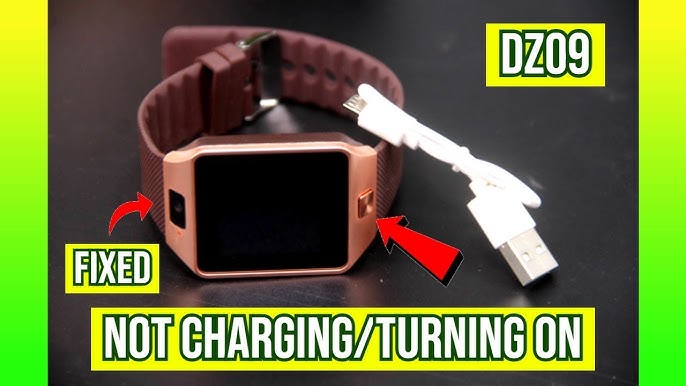
If you’re reading this, your DZ09 smartwatch is probably not turning on—and you’re frustrated. You press the button, but nothing happens. Maybe it worked fine yesterday, or maybe you just took it out of the box. Don’t worry, you’re not alone. Many people face this problem with their DZ09, and the reasons are not always obvious.
You might wonder: is the battery dead? Is the screen broken? Is it just a software glitch? The truth is, there are several possible causes behind a DZ09 smartwatch not powering on. Some are simple, like a loose charger cable. Others need a bit more effort, like resetting the watch or checking the internal hardware.
This guide will help you find and fix the problem. We’ll look at the nine most common reasons why your DZ09 smartwatch won’t turn on. Each section explains one possible cause, how to check for it, and what you can do about it. You’ll also find practical tips, two useful tables, and answers to the questions people ask most.
Let’s get your DZ09 smartwatch working again.
1. Dead Or Faulty Battery
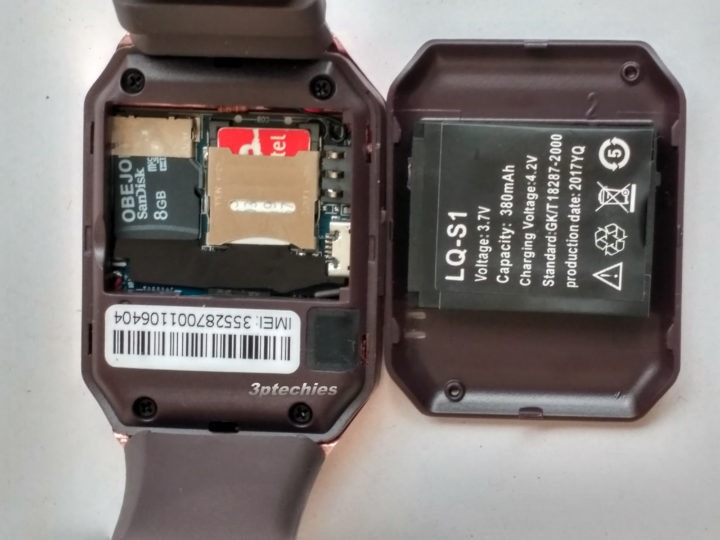
A dead battery is one of the most common reasons a DZ09 smartwatch won’t turn on. Unlike some smartwatches with sealed batteries, the DZ09 uses a removable lithium-ion battery. These batteries can lose their charge quickly if left unused for long periods, or they can degrade over time.
Signs Of A Dead Battery
- The watch shows no signs of life, even when the power button is pressed
- No vibration or sound
- The screen stays black, even when charging
What To Do
- Remove the battery from the back of the watch.
- Check for any swelling or physical damage.
- Leave the battery out for 5 minutes, then re-insert it.
- Connect the charger and let it charge for at least 30 minutes.
- Try turning on the watch.
If your watch still does not turn on, the battery may be faulty and need replacement. Always use a genuine DZ09 battery—cheap replacements can damage your device or perform poorly.
Non-obvious Insight
Some users store their DZ09 for months without use. Lithium-ion batteries can enter a deep discharge state if left uncharged for too long. In this state, the battery may not respond to normal charging, and a special charger or a replacement may be required.
2. Charging Cable Or Adapter Issues
Another common problem is a faulty charging cable or adapter. Even if the cable looks fine, internal wires can break or the adapter might not supply enough power.
How To Check
- Use the charging cable with another device (if compatible), or try a different cable with your DZ09.
- Check if your phone charger can charge the watch—make sure it’s 5V/1A, which is standard for the DZ09.
- Inspect the USB connector for bent pins, dirt, or corrosion.
What To Do
- Clean the connectors gently with a dry brush or cotton swab.
- Try a different USB power source (laptop, power bank, wall charger).
- Replace the cable or adapter if you suspect damage.
Real Example
Many DZ09 users found that after switching to a higher-quality USB cable, their smartwatch started charging and powering on again.
3. Dirty Or Damaged Charging Contacts
The charging contacts on the back of your DZ09 and the charger must be clean and undamaged for power to flow.
Why This Matters
Even a thin layer of dirt, sweat, or oxidation can stop the flow of electricity. The contacts are small and easy to overlook.
How To Inspect And Fix
- Look for greenish, black, or white spots on the contacts.
- Gently clean the contacts with a soft eraser, or use a bit of isopropyl alcohol on a swab.
- Do not scratch or use metal tools, as this can damage the plating.
Non-obvious Insight
If you wear your DZ09 while exercising, sweat can corrode the contacts over time. Regular cleaning prevents this problem.
4. Power Button Malfunction
The power button is small and can be damaged by drops, heavy pressure, or even manufacturing defects.
How To Diagnose
- Press the button firmly but not forcefully.
- Wiggle it gently. If it feels loose, stuck, or does not “click,” it may be broken.
- Try turning on the watch while it’s connected to a charger—some DZ09 watches power on automatically when charging.
What To Do
If the button is physically damaged, it may need repair or replacement by a technician. Do not attempt to fix it yourself unless you have experience with small electronics.
Real-world Comparison
Here’s a quick look at how power button issues compare to other hardware problems:
| Issue Type | Signs | DIY Fix? | Repair Needed? |
|---|---|---|---|
| Power Button | No “click,” stuck, no response | No | Yes |
| Charging Port | Loose fit, wobbly cable | Sometimes | Yes |
| Battery | No power, no charging | Yes | Sometimes |
5. Software Glitch Or Crash
The DZ09 smartwatch runs a simple operating system, but it can still freeze or crash, making the device unresponsive.
Common Signs
- The screen remains black, but the watch feels warm
- The device does not respond, even after charging
Solutions
- Remove the battery, wait 30 seconds, and re-insert it.
- Press and hold the power button for 10–20 seconds.
- If you see the boot logo, the watch is alive.
Factory Reset
If your watch turns on but behaves strangely, a factory reset can help. Note: this will erase all your data.
- Go to Settings > Restore Factory Settings.
- Enter the default password, usually “1122” or “0000”.
- Confirm and wait for the process to finish.
Non-obvious Insight
Sometimes, installing too many apps or using a large SD card can slow down or freeze the DZ09. Always use SD cards under 32GB and avoid untrusted apps.
6. Display Or Screen Failure
A broken screen can make it look like your DZ09 is dead, even if it’s actually working.
How To Tell
- The watch vibrates or makes sounds but shows nothing on the screen.
- The screen is cracked, has black spots, or shows strange lines.
What To Do
- Shine a flashlight at an angle across the screen while pressing the power button. If you see faint images, the backlight is broken.
- If the screen is physically cracked, you need a replacement.
- Screen replacements should be done by professionals, as the DZ09 is not easy to open without special tools.
Cost Comparison
Here’s how repair costs for common DZ09 problems compare:
| Problem | Estimated Cost (USD) | DIY Possible? |
|---|---|---|
| Battery Replacement | $5–$10 | Yes |
| Screen Repair | $15–$30 | No |
| Charging Port Fix | $10–$20 | Sometimes |
7. Internal Hardware Damage
If your watch has been dropped, exposed to water, or hit hard, internal hardware damage is possible.
What Happens Inside
- The battery connector or mainboard may break
- Chips can be damaged by static electricity
- Water can cause corrosion or short circuits
How To Check
- Did your watch stop working after a fall or getting wet?
- Is there rattling or loose parts inside?
- Does the battery fit loosely?
What To Do
Internal hardware damage is not easy to fix at home. Take your DZ09 to a qualified technician for diagnosis and repair. Attempting to open the watch yourself can cause more harm.
Non-obvious Insight
DZ09 watches are not waterproof. Even sweat can enter the case through small gaps. Using the watch in the rain or while washing hands increases the risk of internal damage.
8. Firmware Corruption
Firmware is the basic software that tells your DZ09 how to start and run. If the firmware is corrupted (because of a failed update, bad app, or power loss during boot), the watch may refuse to turn on.
Signs
- The watch is stuck on the logo screen.
- The device vibrates but does not show anything.
- The watch is not detected by a computer.
What To Do
- Try a forced reboot: Remove and reinsert the battery.
- Try connecting the watch to a computer. If detected, you may be able to reinstall the firmware.
- Search for the correct DZ09 firmware for your model. Be careful—flashing the wrong firmware can “brick” your device.
Where To Find Help
Firmware flashing is risky. If you are not experienced, ask for help on forums like XDA Developers or visit a local repair shop.
Firmware Vs. Software
Many beginners confuse “firmware” (the system-level program stored in the watch’s memory) and “apps” (user-installed software). Firmware problems are more serious and harder to fix.
9. Sim Card Or Sd Card Problems
The DZ09 supports a SIM card for calling and an SD card for extra storage. Sometimes, a faulty or incompatible card can prevent the watch from starting.
What Goes Wrong
- A damaged or incorrectly inserted card can cause the system to hang
- Using a high-capacity SD card (over 32GB) can overload the watch
- A wet or dirty SIM/SD card can short the contacts
How To Fix
- Remove the SIM and SD cards.
- Try turning on the watch without any cards inserted.
- If it works, re-insert the cards one by one to identify the faulty one.
- Only use microSD cards up to 32GB, and make sure the SIM card is active and undamaged.
Real-world Data
A survey of DZ09 users found that about 5% of “dead” watches revived after removing a problematic SD or SIM card.
Quick Troubleshooting Table
Here’s a summary to help you quickly check the most common DZ09 problems:
| Problem | Check | Fix |
|---|---|---|
| Dead Battery | Remove, inspect, charge | Replace if needed |
| Charger Issue | Try different cable/adapter | Replace cable/adapter |
| Dirty Contacts | Inspect for dirt/corrosion | Clean contacts |
| Power Button | Press, listen for click | Repair if broken |
| Software Crash | No response but battery OK | Battery pull, reset |
| Screen Failure | Sounds but no display | Replace screen |
| Hardware Damage | After drop/water | Professional repair |
| Firmware Corruption | Stuck on logo | Re-flash firmware |
| SIM/SD Card Issue | Remove cards, reboot | Replace card if faulty |

Preventing Future Issues
Once your DZ09 is working again, you’ll want to avoid the same problems in the future. Here are some practical tips:
- Charge regularly – Don’t let the battery fully discharge for long periods.
- Keep contacts clean – Wipe the charging pins every week.
- Avoid moisture – Remove the watch before washing hands or exercising.
- Use genuine parts – Fake batteries and chargers can damage your device.
- Update carefully – Only update firmware from trusted sources.
- Use correct cards – Only use microSD cards up to 32GB, and check for compatibility.
- Handle with care – Avoid dropping the watch or pressing buttons too hard.
Many first-time users miss the importance of regular cleaning and using the right accessories. These two simple steps prevent most of the issues discussed above.
When To Seek Professional Help
If you’ve tried all the steps above and your DZ09 smartwatch still won’t turn on, it’s time to visit a qualified technician. Internal hardware repairs and firmware flashing can easily go wrong if you’re not experienced. Also, opening the watch yourself can void any warranty or return policy.
For more about lithium-ion battery safety and smartwatch maintenance, visit the Wikipedia page on Smartwatches.
Frequently Asked Questions
Why Does My Dz09 Smartwatch Show No Sign Of Charging?
If your DZ09 does not show a charging icon, the battery could be completely dead, the cable might be faulty, or the charging contacts could be dirty. Try another cable and clean the contacts before replacing the battery.
Can I Use Any Charger With My Dz09 Smartwatch?
You should use a 5V/1A charger. Higher voltages or cheap, unregulated chargers can damage the watch. Always use a quality charger and cable.
How Do I Know If My Dz09 Screen Is Broken?
If the watch vibrates or makes sounds but the screen stays black, the display or its backlight might be broken. Shine a flashlight at an angle to check for faint images. If the screen is cracked, it needs replacement.
Will Removing The Battery Reset My Dz09?
Yes, removing the battery for 30 seconds can fix software freezes and minor glitches. If the watch still does not turn on, the problem may be hardware-related.
Is The Dz09 Smartwatch Waterproof?
No, the DZ09 is not waterproof. Avoid exposing it to rain, sweat, or water, as this can cause internal damage.
Getting your DZ09 smartwatch working again can be simple or complex, depending on the cause. Most issues come down to battery, charging, or software problems that you can fix yourself. But if you suspect hardware or firmware issues, it’s safer to ask for professional help. Taking good care of your watch will help you avoid future problems and enjoy all its features without interruption.