
When your Dyson vacuum’s green light stops working, it can be a confusing and frustrating experience. The green light is a small but important part of your Dyson, often indicating that your device is working correctly, charging, or ready to use.
When it suddenly doesn’t light up, you might worry that something is wrong with your vacuum or that it will no longer function as expected. But before you panic or rush to buy a new device, it’s worth understanding what the green light means, why it may stop working, and how you can fix it.
This guide will help you troubleshoot the issue, learn about the most common causes, and discover practical solutions to get your Dyson back to top shape.
What Does The Dyson Green Light Indicate?
The green light on Dyson vacuums is an essential indicator for several functions. Depending on your Dyson model, it can show:
- Charging status: Green often means fully charged or charging properly.
- Power mode: On some models, a steady green light means the vacuum is in normal mode.
- Blockage or error alerts: A blinking or flashing green can signal a problem.
- Battery health: On a few models, green means the battery is working as it should.
Understanding what the green light means for your model is the first step in diagnosing the problem. Check your user manual or the Dyson website if you’re unsure, as different models (like V7, V8, V10, V11, V15) use the green light in slightly different ways.
Common Reasons The Dyson Green Light Stops Working
If the Dyson green light is not working, the cause can range from simple to complex. Here are the most common reasons:
- Faulty power supply: The vacuum isn’t getting power from the charger or wall outlet.
- Damaged battery: The battery might be dead or nearing the end of its life.
- Loose connections: Internal or external connections may be loose or disconnected.
- Blown LED: The tiny green LED light may have burned out.
- Dirty contacts: Dust or debris can block the connections between the charger and vacuum.
- Software glitch: Rarely, a firmware issue may cause the green light to stop working.
- Defective charger: The charger itself might be faulty.
- Overheating protection: Some models switch off the green light if the vacuum overheats.
Each of these problems has its own solution, so let’s look at them in more detail.
Step-by-step Troubleshooting Guide
When the green light fails, follow this troubleshooting process. This will help you find the root cause and decide if you can fix it yourself or if you need expert help.
1. Check The Power Source
Start by making sure your Dyson is plugged into a working wall outlet. Sometimes, outlets stop working due to tripped breakers or loose wiring. Try plugging another device into the same outlet to confirm it’s working. If you use a power strip or extension cord, plug the charger directly into the wall to rule out issues with the strip.
2. Inspect The Charger And Cable
Examine the charger and cable for any visible damage such as cuts, fraying, or bent connectors. Even small damage can stop power from reaching your Dyson. If you have another compatible charger, try using it. Sometimes the charger fails before the vacuum does.
3. Clean The Charging Contacts
Dust, dirt, and debris can build up on the charging contacts. Use a dry cloth or a cotton swab to gently clean the metal contacts on both the vacuum and the charger. Avoid using water or cleaning products, as these can damage the electronics.
4. Reset The Vacuum
Some Dyson models benefit from a simple reset. Remove the vacuum from the charger, hold down the power button for 10 seconds, then release. Plug it back in and see if the green light returns. This step can clear minor software glitches or errors.
5. Check For Overheating
If your vacuum feels hot to the touch, it might have overheated. Dyson vacuums have built-in safety features that shut off indicators, including the green light, when overheating is detected. Allow the vacuum to cool down for at least 30 minutes before trying again.
6. Examine The Battery
If your Dyson is a few years old, the battery may be wearing out. Most Dyson batteries last between 2-5 years depending on use. If the vacuum doesn’t hold a charge, the battery could be the problem. Some models have a battery indicator that will flash red or amber if there’s an issue. If the green light is dead and the vacuum won’t charge or run, consider replacing the battery.
7. Test For Loose Connections
Gently wiggle the battery and charger while plugged in. If the green light flickers, there may be a loose connection inside the vacuum or charger. In this case, it’s best to consult a professional, as opening the vacuum can void the warranty.
8. Led Light Failure
If all other functions work but the green LED never lights up, it’s possible the light itself is blown. This is rare but can happen with age or a sudden power surge. The vacuum will still function, but you’ll lose the visual indicator. Replacing the LED is not recommended unless you have experience with electronics.
Model-specific Green Light Issues
Dyson produces several popular cordless vacuum models. Each uses the green light differently. Here’s how to spot and fix green light issues on the most common models:
Dyson V7 And V8
On these models, the green light usually means charging or fully charged. If it’s not lighting up:
- Try a different charger.
- Check the battery age; after about 2-3 years, replacement may be needed.
- Clean the contacts.
Dyson V10 And V11
Here, the green light often indicates charging status. If it doesn’t work:
- Reset the vacuum as described earlier.
- Inspect for overheating.
- Replace the battery if it won’t hold a charge.
Dyson V15 Detect
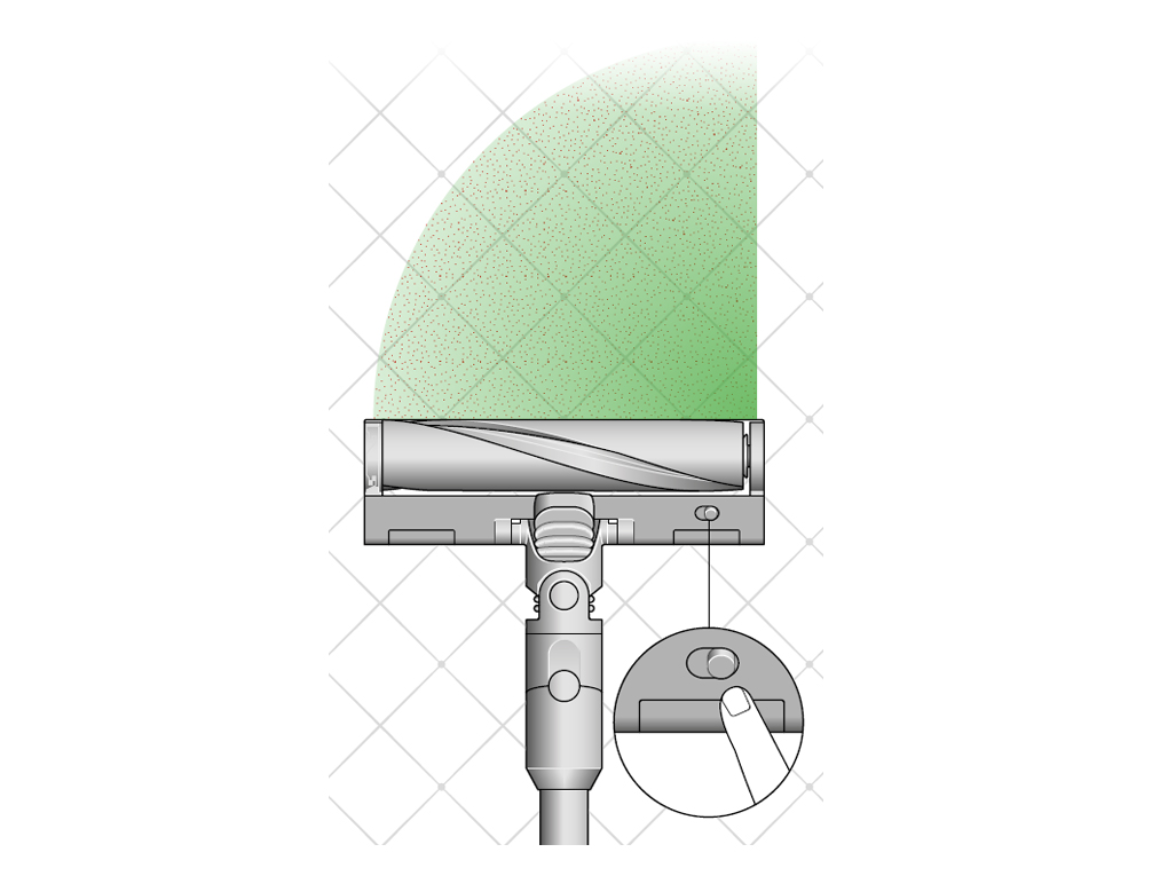
The V15 uses a laser green light for detecting dust on the floor, in addition to a charging light. If the floor laser isn’t working:
- Make sure the vacuum is set to the correct cleaning mode.
- Clean the laser window gently with a dry cloth.
- If only the charging green light is out, follow the earlier steps.
Dyson Outsize
This model combines several indicators. If the green light isn’t working:
- Confirm that the charger is the original one from Dyson.
- Try charging in a different room.
- If the issue continues, contact Dyson support.
Quick Comparison: Dyson Green Light Meanings
Here is a quick reference for what the green light means on different Dyson models:
| Model | Green Light Meaning | Common Issues |
|---|---|---|
| V7/V8 | Charging/Charged | Battery wear, dirty contacts |
| V10/V11 | Charging/Power Mode | Charger fault, overheating |
| V15 Detect | Laser detection/Charging | Laser blocked, mode error |
| Outsize | Charging/Status | Wrong charger, loose connections |
How To Replace A Dyson Battery
If your troubleshooting points to a bad battery, replacing it is often straightforward. Here’s a simple guide for most stick Dyson models:
- Unplug your vacuum and let it cool down.
- Find the screws holding the battery in place (usually near the handle and base).
- Remove the screws using a small Phillips screwdriver.
- Gently slide out the old battery.
- Insert the new battery, making sure it clicks into place.
- Replace the screws.
- Plug in your Dyson and see if the green light returns.
Always buy a genuine Dyson battery or one recommended by Dyson, as cheap third-party batteries can damage your vacuum or void your warranty.
When To Contact Dyson Support
Sometimes, despite your best efforts, the green light still won’t work. Here are signs it’s time to contact Dyson support:
- The vacuum will not charge or turn on, even after battery replacement.
- You hear strange noises or smell burning.
- The device is under warranty and you’re unsure about opening it.
- The green light has never worked since purchase (possible manufacturing defect).
Dyson’s customer service can guide you through advanced troubleshooting, arrange repairs, or replace parts under warranty.
Real-world Example: Diagnosing A Green Light Issue
Let’s look at a real example to bring these steps to life. Imagine you have a Dyson V11. One day, you notice the green light doesn’t come on when you plug it in. The vacuum itself works when using the remaining charge, but after it runs out, it won’t charge anymore.
You follow these steps:
- Try another wall outlet—no change.
- Inspect the charger—no visible damage.
- Clean the charging contacts—still no green light.
- Reset the vacuum—nothing.
- Try a friend’s charger—suddenly, the green light turns on.
- Buy a replacement charger, and the problem is solved.
This example shows how a simple charger failure, not a battery or vacuum issue, can cause the green light to stop working. It also highlights why methodical troubleshooting is so important.
Non-obvious Insights For Beginners
Many new Dyson users miss two important details:
- Green light location may change. On some models, the charging indicator is on the battery, while on others, it’s on the main body or even the charger itself. Always check your specific model.
- Green doesn’t always mean “good”. Some models use a blinking or flashing green to indicate a problem, such as a blockage or overheating. Always look for patterns (steady vs. flashing) and check your manual for what they mean.
Table: Common Dyson Green Light Problems And Fixes
To make troubleshooting easier, here’s a quick table of problems and solutions:
| Problem | Possible Cause | Solution |
|---|---|---|
| No green light, not charging | Charger failure | Try another charger |
| Green light flickers | Loose connection | Check battery and charger contacts |
| Green light never comes on, vacuum works | Blown LED | Ignore, use vacuum as normal |
| Green light blinks rapidly | Software error/overheating | Reset and let cool |
| Green laser not working (V15) | Dirty laser or wrong mode | Clean laser window, check settings |
Credit: support.dyson.com.au
Preventing Future Green Light Issues
While some problems are unavoidable, you can reduce the risk of green light failure with these tips:
- Keep contacts clean: Wipe the charging contacts every few weeks.
- Use original chargers: Avoid third-party chargers, which can cause damage.
- Store in a cool, dry place: Heat and humidity can damage the battery and electronics.
- Don’t overcharge: Unplug the vacuum after it’s fully charged if possible.
- Check battery health: If your model allows, check the battery indicator regularly.
Many people ignore these small steps, but they can add years to your Dyson’s life.
Is It Safe To Use A Dyson Without The Green Light?
If the only problem is the green light not working—and the vacuum charges and runs as normal—it’s generally safe to use. The light is just an indicator, not a safety feature. However, you’ll lose the visual feedback for charging status and might not spot other errors. If you rely on the green light to know when your vacuum is ready, you may want to fix the issue or use a timer to avoid overcharging.

Credit: www.amazon.com
When A Repair Shop Is Necessary
Some green light issues are best handled by professionals, especially if:
- You suspect internal wiring problems.
- The vacuum is under warranty.
- You’re uncomfortable opening electronics.
A certified Dyson repair center will have the tools and knowledge to fix or replace faulty parts safely.
How Much Does It Cost To Fix A Dyson Green Light?
The cost depends on the cause:
- New charger: $30–$60
- Replacement battery: $70–$120
- Professional repair: $50–$150, depending on labor and parts
- LED replacement: Rarely done; may cost more than it’s worth
If your vacuum is under warranty, most repairs are free. Always check your warranty status before paying for repairs.
Tips For Long-term Dyson Health
To keep your Dyson working well for years:
- Regularly empty the dust bin to avoid blockages.
- Clean filters every 1–3 months, depending on use.
- Charge the battery at room temperature; avoid charging in extreme heat or cold.
- Inspect for wear and tear on the charger and battery yearly.
These habits will not only help your green light stay functional but also improve your vacuum’s performance overall.
Where To Find More Help
If you need more detailed instructions, Dyson’s official website has troubleshooting guides and videos. You can also find user forums where people share tips for specific models. A good starting point is the Dyson Support page.
Frequently Asked Questions
What Does A Flashing Green Light Mean On My Dyson?
A flashing green light usually means your Dyson is trying to tell you something. On most models, it can indicate a problem such as a blockage, overheating, or a battery error. Always check your user manual for the exact meaning for your model. If you see a flashing pattern, unplug the vacuum, let it cool, and clear any blockages.
Credit: www.reddit.com
Can I Replace The Green Led Light Myself?
Replacing the green LED is not recommended unless you have experience with electronics. The light is part of the internal circuit board, and opening your vacuum may void the warranty. If your vacuum works but the green light is out, it’s best to live without it or seek help from a professional.
Why Does My Dyson Charge But The Green Light Doesn’t Turn On?
If your Dyson charges but the green light doesn’t come on, the LED may be faulty or there could be a loose connection inside. As long as the vacuum holds a charge and runs normally, this is not a serious issue. If you want the indicator, you’ll need professional repair.
How Long Should My Dyson Battery Last?
A typical Dyson battery lasts about 2–5 years, depending on usage and charging habits. If your vacuum loses power quickly or won’t charge, the battery may need replacing. Using the right charger and avoiding overcharging can extend battery life.
Does Using A Third-party Charger Affect The Green Light?
Yes, using a third-party charger can sometimes cause problems, including green light failure. Non-original chargers may deliver the wrong voltage or current, damaging the battery or electronics. Always use the charger that came with your Dyson or buy an official replacement.
If your Dyson green light isn’t working, don’t panic. Most issues can be fixed with simple checks or affordable parts. By understanding how the light works and following these troubleshooting steps, you can keep your vacuum running smoothly for years to come.