
If you rely on a Compustar command start system, you know how convenient it can be—especially during cold winters or hot summers. With a simple press of a button, your car starts from a distance, warming or cooling before you even get in. But what happens when your Compustar command start stops working? That frustration can ruin your day and even leave you stranded. Understanding why it fails and how to fix it is crucial for any driver who uses this technology.
This article goes deep into the reasons your Compustar command start may not work, practical troubleshooting steps, and solutions for different scenarios. Whether you’re a car owner with basic technical knowledge or just curious about remote starters, you’ll find clear, step-by-step advice here. With real-world examples, expert tips, and answers to common questions, you’ll soon know how to get your Compustar system running again—or when it’s time to call a professional.
How Compustar Command Start Works
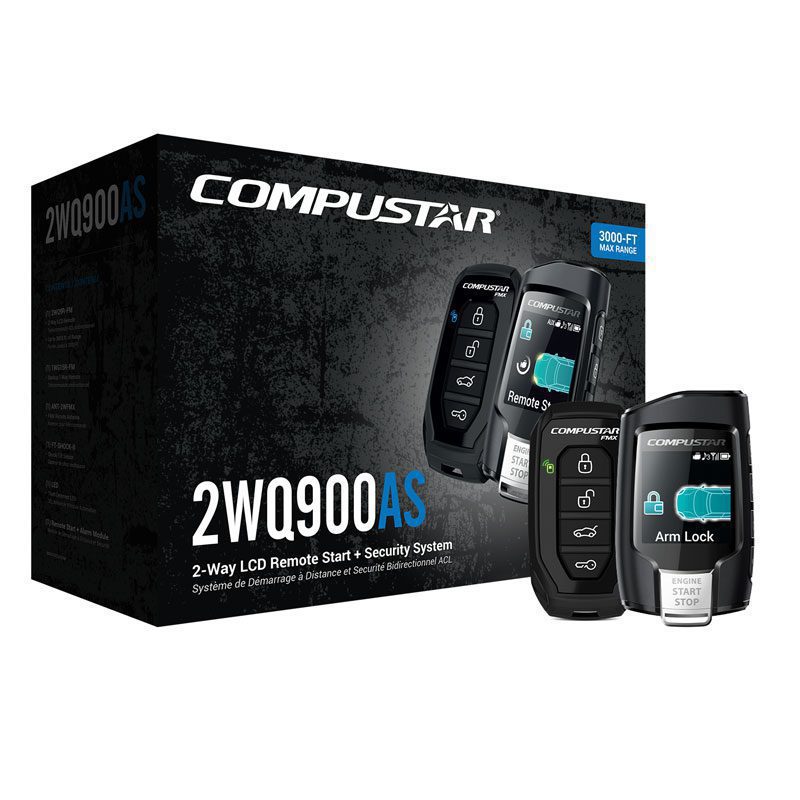
To solve a problem, it helps to know how the system works. A Compustar command start is a type of remote car starter. When you press the button on your remote, a small signal goes to a control module installed in your vehicle. This module communicates with your car’s ignition system, “telling” it to start the engine. Most Compustar systems include safety features, anti-theft protection, and connections to your car’s climate controls.
Here’s what happens step-by-step:
- You press the start button on your Compustar remote.
- The remote sends a radio signal to the antenna in your car.
- The control module receives the signal and checks if all conditions are safe.
- If everything is okay, the module mimics your car key’s signal, starting the engine.
- The system keeps the engine running for a set time or until you enter the vehicle.
If any part of this chain is broken, your command start will fail.
Common Reasons Compustar Command Start Fails
Many drivers are surprised by how many things can cause a remote starter to stop working. Below are the most frequent reasons, with explanations for each:
1. Weak Or Dead Remote Battery
The remote uses a small battery, usually a coin cell. If it’s weak, the remote can’t send a strong signal. Some remotes may still blink but lack the power to reach your car.
*Tip*: A remote battery usually lasts 1-2 years, but cold weather can shorten this time.
2. Vehicle Battery Problems
A low or dead car battery is one of the most common causes. If your car’s battery can’t provide enough power, the Compustar module will not attempt to start the engine for safety reasons.
3. Out Of Range
Remote starters have a limited range, usually between 800 feet and 3,000 feet depending on the model and the environment. Walls, buildings, or electronic interference can reduce this range.
4. Hood Pin Switch Issues
A hood pin switch is a small sensor that tells the Compustar module if your hood is open or closed. For safety, the system will not start if it “thinks” the hood is open. Corrosion, physical damage, or misalignment often cause problems here.
5. Valet Mode Activated
Most Compustar systems have a Valet Mode. This mode disables remote start functions, usually for maintenance or car washes. Accidentally entering Valet Mode is a very common beginner mistake.
6. Faulty Or Disconnected Antenna
The antenna is usually installed on the windshield or high on the dashboard. If it becomes disconnected or damaged, the remote signal can’t reach the control module.
7. Engine Check Light Or Fault Codes
If your car’s computer detects a problem (like a check engine light), it can block remote start for safety. Some Compustar models monitor the OBD-II port and will refuse to start if there’s a stored code.
8. Door Or Trunk Not Closed
The system checks if all doors and the trunk are closed. If any are open or the sensors are faulty, the Compustar command start won’t work.
9. Ignition Key Issues
Many cars have transponder keys or special security chips. If there’s a problem with the bypass module (which tells the car it’s okay to start without a key), the Compustar may fail.
10. Installation Or Wiring Problems
Sometimes, connections become loose, wires corrode, or installers make mistakes. Even a small wiring error can stop the whole system.
11. Software Or Firmware Errors
Modern Compustar modules use software. Sometimes, a glitch or outdated firmware can cause failures. Rare, but possible.
12. Interference From Other Devices
High-power electronics, radio towers, or even other car starters can interfere with your Compustar system’s signal.
13. Physical Damage To Remote
Drops, water, or dirt can damage remote internals. Even if the outside looks fine, inside contacts may be broken.
14. Blown Fuses
There are usually several fuses in the Compustar wiring harness. If any are blown, the system may partially or fully stop working.
15. Temperature-related Issues
Extreme cold or heat can affect both the remote and the car’s electronics. Batteries, in particular, lose capacity in cold weather.
Many drivers overlook the hood pin switch and valet mode—these are two of the most common, yet least obvious, sources of trouble.
Credit: www.compustar.com
Step-by-step Troubleshooting Guide
If your Compustar command start is not working, follow these steps in order. Start with the easiest checks and move toward the more technical.
Step 1: Check The Remote Battery
- Open your remote (usually a small screw or snap).
- Check the battery model (often CR2032 or similar).
- Replace with a new, high-quality battery.
- Test the remote again.
Step 2: Test Vehicle Battery
- Try starting your car with the key.
- If the car struggles or clicks, your battery is low. Charge or replace as needed.
- If the car starts fine, move to the next step.
Step 3: Confirm You’re In Range
- Stand close to the car (next to the driver’s door).
- Try the command start.
- If it works, you may have range or antenna issues.
Step 4: Inspect The Hood Pin Switch
- Open the hood and find the pin switch (usually near the latch).
- Press the switch by hand; you should hear a click.
- If rusty, bent, or broken, clean or replace it.
Step 5: Check For Valet Mode
- Look in your manual for how to exit Valet Mode (often holding the lock and trunk buttons together, or a special button under the dash).
- Try remote start again.
Step 6: Examine Doors And Trunk
- Open and close all doors and trunk firmly.
- Lock the car with the remote.
- Try remote start again.
Step 7: Inspect Remote For Damage
- Look for cracks, water inside, or missing buttons.
- If damaged, try a spare remote if you have one.
Step 8: Review Vehicle Dashboard
- Check for “Check Engine,” security, or other warning lights.
- If present, scan for codes and fix underlying issues.
Step 9: Look At The Antenna
- Find the small black box, usually near the windshield.
- Make sure the plug is secure and the wire is not cut or damaged.
Step 10: Check Fuses
- Under the dash, look for small inline fuses on the Compustar wiring.
- Check with a test light or visually inspect for broken wires inside.
- Replace any blown fuses with the same rating.
Step 11: Rule Out Software/firmware Issues
- If nothing else works, ask your installer if there are firmware updates.
- Some shops can update modules or reprogram remotes.
Step 12: Look For Interference
- If you live near a radio tower or have lots of electronics nearby, try remote start away from those devices.
Step 13: Inspect For Wiring Problems
- Look for loose plugs or wires under the dash (if you’re comfortable).
- If you see anything disconnected, consult a professional.
If none of these steps work, it’s likely a complex issue needing a professional installer.
Compustar System Components: What Can Go Wrong
Understanding each part of your Compustar system helps you pinpoint problems. Here’s a quick comparison of the main components and how they can fail:
| Component | Main Function | Common Failure | Difficulty to Fix |
|---|---|---|---|
| Remote | Sends start signal | Battery, physical damage | Easy |
| Antenna | Receives remote signal | Disconnected, broken wire | Medium |
| Control Module | Controls starter | Software, wiring issues | Hard |
| Hood Pin Switch | Safety sensor | Rust, misalignment | Easy |
| Bypass Module | Security override | Programming error | Hard |
How To Reset A Compustar Command Start
Sometimes, a simple reset can solve hidden electronic bugs. Here’s how to reset most Compustar systems:
- Sit in the driver’s seat with all doors closed.
- Turn the key to “ON” (not start).
- Press and hold the Valet button (usually under the dash).
- While holding, turn the key to “OFF” and then back to “ON.”
- Release the Valet button.
- Try remote start again.
Check your manual for exact steps, as some models have different reset methods.
Pro tip: After a reset, you may need to reprogram your remote. This is another step often missed by beginners.
Valet Mode: What It Is And How To Exit
Valet Mode is designed for times when you don’t want the remote starter to work—like when a mechanic is servicing your car. Accidentally turning on Valet Mode is very common.
How to tell if you’re in Valet Mode:
- The Compustar remote may show a small “V” or “valet” icon.
- The car does not respond to start commands but still locks/unlocks.
- Some models beep or flash lights in a special pattern.
How to exit Valet Mode (general method):
- Turn the ignition to “ON.”
- Press and release the Valet button once (sometimes hold for a few seconds).
- The system should chirp or flash lights.
- Try remote start again.
*Check your manual for the exact steps. Some systems use a combination of remote buttons instead. *
Compustar Error Codes And Light Flashes
Many Compustar systems “talk” to you using error codes or flashes. Here’s a quick guide to what different light patterns mean:
| Flashes/Chirps | Possible Cause | Action |
|---|---|---|
| 3 flashes | Hood open or pin switch problem | Check switch |
| 5 flashes | Door/trunk open | Close all doors/trunk |
| 7 flashes | Engine sense error | Check wiring, consult installer |
| 1 long, 2 short | Valet Mode active | Exit Valet Mode |
Non-obvious insight: Not all installers show customers how to read these codes. Learning your vehicle’s specific flash patterns can save you hours.
When Should You Call A Professional?
Some problems are simple, but others require special tools or knowledge. Call a professional installer if:
- You suspect wiring or software problems.
- You’re not comfortable working with car electronics.
- The system is under warranty.
- There are security or anti-theft issues.
Professional installers have test equipment and know the exact programming steps. They can often fix a system in minutes that would take a beginner hours—or even days.
Credit: www.youtube.com
Preventing Future Command Start Failures
Most Compustar command start problems can be prevented with basic maintenance:
- Change remote batteries every 12-18 months.
- Keep the car battery in good condition.
- Clean the hood pin switch once a year.
- Avoid dropping or getting the remote wet.
- Have your system checked annually by a pro.
Practical tip: Keep a spare remote battery in your glove box, especially if you live in a cold climate.
Real-world Examples And Case Studies
Let’s look at a few real-world cases:
Case 1: The Winter Deadlock
A driver in Minnesota found his Compustar command start stopped working during a cold snap. He replaced the remote battery, but no luck. After checking everything else, he found the hood pin switch had frozen in the “open” position. A quick spray of de-icer fixed the problem.
Case 2: The Valet Trap
A car owner took her vehicle for an oil change. When she got it back, the remote start didn’t work. She was in Valet Mode, accidentally triggered by the mechanic during service. Exiting Valet Mode solved the issue instantly.
Case 3: The Hidden Fuse
One driver spent hours troubleshooting only to find a tiny blown fuse in the Compustar wiring harness under the dash. Replacing the fuse restored full function—something he never thought to check before.
These examples show how a simple check can save time and money.
Compustar Command Start Vs. Other Brands
How does Compustar compare to other remote start systems like Viper or Avital? Here’s a quick comparison:
| Feature | Compustar | Viper | Avital |
|---|---|---|---|
| Range | Up to 3,000 ft | Up to 1 mile | Up to 1,500 ft |
| Smartphone Control | Yes (DroneMobile) | Yes (SmartStart) | No |
| Reliability | High | High | Medium |
| Installation Difficulty | Medium | Medium | Easy |
| Price | $$$ | $$$ | $$ |
Compustar is known for its long range and reliability, but the system is only as good as its installation and maintenance.
Can You Fix Compustar Command Start Problems Yourself?
Most drivers can handle basic troubleshooting: changing batteries, checking switches, or exiting Valet Mode. For deeper issues—like wiring, firmware, or bypass module problems—it’s safer to use a professional.
Non-obvious insight: Some car models are more sensitive to remote start systems. For example, European vehicles like BMW or Mercedes often need extra programming. Always ask your installer if your car has special requirements.
What To Do If A Compustar Command Start Still Does Not Work
If you’ve tried all steps and your Compustar system is still down:
- Gather details: Note the symptoms, warning lights, and steps you’ve tried.
- Take photos of the wiring and error codes if possible.
- Contact your installer or Compustar technical support.
- Be ready to show your car to a pro—they can often diagnose with a quick scan tool.
If you’re out of warranty, ask for a quote before repairs to avoid surprises.
Frequently Asked Questions
Why Does My Compustar Remote Start Work Sometimes But Not Always?
This usually points to intermittent signal problems. It could be a weak battery, interference, or a loose antenna wire. Weather can also affect signal strength, especially in extreme cold.
How Do I Know If My Car Is In Valet Mode?
Look for a “valet” indicator on the remote (a small “V” or special icon). If the car locks and unlocks but will not remote start, Valet Mode is likely on. Check your manual for the steps to exit.
Can A Bad Car Battery Cause My Compustar Command Start To Fail?
Yes. If your car battery is weak, the Compustar module will refuse to start the car for safety. Always check your car’s battery first when troubleshooting.
Is It Safe To Reset My Compustar System Myself?
For most users, a basic reset is safe and often helpful. Just follow the manual’s instructions. If you’re uncomfortable or your car uses advanced security, call a pro.
Where Can I Find The Latest Firmware Or Troubleshooting Guides For Compustar?
The best source is the official Compustar website. Visit Compustar for manuals, guides, and support.
Conclusion
Dealing with a Compustar command start that isn’t working can be frustrating, but most issues are simple and quick to fix. Start with basic checks, be patient, and don’t hesitate to ask a professional for help. With the right approach, you’ll have your car starting remotely again in no time—keeping you comfortable and safe, whatever the weather.