
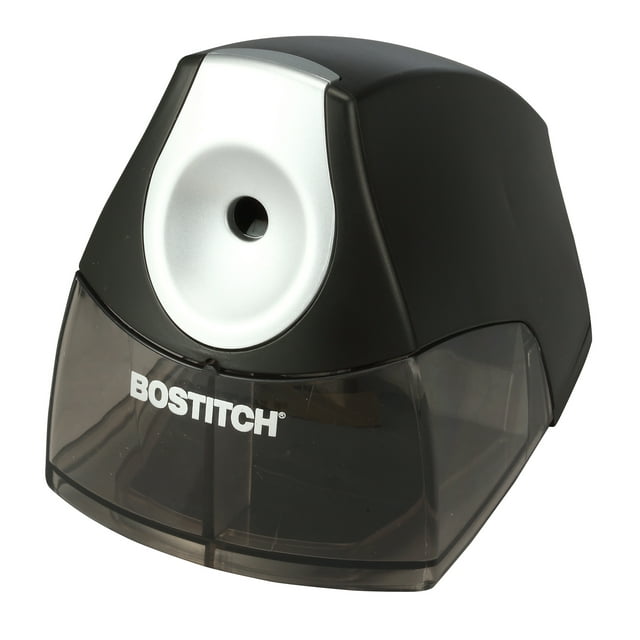
Is your Bostitch pencil sharpener suddenly refusing to work? You rely on it to keep your pencils ready for notes, sketches, or important tasks, so when it stops sharpening, it can throw off your entire workflow.
But don’t worry—your sharpener isn’t broken beyond repair. You’ll discover simple, effective ways to troubleshoot and fix common issues that cause your Bostitch pencil sharpener not to work. Whether it’s a jammed blade, an overfilled shavings tray, or a safety switch problem, you’ll learn exactly how to get your sharpener back in action quickly.
Keep reading, and you’ll never have to struggle with a dull pencil again!

Credit: www.instructables.com
Common Causes Of Failure
The Bostitch pencil sharpener may stop working due to several common issues. Knowing these causes helps in fixing the problem quickly. Understanding the main reasons improves the chances of restoring your sharpener’s function.
Each cause affects the sharpener differently. Some problems are simple to solve. Others require more attention or parts replacement. Below are the frequent causes of failure in Bostitch pencil sharpeners.
Power Issues
Power problems often stop the sharpener from running. Check if the batteries are fresh and correctly placed. For electric models, ensure the power cord is plugged in and undamaged. A loose connection or dead batteries can cause total power loss.
Jammed Blades
Blades can jam when pencil shavings or broken tips block the cutter. This stops the sharpening motion and can cause a humming sound. Turn off the sharpener, open the casing if possible, and carefully remove any debris. Use a small tool to clear stuck pieces.
Overfilled Shavings Tray
A full shavings tray may prevent the sharpener from working. Shavings can block the gears or safety switches. Empty the tray regularly to avoid this issue. Keeping the tray clean ensures smooth operation and extends the sharpener’s life.
Safety Switch Problems
The safety switch stops the sharpener if the tray is not seated correctly. This prevents accidental injury. Check that the tray is firmly in place. Misalignment or a broken switch will stop the sharpener from starting. Adjust or replace the switch if needed.
Overheating Protection
The sharpener has a built-in feature to prevent damage from overheating. If used continuously for a long time, it may shut off automatically. Let the sharpener cool down before using it again. This protects the motor and extends the device’s lifespan.
Basic Troubleshooting Steps
Basic troubleshooting steps can help fix your Bostitch pencil sharpener quickly. These steps cover common issues that stop the sharpener from working. Follow each step carefully to identify the problem and get your sharpener back in action.
Start with simple checks before moving to more detailed inspection. These easy actions save time and often solve the issue without extra tools or parts.
Check Battery And Power Supply
First, confirm the pencil sharpener has power. If it uses batteries, open the battery compartment. Remove old batteries and replace them with fresh AA batteries. Make sure the batteries are inserted correctly with the right polarity. For models with power cords, check the cord for damage. Try plugging the sharpener into a different outlet to ensure the socket works.
Empty The Shavings Tray
An overfilled shavings tray can block the blades. Remove the tray carefully and empty all shavings into the trash. Clean the tray with a dry cloth to remove dust. Reinsert the tray firmly to ensure it fits properly. A loose or full tray can trigger safety locks and stop the sharpener.
Inspect Safety Interlock
The sharpener has a safety interlock to prevent operation if parts are not in place. Check if the shavings tray and cover are seated correctly. Gently press or adjust them to ensure all components fit snugly. If the safety switch is stuck or dirty, clean it with a soft cloth. This step ensures the sharpener recognizes it is safe to run.
Test With Different Pencils
Try sharpening different pencils to rule out pencil issues. Use standard-sized pencils without damage. Avoid very soft or thick pencils that may jam the blades. If the sharpener works with one pencil but not another, the problem may be the pencil rather than the device. Testing various pencils helps isolate the cause.
Clearing Jams
Jams are a common problem with Bostitch pencil sharpeners. Clearing these jams quickly restores your sharpener’s function. The process involves careful removal of stuck pieces and cleaning the blades. Follow simple steps to avoid damage and keep your sharpener working smoothly.
Removing Broken Lead Pieces
Broken lead pieces often cause jams. First, unplug the sharpener for safety. Turn the unit upside down to access the blades. Use a small tool like a paperclip or needle to gently remove stuck lead pieces. Avoid pushing debris further inside. Clear all visible pieces for smooth operation.
Dislodging Debris From Blades
Debris buildup on blades reduces sharpener efficiency. Use a soft brush or compressed air to clean the blades. Remove any pencil shavings or dust carefully. Avoid touching blades with fingers to prevent injury. Regular cleaning helps prevent future jams and keeps sharpening consistent.
Using Tools For Jam Removal
Tools like tweezers, paper clips, or a small screwdriver help remove jams. Insert them carefully into the sharpener’s opening. Pry out stuck debris slowly without forcing the mechanism. For tough jams, disassemble parts following the manufacturer’s guide. Always reassemble securely before use.

Credit: www.amazon.sg
Cleaning And Maintenance
Regular cleaning and maintenance keep your Bostitch pencil sharpener working smoothly. Dust, shavings, and small pencil bits can block parts inside. This causes the sharpener to jam or stop working. Taking time to clean the sharpener helps avoid these issues. It also extends the life of your tool.
Removing The Enclosure
Start by unplugging the sharpener for safety. Turn it upside down to find screws on the base. Use a screwdriver to remove these screws carefully. Lift off the top enclosure to see the inside parts. Keep the screws safe to reassemble later. Avoid forcing the enclosure off to prevent damage.
Cleaning The Cutter Blades
Look inside to find the cutter blades. Use a small brush or a soft cloth to remove shavings and dust. For stubborn debris, a toothpick or a small needle works well. Be gentle to avoid bending or dulling the blades. Clean blades cut pencils smoothly and reduce jamming.
Lubricating Moving Parts
Check the sharpener’s moving parts for dryness or stiffness. Apply a small drop of light machine oil or silicone lubricant. Avoid over-oiling as it may attract more dust. Move the parts gently to spread the lubricant evenly. Proper lubrication helps the sharpener run quietly and smoothly.
When To Replace Parts
Knowing when to replace parts in your Bostitch pencil sharpener helps keep it working smoothly. Some parts wear out over time and cause poor sharpening. Replacing these parts at the right time saves you from bigger problems later. Regular checks help spot issues early and keep your sharpener in top shape.
Signs Of Dull Blades
Dull blades make pencils sharpen unevenly or not at all. You may hear a grinding noise or see broken leads often. The sharpener may take longer to sharpen or stop working midway. If cleaning the blades does not help, it is time to replace them. Sharp blades give clean, smooth points quickly.
Replacing The Motor Or Gears
The motor and gears move the blades to sharpen pencils. If the sharpener hums but does not sharpen, these parts may be faulty. Strange noises or no movement can also mean a motor or gear problem. Replacing worn motors or broken gears restores full function. Use parts made for your Bostitch model for best results.
Buying Replacement Batteries
Battery power is key for cordless Bostitch sharpeners. Weak batteries cause slow or no sharpening. If your sharpener stops working, check the batteries first. Replace old batteries with fresh AA batteries. Always use good-quality batteries to avoid leaks and damage. Changing batteries regularly keeps your sharpener ready to use.
Credit: schulinitiative-elektrotechnik.de
Preventive Tips
Maintaining your Bostitch pencil sharpener helps avoid common problems. Preventive care keeps it working longer and sharpens pencils smoothly. Simple habits protect the sharpener’s parts and improve performance. Follow these key tips to reduce issues and extend the sharpener’s life.
Regular Cleaning Schedule
Clean the sharpener often to remove pencil shavings and dust. Empty the shavings tray after every use or when full. Use a soft brush or cloth to clear debris from blades and inside parts. Avoid letting dust build up as it can block the blades and motor. A clean sharpener runs quietly and sharpens pencils better.
Proper Pencil Types To Use
Choose pencils that fit the sharpener’s size and type. Avoid very thick or extra soft pencils that can jam the blades. Use standard wood pencils with hard or medium lead for best results. Colored pencils with soft cores may cause more buildup. Using the right pencils reduces strain and blade damage.
Avoiding Overuse And Overheating
Do not sharpen pencils continuously for long periods. Give the sharpener breaks to cool down after heavy use. Overheating can stop the motor and damage internal parts. Let the sharpener rest if it becomes warm to the touch. Controlled use keeps the motor running smoothly and prevents breakdowns.
Frequently Asked Questions
Why Is My Pencil Sharpener Not Sharpening?
Your pencil sharpener may not sharpen due to a jammed blade, dull or clogged blades, or an overfilled shavings tray. Ensure power supply and check the safety switch. Clean debris and remove broken lead tips to restore proper function.
What Type Of Battery Does A Bostitch Pencil Sharpener Use?
A Bostitch pencil sharpener uses four AA batteries. These batteries power the sharpener efficiently. Batteries are sold separately. Replace all four to ensure proper function.
How Do I Unclog A Sharpener?
Turn the sharpener upside down and remove screws to open it. Clear debris or stuck pencil tips carefully. Reassemble and test.
Can A Pencil Sharpener Overheat?
Yes, a pencil sharpener can overheat if used continuously without breaks. Overheating may cause it to stop working temporarily to prevent damage. Allow it to cool down before resuming use. Regularly empty shavings and clear jams to avoid overheating issues.
Why Is My Bostitch Pencil Sharpener Not Sharpening?
A jammed blade or pencil tip often blocks sharpening. Check for stuck pencil pieces or debris inside. Also, ensure the shavings tray is not full.
Conclusion
A Bostitch pencil sharpener may stop working for simple reasons. Check for jams or an overfilled shavings tray. Make sure the safety switch is properly engaged. Clean or replace dull blades to improve performance. If it hums but won’t sharpen, it likely needs clearing.
A quick inspection and basic fixes often restore function. Taking small steps can save time and money. Keep these tips handy to keep your sharpener working well.