
If you’re holding an 8Bitdo Sn30 Pro controller and see its three lights blinking, you might be worried, confused, or just want to know what’s going on. The Sn30 Pro is a popular wireless game controller for Nintendo Switch, PC, Android, and more. But those three blinking lights can mean different things. Understanding them will help you solve problems faster, avoid frustration, and keep playing your favorite games.
This article explains everything about the 8Bitdo Sn30 Pro 3 light blinking issue. You’ll learn what the blinking means, why it happens, and how to fix it in 30 different scenarios. Each situation is explained step by step, so even if you’re new to gaming controllers, you’ll know what to do. We’ll also share some tips that most people miss, and answer the most common questions at the end. If you want your Sn30 Pro working smoothly, keep reading.
What Does 3 Light Blinking Mean?
The three blinking lights on the Sn30 Pro are a way for the controller to communicate. These LED indicators tell you about its status, connection, and problems. It’s important to know that not every blinking means the same thing. Sometimes it’s trying to pair, sometimes it’s searching for a device, and sometimes there’s a problem that needs fixing.
Common Reasons For 3 Light Blinking
- Pairing mode: The controller is ready to connect to a new device.
- Low battery: The battery is almost empty and needs charging.
- Firmware update: The device needs or is undergoing a firmware update.
- Connection lost: The controller can’t find the last paired device.
- Button combination error: Wrong button sequence used.
- Unsupported platform: Trying to connect to a device that doesn’t support the controller.
- Hardware fault: A rare issue with the controller’s internal parts.
These are just the basics. Let’s break down 30 specific situations and what the 3 blinking lights mean in each one.
1. Controller Is In Pairing Mode
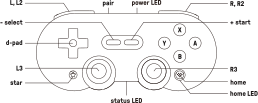
When you first turn on the Sn30 Pro and hold the pairing button, the three lights start blinking. This tells you the controller is looking for a device to connect to, like your Nintendo Switch, PC, or phone. The blinking will stop once the controller is paired. If it keeps blinking, pairing hasn’t succeeded.
Tip: If you see three lights blinking for a long time, check if your target device’s Bluetooth is on and in range.
2. Bluetooth Connection Lost
If the controller was paired and suddenly loses the connection, you’ll see the three lights blink. This often happens if you walk away from your device or turn it off. To fix it, bring the controller close to the device and wait a few seconds.
If it doesn’t reconnect, try pairing again.
Non-obvious insight: Many users forget that interference from other wireless devices or thick walls can cause this problem.
3. Low Battery Warning
When the battery is low, the controller blinks three lights to warn you. This is different from the single light that blinks during charging. Plug it into a USB charger. The lights will change when it starts charging.
Tip: Charging with a weak USB port (like on some TVs) may not provide enough power. Use a wall charger or a powered USB port.
4. Firmware Update Required
Sometimes, the controller blinks three lights to signal that a firmware update is needed. This usually happens after connecting to a new device or after long storage. Use the 8Bitdo Ultimate Software on your PC or Mac to update the firmware.
Non-obvious insight: Outdated firmware can cause compatibility issues with new devices or games. Always keep your firmware updated.
5. Wrong Button Combination
The Sn30 Pro supports multiple platforms. If you hold the wrong button combination when turning it on, the three lights may blink. For example, holding “Y + Start” is for Switch mode, “B + Start” is for D-input, and so on.
If you use the wrong combo, the controller can’t connect properly.
Example: If you want to connect to Nintendo Switch, use “Y + Start.” For Windows (X-input), use “X + Start.”
6. Controller Not Recognized By Device
If your device doesn’t see the controller, the three lights will keep blinking. This can happen if the device’s Bluetooth is off, the controller is out of range, or there’s interference.
Solution: Restart Bluetooth on your device, move closer, and remove other wireless devices nearby.
7. Outdated Bluetooth Driver On Pc
On Windows PCs, an outdated Bluetooth driver can prevent the controller from connecting. The three lights blink because the controller is trying to pair but the PC doesn’t respond properly.
Solution: Update your Bluetooth driver via Device Manager or your PC’s manufacturer website.
8. Multiple Devices In Memory
The Sn30 Pro remembers several devices. If you try to switch between them, sometimes it gets stuck searching for the previous device, showing three blinking lights.
Fix: Reset the controller’s pairing memory. Hold the pairing button for 10 seconds. Then pair again with your new device.
9. Usb Connection Not Detected
When connecting with a USB cable, the three lights can blink if the cable is damaged or the port is faulty.
Tip: Try a different USB cable and port. Avoid cheap cables that only support charging, not data transfer.
10. Controller Needs Resetting
Like many electronic devices, the Sn30 Pro may need a reset if it acts strangely. Three blinking lights with no clear reason can mean a software glitch.
How to reset: Use a paperclip to press the small reset button (usually on the back or near the USB port). Then restart pairing.
11. Interference From Other Wireless Devices
Wi-Fi routers, other controllers, or even microwaves can interfere with the Bluetooth signal. The Sn30 Pro shows three blinking lights if it can’t maintain a good connection.
Solution: Turn off or move away from other wireless devices during pairing.
12. Battery Not Charging Properly
If you plug in the controller but the battery does not charge, you might still see three lights blinking. This means the controller is powered on but not receiving enough charge.
Example: Check the charging cable, USB port, and try a different power source.
13. Connecting To Unsupported Device
If you try to pair the Sn30 Pro with a device that does not support it (like some smart TVs or old phones), it will keep blinking three lights.
Tip: Check the official compatibility list on the 8Bitdo website before buying or pairing.
14. Accidental Firmware Corruption
Rarely, a failed firmware update or sudden unplug during update can corrupt the controller’s firmware. The result is three lights blinking and no connection.
Fix: Reconnect the controller via USB to your PC, run the 8Bitdo Ultimate Software, and reinstall the firmware.
15. Controller Stuck In Boot Loop
If the controller keeps restarting itself, you’ll see repeated three-light blinking. This usually means a deeper software problem.
What to do: Reset the controller as described above. If that fails, contact 8Bitdo support.
16. Using The Wrong Controller Mode
The Sn30 Pro has several modes (Switch, X-input, D-input, macOS). If you use the wrong one, the controller can’t connect and blinks three lights.
Example: If you want to play on PC, use “X + Start.” If you use “Y + Start,” it won’t work on Windows and will keep blinking.
17. Bluetooth Pairing Limit Reached
The controller can remember only a few devices. If you try to pair with too many, new attempts will fail, causing three lights to blink.
Solution: Forget old devices from your controller’s memory, then pair with the new device.
18. Software Conflict With Other Controllers
If you have other wireless controllers connected to your device, there can be a software conflict. The Sn30 Pro blinks three lights because it can’t get a stable connection.
Tip: Disconnect other controllers and try pairing again.
19. Hidden Bluetooth Settings On Android
Some Android devices require you to enable extra Bluetooth settings or permissions. Without these, the Sn30 Pro may show three blinking lights.
Example: Enable “pair new device” in Bluetooth settings and allow all permissions.
20. Battery Health Is Bad
If the controller is old or the battery is damaged, it might not hold a charge. The three lights blink even after charging.
Non-obvious insight: Swelling or overheating is a sign the battery should be replaced by a professional.
21. Incomplete Firmware Update
Sometimes, updating the firmware does not finish correctly. The controller stays in update mode, blinking three lights.
Fix: Repeat the update process using the official 8Bitdo software until it completes successfully.
22. Device Cache Problems
Smartphones and computers can have Bluetooth cache issues, causing pairing problems. The controller blinks three lights but is not faulty.
Solution: Clear the Bluetooth cache on your device (instructions depend on your device type).
23. Hidden Menu/developer Mode Problems
Advanced users sometimes use developer options or hidden menus on their devices. Wrong settings can block Bluetooth pairing, causing the three lights to blink.
Tip: Restore default Bluetooth settings if you have changed developer options.
24. Faulty Bluetooth Module In Controller
If the Bluetooth hardware inside the Sn30 Pro fails, the three lights blink no matter what you do.
What to do: Test the controller on several devices. If it never pairs, it may need repair or replacement.
25. Using With Nintendo Switch After System Update
Nintendo Switch firmware updates sometimes change Bluetooth support. Your Sn30 Pro might start blinking three lights if it needs a firmware update to match.
Solution: Update both your Switch and your controller’s firmware.
26. Controller In Update Mode After Crash
If you unplug the controller during a firmware update, it may get stuck in update mode, blinking three lights.
Fix: Connect to a PC via USB and restart the update process.
27. Controller Memory Corrupted
If the controller’s memory is corrupted (from a power surge, for example), it may blink three lights and not function.
Solution: Try a factory reset or contact support.
28. Using With Unsupported Emulators
Some PC emulators or apps are not compatible with the Sn30 Pro, causing the controller to blink three lights instead of pairing.
Tip: Check emulator forums for specific compatibility and try changing controller modes.
29. Faulty Charging Port
If the USB-C port is damaged, the controller may turn on but not charge or connect, blinking three lights.
What to do: Test with another cable and port. If still faulty, the port may need repair.

30. Physical Button Jam
Sometimes, a stuck button (from dirt or wear) can cause the controller to misbehave, resulting in three blinking lights.
Example: Clean around all buttons and test again.
Comparison Table: Common 3 Light Blinking Causes And Fixes
Here’s a quick overview to help you match the blinking pattern with the correct solution.
| Situation | Possible Cause | Suggested Fix |
|---|---|---|
| Pairing Mode | Searching for device | Start pairing on your device |
| Low Battery | Battery is nearly empty | Charge with good USB cable |
| Firmware Update Needed | Outdated software | Update using 8Bitdo software |
| Hardware Fault | Internal issue | Contact support/repair |
How To Troubleshoot 3 Light Blinking: Practical Steps
If you see three lights blinking on your 8Bitdo Sn30 Pro, follow these steps:
- Check the device you’re pairing with. Is Bluetooth on? Is it in range?
- Charge the controller. Use a known good USB cable and wall charger.
- Try a different pairing mode. Hold the correct button combination for your system.
- Update firmware. Download the latest from the 8Bitdo site.
- Reset the controller. Use the reset button or button combo.
- Remove old paired devices. Clear memory if you have paired with many devices.
- Test on another device. This shows if the problem is with the controller or the original device.
If none of these work, hardware repair may be needed.
Advanced Troubleshooting: When Basic Steps Fail
Sometimes, the problem is not obvious. Here’s what to try:
- Update all software: Make sure your device’s OS and Bluetooth drivers are current.
- Try a wired connection: Connect with USB to see if the issue is just Bluetooth.
- Factory reset: If possible, restore the controller to its original settings.
- Contact support: If your device is under warranty, professional help is best.
Sample Troubleshooting Scenario
Let’s say your Sn30 Pro blinks three lights when connecting to a PC:
- Check Bluetooth is enabled on your PC.
- Update your Bluetooth driver.
- Use “X + Start” for X-input mode.
- If still blinking, update the controller firmware.
- If nothing works, try on another PC.
If it works elsewhere, the problem is your computer. If it never works, it’s likely the controller.
Data Table: Common Devices And 8bitdo Sn30 Pro Compatibility
This table shows which devices are known to work well with the Sn30 Pro, and which might need extra steps.
| Device | Compatible? | Special Steps Needed? |
|---|---|---|
| Nintendo Switch | Yes | Use “Y + Start” mode |
| Windows PC | Yes | Use “X + Start” mode |
| Android Phone | Yes | Enable Bluetooth permissions |
| iPhone (iOS) | Partial | Firmware update may be required |
| Mac | Yes | Use “A + Start” mode |
| Smart TV | No | Usually unsupported |
How To Prevent Future Blinking Issues
- Always use the correct mode for your system.
- Keep your firmware and device drivers up to date.
- Avoid pairing with too many devices.
- Store the controller in a safe, dry place.
- Clean buttons regularly to prevent jams.
- Use only high-quality charging cables.
Real-world Example
Jin, a gamer from Singapore, found his Sn30 Pro blinking three lights when trying to play on his Android TV. After several failed attempts, he realized the TV was not officially supported. When he switched to his PC and used the right pairing mode, the controller worked immediately.
This shows the importance of checking compatibility and using the correct setup steps.
Pro Tips Most Users Miss
- Soft reset can fix weird issues. Hold the Start button for 15 seconds to force a soft reset.
- Firmware affects compatibility. Even if your controller works today, a new system update might require a firmware update tomorrow.
- Not all USB-C cables are equal. Some are power-only and won’t work for data or firmware updates.
Final Comparison Table: Quick Fixes For 3 Light Blinking
| Problem | Quick Fix | When to Seek Help |
|---|---|---|
| Low Battery | Charge with quality cable | Battery won’t charge after 2 hours |
| Pairing Fails | Use right button combo, update driver | Works on no device |
| Firmware Issue | Update using 8Bitdo software | Fails to update via USB |
| Hardware Fault | Test on other devices | Contact support if always blinking |
Frequently Asked Questions
Why Does My Sn30 Pro Keep Blinking Three Lights And Won’t Connect?
The most common reasons are wrong pairing mode, low battery, outdated firmware, or device incompatibility. Check each of these before assuming the controller is broken.
How Do I Update My Sn30 Pro Controller Firmware?
Download the official 8Bitdo Ultimate Software from their website. Connect your controller to your PC via USB, then follow the instructions to update.
Can A Faulty Usb Cable Cause Three Blinking Lights?
Yes. Many cheap USB-C cables are charge-only and do not support data transfer. Always use a quality, data-capable cable for updating or charging.
Is The Sn30 Pro Compatible With All Android Devices?
Most modern Android devices work, but some need extra Bluetooth settings or permissions. If the controller keeps blinking, check your device’s Bluetooth compatibility and update firmware as needed.
Where Can I Find Official Troubleshooting Help?
Visit the 8Bitdo Support Page for detailed guides, firmware, and customer support.
If your 8Bitdo Sn30 Pro shows three blinking lights, don’t panic. Use the information above to diagnose and fix the problem. Most issues can be solved quickly with the right steps. Keep your controller updated, use the correct modes, and enjoy hours of gaming without interruption.